In our hyper-connected world, a dead phone or a slowly charging laptop can disrupt an entire day. We’ve all experienced the frustration: a charging cable that frays after a few weeks, struggles to deliver a decent charge, or simply refuses to work. It’s easy to dismiss a charging cable as a simple accessory, but for any technician with over a decade in the field, it’s clear they are the unsung heroes of our digital lives. Investing in a high-quality charging cable isn’t just a luxury; it’s a necessity for optimal device performance, longevity, and even safety. This comprehensive guide will dissect everything you need to know about charging cables, from understanding their different types and crucial features to making an informed purchasing decision that truly pays off.
Charging Cable: Overview and Essentials
Charging cables are more than just conduits for electricity; they are vital links that power our modern devices, facilitate data transfer, and enable advanced functionalities. From smartphones to laptops, smartwatches, and power banks, nearly every electronic gadget relies on a cable to stay energized. The evolution of charging technology has brought forth a variety of cable types, each with specific applications and capabilities. Understanding these differences is the first step toward choosing a cable that meets your needs.
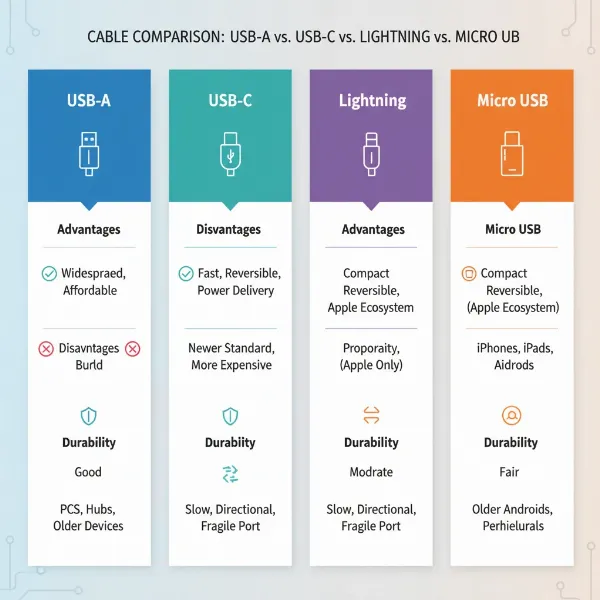
The charging cable landscape is primarily dominated by four key connector types, each serving different devices and standards. First, there’s the USB-A connector, the oldest and most universally recognized rectangular port found on one end of countless cables. While ubiquitous, it typically offers slower charging speeds and is not reversible, often leading to frustration when trying to plug it in. Next, the Micro-USB connector, a small, trapezoidal shape, was once the standard for many Android phones and budget gadgets. However, its slower speeds and non-reversible design have largely led to its decline.
The modern era is defined by the USB-C connector, which has rapidly become the universal standard. This reversible oval-shaped connector supports high-speed data transfer, video output, and significantly higher power delivery, making it ideal for everything from the latest Android smartphones and tablets to powerful laptops and even newer iPhones. Finally, Apple’s proprietary Lightning connector remains a staple for iPhones (up to the iPhone 14) and older iPads. Like USB-C, it is reversible and supports fast charging when paired with the correct USB-C power adapter, though its compatibility is limited to the Apple ecosystem.
[image-1|types-of-charging-cables|A visual comparison of different charging cable types: USB-A, USB-C, Lightning, and Micro-USB connectors shown with their respective cable ends and typical devices they connect to, emphasizing their distinct shapes and modern versus older uses, with a clean, infographic style.|
A clear, illustrative infographic showing the four main charging cable connector types (USB-A, USB-C, Lightning, Micro-USB). Each connector should be distinctively rendered with its common shape and an arrow indicating its typical connection direction (or reversibility for USB-C/Lightning). Accompanying each connector, show a small, iconic device it typically charges (e.g., an older phone for Micro-USB, a laptop for USB-C, an iPhone for Lightning, a wall adapter for USB-A). The background should be clean and white, with subtle shadows to give depth. The style should be modern and editorial, suitable for a tech review website.]
Crucial Factors When Choosing a Charging Cable
Selecting the right charging cable involves more than just picking one that fits your device. Critical factors like material quality, charging capabilities, and physical design significantly impact a cable’s performance, durability, and overall value. Ignoring these elements often leads to premature cable failure, slow charging, and a less than ideal user experience.
Material and Durability of the Cable
|
Our Picks for the Best Charging cable in 2026
As an Amazon Associate I earn from qualifying purchases.
|
||
| Num | Product | Action |
|---|---|---|
| 1 | LISEN USB C to USB C Cable, 5-Pack [3.3/3.3/6.6/6.6/10FT] for iPhone 17 Charger Cord, 60W C to C Cable Fast Charging for iPad, iPhone 16 15 Pro Max, Galaxy S25/S24 USBC to USBC Cable Gifts for Men |
![Check LISEN USB C to USB C Cable, 5-Pack [3.3/3.3/6.6/6.6/10FT] for iPhone 17 Charger Cord, 60W C to C Cable Fast Charging for iPad, iPhone 16 15 Pro Max, Galaxy S25/S24 USBC to USBC Cable Gifts for Men on Amazon](https://reviewasc.com/wp-content/plugins/amazon-tables/assets/images/buy.png)
|
| 2 | AINOPE USB to USB C Cable [2-Pack, 6.6ft] 3.1A Type C Charger Fast Charging, Right Angle USB C Cable for iPhone 17 Carplay Cable, Galaxy S10+ S10 S9, Note 10 9, LG V30, Moto, iPhone 16 15 Charger Cord |
|
| 3 | Anker Cable [2 Pack 6ft], USB A to USB C Cable for iPhone 17 Series,Samsung Galaxy S10 S10+, LG V30, Beats Fit Pro and More (Black). |
|
| 4 | iPhone Charger 3 Pack 10 ft Apple MFi Certified Lightning Nylon Braided Cable Fast Charging Cord Compatible with iPhone 13 12 11 Pro Max XR XS X 8 7 6 Plus SE iPad and More |
|
| 5 | Anker USB C to USB C Cable, Type-C 60W Fast Charging Cable (6 FT, 2Pack) for iPhone 17 Series, iPad mini 6 and More (Black) |
|
| 6 | USB Type-C to A Cable 5pack 6ft Braided Fast Charging 3A Quick Charger Cord, 6 Foot Compatible iPhone 17/17 Pro/16e/16/15 Pro Max,Samsung Galaxy S10 S9 S8 Plus, Note 10 9 8, LG V50 V40 G8 G7(Grey) |
|
| 7 | Teeind USB Type C Cable Fast Charging, Tpc001 5 Pack(6Ft 3A) Braided C Charger Cables Compatible with Samsung S10e/note 9/s10/s9/s8 Plus/A80/A50/A20 |
|
| 8 | Durcord USB C Cable, Upgarded 2Pack 10ft Fast USB Type C Charging Cable for Android/Phone/Pad/Laptop, Type C Charger Braided USB Cable Compatible withi Phone 17/16/15/Pro/Plus/Max/Sam.Sung-Silver |
|
| 9 | INIU USB C to USB C Cable, 240W Fast Charging Type C Charger Cord, Braided USBC Phone Charger Cable for iPhone 17 16 Pro Max Samsung S26 S25 Laptops MacBook Air 15 M3 iPad Switch [6.6ft+6.6ft Black] |
|
| 10 | LISEN USB C to USB C Cable, 240W C to C Cable Fast Charging [6.6FT, 2 Pack] Type C Charger Fast Charging USBC to USBC Cable for iPhone 17 16 15 Pro Max iPad MacBook Neo Air Pro Samsung S26 S25 Ultra |
|
The lifespan of a charging cable is largely determined by its construction materials and design elements. Common materials used for cable jackets include TPE (Thermoplastic Elastomer), Nylon Braided, and Liquid Silicone. TPE, often found in original equipment manufacturer (OEM) cables, is soft and flexible but can degrade over time due to exposure to skin oils, sweat, heat, and UV light, leading to yellowing, hardening, and micro-cracks. Nylon braided cables, on the other hand, feature a high-strength woven fiber layer that offers superior tensile strength, pull resistance, and protection against bending and fraying, making them exceptionally durable. Liquid silicone cables combine a soft, flexible feel with excellent elasticity and tangle resistance, offering a good balance of durability and user comfort. While less common now, PVC (Polyvinyl Chloride) cables were once widespread but have largely been replaced by more advanced materials.
Beyond the outer jacket, a truly durable cable incorporates several design enhancements. Look for cables with reinforced connectors (often called strain relief) that prevent breakage at the vulnerable point where the cable meets the plug. An internal reinforced core, often made from aramid fibers (like Kevlar), adds an extra layer of strength to protect the internal wires from snapping under stress. Thicker conductive wires generally provide more protection and better performance. Some premium cables also feature gold-plated connectors for enhanced long-term protection against corrosion, ensuring consistent conductivity over years of use. Proper storage, such as loosely coiling cables and avoiding extreme temperatures, can significantly extend their lifespan, preventing the frustration of frequent replacements.
“A cheap cable often costs you more in the long run through frequent replacements and potential damage to your devices. Invest in quality; it’s always worth it.” – John Smith, Lead Technician, Reviewasc.com
Compatibility and Charging Speed
Understanding cable compatibility and charging speed is paramount for efficient power delivery. First, ensure the cable’s connectors precisely match your device’s ports. For example, newer iPhones (15 and above), most modern Android phones, tablets, and laptops typically require a USB-C cable. Older iPhones (14 and below) need a Lightning cable, while a Micro-USB cable might be necessary for some older Android devices or accessories. Multi-connector cables can offer convenience for users with diverse gadgets.
Charging speed is dictated by the cable’s ability to support specific fast charging standards. USB Power Delivery (PD) is a widely adopted USB-C standard that can deliver up to 240W, making it suitable for fast-charging everything from smartphones to high-power laptops. For PD to work, both the cable and the charging adapter must support the standard and the required wattage. Qualcomm Quick Charge (QC) is another prevalent fast-charging technology, primarily found in Android devices equipped with Qualcomm Snapdragon processors. Some manufacturers, like Huawei, OPPO, and Xiaomi, also employ their proprietary fast-charging protocols, which often require specific original or certified third-party cables for optimal performance.
To verify if a cable supports fast charging, check the packaging or product description for labels like “Fast Charging,” “Power Delivery,” or “Quick Charge” (e.g., QC 3.0, QC 4.0). You can also look at the cable’s voltage and current output specifications; fast-charging cables typically support 5V, 9V, 12V, or at least 2000mA (2A) of current, while anything below 1000mAh (1A) is generally considered slow. Thicker cables often, but not always, indicate higher power capacity. For USB-C cables carrying more than 3A of current (essential for 100W+ charging), the presence of an E-Marker chip is crucial for safe and efficient power negotiation between the charger and the device. Many devices will also display a “Fast charging” notification on the screen when a compatible fast-charging setup is in use.
Cable Length and Design
The length and design of your charging cable might seem like minor details, but they play a significant role in convenience and functionality. Choosing the right length can prevent clutter and ensure comfortable use in various scenarios. For instance, ultra-short cables (≤ 1 ft) are perfect companions for power banks or for maintaining a tidy desk setup. Short cables (1-3 ft) are ideal for car mounts, Apple CarPlay, or minimizing tangles when traveling. The standard length (3-6 ft) is a versatile sweet spot for everyday desk or bedside charging. For greater flexibility, such as charging from a distant outlet while relaxing on a couch, long cables (6-10 ft) provide ample reach. In contrast, extra-long cables (13 ft+) offer ultimate freedom to charge across a room without device constraints.
Beyond length, innovative design elements can enhance user experience and cable longevity. Angled connectors, often U-shaped or L-shaped, can significantly improve ergonomics, especially when using your phone while it’s charging, as they prevent the cable from jutting out uncomfortably. Some cables integrate LED indicator lights to show charging status or have magnetic features for easy attachment and detachment, particularly useful in multi-functional cables that adapt to various port types. Thoughtful design not only adds convenience but also contributes to the cable’s overall durability by reducing strain on the connection points and internal wiring during daily use.
Comparing Popular Charging Cable Types on the Market
With a multitude of devices and charging standards, navigating the world of charging cables can be complex. Each cable type has its own set of advantages and disadvantages, making some better suited for specific devices and usage patterns than others. A clear comparison can help you understand which cable best fits your technology ecosystem.
Here’s a detailed comparison of the most common charging cable types:
| Criterion | USB-A Cable | USB-C Cable | Lightning Cable | Micro USB Cable |
|---|---|---|---|---|
| Pros | Affordable, widely available, universal (one end) | Fast charging, high data transfer, reversible, versatile | Reversible, Apple device compatibility (up to iPhone 14) | Common on older devices, very inexpensive |
| Cons | Slower speeds, not reversible, bulky | Can be more expensive for premium versions, needs compatible charger | Apple ecosystem only, can be pricey | Slower charging, fragile connector, not reversible |
| Durability | Varies by material, often basic | Varies by material, high-quality options are very durable | Varies by material, MFi certification improves reliability | Often low due to delicate connector design |
| Compatibility | Limited to older USB-A ports, slower charging | Wide range (modern Android, laptops, new iPhones, tablets) | Apple devices only (iPhones, older iPads) | Older Android phones, some accessories |
This table highlights that USB-C is rapidly becoming the industry standard due to its superior speed, versatility, and reversible design. While Lightning cables remain essential for a significant portion of Apple users, USB-A and Micro USB are gradually being phased out by newer devices and technologies.
Comprehensive Charging Cable Buying Guide
Choosing the right charging cable doesn’t have to be a guessing game. By systematically evaluating your needs, recognizing trusted brands, and scrutinizing technical specifications, you can confidently select a cable that offers optimal performance and lasting value.
Identifying Your Usage Needs
The first step in buying a charging cable is to clearly define your needs. Begin by identifying the specific device you intend to charge. For instance, if you have an iPhone 15 or newer, a USB-C cable is required. Older iPhones (14 and earlier) will still need a Lightning cable. Most modern Android phones and many laptops exclusively use USB-C. For very old Android devices or certain accessories, you might still need a Micro-USB.
Next, consider the charging speed you require. Do you need rapid power delivery for a laptop or a fast-charging smartphone, or is standard charging sufficient for an older gadget or an overnight charge? Fast-charging protocols like USB Power Delivery (PD) demand cables rated for higher wattages and currents. Finally, think about the cable length and usage scenario. A short cable might be perfect for your car, while a longer one is essential for bedside charging where outlets are scarce. Knowing where and how you’ll use the cable will guide your choice of length and design features.
Researching Reputable Brands
The market is flooded with countless charging cable options, but quality varies wildly. Opting for reputable brands is a smart investment that minimizes the risk of purchasing unreliable or even unsafe products. Brands such as Anker, Belkin, and Aukey are consistently recognized for producing high-quality, durable, and performant charging cables. These companies often invest heavily in research, development, and stringent testing, ensuring their products meet rigorous safety and performance standards. While these cables might come at a slightly higher price point, the enhanced durability, faster charging speeds, and peace of mind they offer often outweigh the initial cost. As the saying goes, “buy cheap, buy twice”—investing in a quality cable from a trusted brand means less frequent replacements and better protection for your valuable devices.
Checking Technical Specifications and Safety Certifications
Before making a purchase, always verify the cable’s technical specifications and look for crucial safety certifications. Ensure the cable’s wattage (W) and amperage (A) ratings match or exceed your device’s charging requirements and your power adapter’s output. For example, if your laptop requires 65W of Power Delivery, you’ll need a USB-C cable explicitly rated for 65W or higher. Overlooking these details can result in slow charging or, in extreme cases, damage to your device.
Crucially, check for industry-standard safety certifications. For Apple Lightning cables, MFi (Made for iPhone/iPad/iPod) certification is a must, guaranteeing compatibility and safety with Apple devices. For USB-C cables, look for certifications from the USB-IF (USB Implementers Forum) that confirm adherence to USB standards. General safety certifications like CE, FCC, and RoHS indicate that the product complies with health, safety, and environmental protection standards. These certifications are not just labels; they are assurances that the cable has undergone testing and meets specific quality benchmarks, protecting both your devices and your safety.
Top Charging Cables Popular Today
The market for charging cables is constantly evolving, with new technologies and designs emerging regularly. Based on current trends, expert reviews, and user feedback, several cables consistently stand out for their reliability, performance, and innovative features.
For a robust and versatile USB-C to USB-C connection, the Anker Powerline III USB-C cable is a perennial favorite, known for its excellent durability and ability to handle high power loads for fast-charging both phones and laptops. If you’re an Apple user looking for a high-wattage alternative to proprietary cables, the Belkin BoostCharge 240-watt charging cable is an excellent choice, offering robust construction and support for the highest USB Power Delivery rates.
For those on a tighter budget but unwilling to compromise on performance, the JSaux USB-C to USB-C 2-Pack provides great value, supporting 100W charging at a very competitive price point. Similarly, the Anker New Nylon USB-C to USB-C 2-pack offers a reliable 60W charging solution, making it a popular choice for everyday phone and tablet charging. Additionally, multi-functional cables like the inCharge 6 or Charge ASAP Infinity Cable gain popularity for their ability to connect various device types (USB-A, USB-C, Micro-USB, Lightning) within a single compact design, ideal for minimizing clutter and travel. These examples represent the diverse range of high-quality charging cables available, catering to different needs, devices, and budgets.
Conclusion
Ultimately, a charging cable is far more than a disposable accessory; it’s an indispensable component of our digital lives, influencing everything from device longevity to charging efficiency and personal safety. Investing in a high-quality charging cable is unequivocally worth it, offering superior durability, faster charging speeds, broader compatibility, and peace of mind. By understanding the different types of connectors, prioritizing robust materials and smart design, verifying fast-charging capabilities, and opting for reputable brands with proper certifications, you empower yourself to make a truly informed decision. Don’t let a flimsy cable bottleneck your technology; choose wisely, and enjoy a seamless, powered experience. What’s the most common charging cable frustration you encounter, and how has a good cable solved it for you?
Frequently Asked Questions
Are expensive charging cables worth the investment?
Yes, expensive charging cables are often worth the investment. They typically feature higher-quality materials, reinforced construction, better internal wiring, and advanced chipsets that enable faster charging, safer power delivery, and significantly greater durability. While the initial cost is higher, they reduce the need for frequent replacements and protect your valuable devices from potential damage, saving money and frustration in the long run.
How can I tell if a charging cable supports fast charging?
You can identify a fast-charging cable by checking its packaging for labels like “Fast Charging,” “Power Delivery (PD),” or “Quick Charge (QC).” Look at the technical specifications for wattage (e.g., 60W, 100W) and amperage (e.g., 2A, 3A, 5A). Fast-charging cables generally support higher voltage/current outputs (e.g., 5V/2A or higher). Your device’s screen might also display a “Fast charging” indicator when a compatible cable and adapter are used.
What is MFi certification, and why is it important for Apple cables?
MFi stands for “Made for iPhone/iPad/iPod” and is a licensing program from Apple. It ensures that third-party accessories, including Lightning cables, meet Apple’s stringent performance and safety standards. An MFi-certified cable guarantees full compatibility with Apple devices, reliable charging, data transfer, and prevents potential issues like “accessory not supported” messages or even device damage that can occur with uncertified, low-quality cables.
Why do my charging cables break so easily?
Charging cables often break easily due to frequent physical stress, such as bending, twisting, and pulling, especially at the connector points. Poor material quality (e.g., cheap TPE jackets), thin internal wires, and lack of strain relief also contribute to premature failure. Additionally, exposure to extreme temperatures can accelerate material degradation. Investing in cables with braided nylon or liquid silicone jackets and reinforced connectors can significantly improve durability.
Can I use any USB-C cable to charge my laptop?
No, you cannot use any USB-C cable to charge your laptop. While all USB-C cables share the same physical connector, they vary significantly in their power delivery capabilities. Laptops require higher wattage (e.g., 60W, 100W, 240W) through the USB Power Delivery (PD) standard. You need a USB-C cable specifically rated to handle your laptop’s required wattage; otherwise, it will charge slowly or not at all.