In today’s fast-paced world, a reliable charging cable is more than just an accessory; it’s an indispensable tool for staying connected. With Apple devices being central to many lives, understanding how to select the right charging cable is paramount for optimal performance, safety, and longevity. As an expert with over a decade in the field, I’ve seen countless cables—from budget buys to premium brands—and I’m here to guide you through the maze. Let’s delve into the crucial factors that determine a quality charging cable for your beloved iPhone, iPad, or MacBook.
Charging Cables: Overview and Essential Knowledge
Charging cables are the lifeline for our devices, bridging the gap between power sources and our gadgets. Without a suitable charging cable, your Apple device can’t power up, transfer data, or remain functional. The evolution of charging technology has brought forth several types of connectors, each serving different purposes and devices.
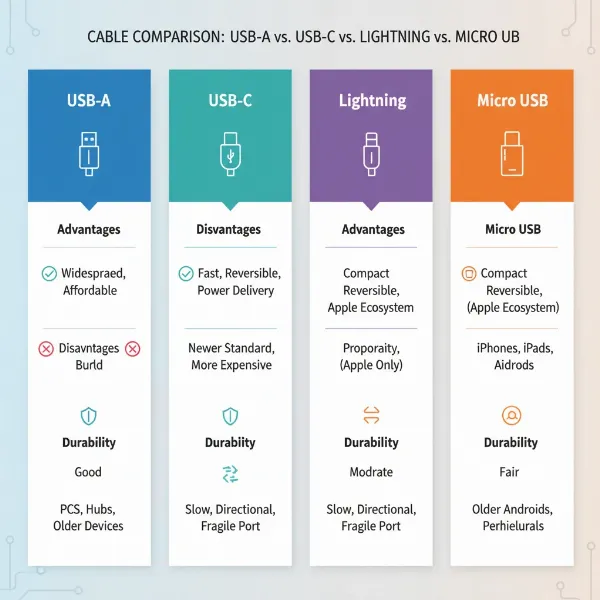
The most common charging cable types you’ll encounter today include USB-A, USB-C, Lightning, and Micro USB. USB-A is the traditional rectangular connector, widely recognized and used with older power adapters and computers. USB-C, a reversible and more powerful connector, is the modern standard for many new Apple devices, including the iPhone 15 series, iPads, and MacBooks. Lightning cables are Apple’s proprietary connectors, primarily used for iPhones (up to iPhone 14), older iPads, and certain Apple accessories. While less relevant for contemporary Apple devices, Micro USB was a common standard for many older Android phones and accessories.
Each cable type offers distinct advantages and disadvantages. USB-A cables are inexpensive and ubiquitous but generally offer slower charging and data transfer speeds. USB-C cables boast high power delivery (Power Delivery) and rapid data transfer, making them ideal for fast charging and modern device ecosystems. Lightning cables are exclusive to Apple’s ecosystem, ensuring seamless integration and compatibility, especially when MFi-certified. Micro USB cables, while still found on some older devices, are largely phased out in favor of USB-C due to their slower speeds and less robust design.
Key Factors When Selecting a Charging Cable
Choosing a charging cable involves more than just picking one that fits. Several critical factors influence a cable’s performance, durability, and safety, especially when it comes to sophisticated Apple devices.
Cable Material and Durability
The materials used in a charging cable significantly impact its lifespan and resistance to daily wear and tear. Low-quality cables are prone to fraying and breakage, leading to inconsistent charging or even potential damage to your device.
Common cable materials include:
- PVC (Polyvinyl Chloride) and TPE (Thermoplastic Elastomer): These are standard materials for many cables, including official Apple ones. While flexible and often more affordable, they can be prone to wear and tear, especially near the connector ends, after 18-24 months of regular use.
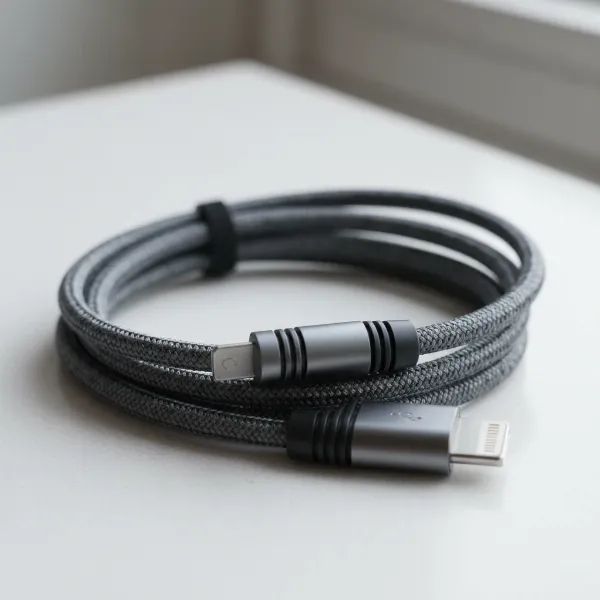
- Nylon Braided: Often considered the gold standard for durability, braided nylon cables are highly resistant to kinks, fraying, and tangling. This construction significantly reduces damage from repeated bending, making them an excellent choice for frequent travelers or those who are hard on their cables.
- Reinforced Cores: Some premium cables incorporate internal reinforcements, such as aramid fibers or thick conductive wires, adding an extra layer of strength and protection against breakage. Features like bend protectors and gold-plated connectors also contribute to long-term durability and conductivity.
|
Our Picks for the Best Charging cable in 2026
As an Amazon Associate I earn from qualifying purchases.
|
||
| Num | Product | Action |
|---|---|---|
| 1 | LISEN USB C to USB C Cable, 240W C to C Cable Fast Charging [6.6FT, 2 Pack] Type C Charger Fast Charging USBC to USBC Cable for iPhone 17 16 15 Pro Max iPad MacBook Neo Air Pro Samsung S26 S25 Ultra |
![Check LISEN USB C to USB C Cable, 240W C to C Cable Fast Charging [6.6FT, 2 Pack] Type C Charger Fast Charging USBC to USBC Cable for iPhone 17 16 15 Pro Max iPad MacBook Neo Air Pro Samsung S26 S25 Ultra on Amazon](https://reviewasc.com/wp-content/plugins/amazon-tables/assets/images/buy.png)
|
| 2 | Anker Cable [2 Pack 6ft], USB A to USB C Cable for iPhone 17 Series,Samsung Galaxy S10 S10+, LG V30, Beats Fit Pro and More (Black). |
|
| 3 | iPhone Charger 3 Pack 10 ft Apple MFi Certified Lightning Nylon Braided Cable Fast Charging Cord Compatible with iPhone 13 12 11 Pro Max XR XS X 8 7 6 Plus SE iPad and More |
|
| 4 | INIU USB C to USB C Cable, 240W Fast Charging Type C Charger Cord, Braided USBC Phone Charger Cable for iPhone 17 16 Pro Max Samsung S26 S25 Laptops MacBook Air 15 M3 iPad Switch [6.6ft+6.6ft Black] |
|
| 5 | Teeind USB Type C Cable Fast Charging, Tpc001 5 Pack(6Ft 3A) Braided C Charger Cables Compatible with Samsung S10e/note 9/s10/s9/s8 Plus/A80/A50/A20 |
|
| 6 | LISEN USB C to USB C Cable, 5-Pack [3.3/3.3/6.6/6.6/10FT] for iPhone 17 Charger Cord, 60W C to C Cable Fast Charging for iPad, iPhone 16 15 Pro Max, Galaxy S25/S24 USBC to USBC Cable Gifts for Men |
|
| 7 | USB Type-C to A Cable 5pack 6ft Braided Fast Charging 3A Quick Charger Cord, 6 Foot Compatible iPhone 17/17 Pro/16e/16/15 Pro Max,Samsung Galaxy S10 S9 S8 Plus, Note 10 9 8, LG V50 V40 G8 G7(Grey) |
|
| 8 | Anker USB C to USB C Cable, Type-C 60W Fast Charging Cable (6 FT, 2Pack) for iPhone 17 Series, iPad mini 6 and More (Black) |
|
| 9 | AINOPE USB to USB C Cable [2-Pack, 6.6ft] 3.1A Type C Charger Fast Charging, Right Angle USB C Cable for iPhone 17 Carplay Cable, Galaxy S10+ S10 S9, Note 10 9, LG V30, Moto, iPhone 16 15 Charger Cord |
|
| 10 | Durcord USB C Cable, Upgarded 2Pack 10ft Fast USB Type C Charging Cable for Android/Phone/Pad/Laptop, Type C Charger Braided USB Cable Compatible withi Phone 17/16/15/Pro/Plus/Max/Sam.Sung-Silver |
|
To prolong your charging cable’s life, avoid extreme bending, especially at the connector points. Store cables neatly rather than stuffing them haphazardly into bags, and consider using protective cable covers or ties to minimize stress. Regular cleaning of connectors can also prevent dust and debris from affecting charging efficiency.
 Durable braided charging cable with reinforced connectors for Apple devices
Compatibility and Charging Speed
Understanding your device’s needs and the cable’s capabilities is crucial for efficient charging. Not all cables are created equal in terms of power delivery.
First, identify the connector type your Apple device requires. iPhones up to the 14 series use Lightning connectors, while iPhone 15 and newer models, as well as most modern iPads and MacBooks, utilize USB-C. For Lightning-enabled devices, MFi (Made for iPhone/iPad/iPod) certification is non-negotiable. MFi-certified cables contain an Apple-certified chip, guaranteeing safety, compatibility, and reliable performance, preventing issues like “Accessory Not Supported” messages or slow charging.
Next, consider charging speed. Modern Apple devices, particularly iPhone 8 and later, support USB Power Delivery (PD) for fast charging, capable of reaching up to 50% battery in approximately 30 minutes. To achieve this, you need a USB-C to Lightning cable (for older iPhones) or a USB-C to USB-C cable (for iPhone 15, iPads, MacBooks) paired with a compatible USB-C PD power adapter, typically 20W or higher for iPhones. While higher wattage chargers (like 30W, 60W, 100W) are available, an iPhone typically won’t charge faster beyond 20-30W; these higher wattages are more beneficial for larger devices like iPads and MacBooks. You can often tell if your iPhone is fast charging by a double vibration or two “ding” sounds when connected, or by observing if it reaches 50% in about 30 minutes.
Cable Length and Design
The length and design of a charging cable greatly influence its practicality and convenience. Choosing the right length ensures comfort and reduces strain on the cable.
Cable lengths typically range from short (0.3m/1ft) to very long (3m/10ft). A shorter cable might be perfect for charging with a power bank or on a desk, minimizing clutter. Longer cables offer more flexibility, allowing you to use your device comfortably while it’s plugged into a distant wall outlet. However, excessively long or poorly designed cables can be more prone to tangling and physical stress, potentially impacting durability.
Beyond length, consider design elements that enhance usability and durability. Reinforced stress points near the connectors are crucial, as these are common failure areas. Some cables feature indicators like LED lights, which can be convenient for confirming charging status. Magnetic cables or those with integrated cable ties can aid in organization and portability, preventing knots and damage when stored.
Comparing Popular Charging Cable Types
To help you navigate the options, here’s a detailed comparison of the most common charging cable types, highlighting their characteristics and suitability for various uses, particularly concerning Apple devices.
Detailed Comparison Table
| Tiêu chí | Cáp sạc USB-A | Cáp sạc USB-C | Cáp sạc Lightning | Cáp sạc Micro USB |
|---|---|---|---|---|
| Ưu điểm | Affordable, universal compatibility with older devices/chargers. | Reversible connector, supports high power delivery (PD) for fast charging, versatile for data transfer and video, compatible with new Apple devices (iPhone 15+). | MFi certification ensures optimal compatibility and safety with Apple devices (iPhone 14 and older, certain iPads). | Inexpensive, widely compatible with very old non-Apple devices. |
| Nhược điểm | Slower charging speeds (max 12W for iPhones with USB-A to Lightning), unidirectional, older standard. | Higher initial cost, requires USB-C power adapter for fast charging. | Proprietary to Apple, not universally compatible, requires MFi certification for reliability. | Very slow charging, not reversible, prone to damage, not compatible with modern Apple devices. |
| Độ bền | Varies, often standard PVC/TPE. | Good to excellent with braided or reinforced designs. | Varies, can be enhanced with MFi and robust materials. | Generally poor, easily damaged. |
| Khả năng tương thích | Older Apple devices (with USB-A to Lightning cable), older chargers, computers. | iPhone 15 and later, modern iPads, MacBooks, new power adapters, Android devices. | iPhone 14 and older, specific iPads, AirPods, some Apple accessories. | Not compatible with Apple devices; older Android phones, basic electronics. |
Detailed Charging Cable Buying Guide
Making an informed decision about your charging cable requires a systematic approach. Here’s a comprehensive guide to ensure you pick the perfect one for your needs.
Identify Your Usage Needs
Before anything else, pinpoint what you need the charging cable for.
- Which device are you charging? An iPhone 14 needs a Lightning cable, while an iPhone 15 or a MacBook requires USB-C.
- Do you need fast charging? If you have an iPhone 8 or newer, an iPad Pro, or a MacBook, a USB-C PD compatible cable is essential to unlock faster charging speeds. If speed isn’t a priority, a standard USB-A to Lightning cable might suffice for older iPhones.
- What length do you need? A short cable for your desk or car, a standard 1m/3ft for everyday use, or a longer 2m/6ft cable for bedside or lounge charging?
- Will it be subjected to heavy use? If you’re frequently bending, coiling, or traveling with your cable, invest in one made from durable materials like braided nylon.
Research Reputable Brands
The market is flooded with charging cables, but quality varies widely. Sticking with well-known and reputable brands minimizes the risk of purchasing an unreliable or unsafe product.
Some of the most trusted brands for Apple-compatible charging cables include:
- Anker: Renowned for its durable, high-performance USB-C and MFi-certified Lightning cables.
- Belkin: Offers a wide range of Apple-certified MFi cables, often with strong warranties and robust designs.
- UGREEN: Provides affordable, reliable, and certified cables that offer great value.
- Native Union: Known for stylish, premium cables that combine aesthetic appeal with durability and certification.
- Apple: While official Apple cables are of premium build quality with guaranteed compatibility, their standard rubber sheaths can be less durable than braided third-party options.
“Choosing MFi-certified cables from trusted brands like Anker or Belkin is the simplest way to ensure both safety and optimal performance for your Apple devices. Don’t compromise on quality for a few dollars.” – Tech Advisor, Reviewasc.com
Verify Technical Specifications and Safety Certifications
Always check the cable’s specifications and certifications before purchasing.
- MFi Certification: For any Lightning cable, confirm it has the “Made for iPhone/iPad/iPod” logo and ideally, check Apple’s official MFi Accessory Search Tool. This certification is your strongest assurance of compatibility and safety.
- USB-IF Certification: For USB-C cables, look for USB-IF certification. This signifies adherence to USB-C and Power Delivery standards, ensuring safe and effective power delivery, especially for high-wattage charging.
- Wattage (W) and Amperage (A): Ensure the cable supports the wattage required for your device and charger. For fast charging iPhones, a cable supporting at least 20W is ideal. For MacBooks, you might need cables rated for 60W, 100W, or even 140W (for the 16-inch MacBook Pro).
- Data Transfer Speed: While most charging cables handle data, if you frequently transfer large files, look for cables with higher data transfer rates (e.g., 480Mbps for standard USB 2.0, or 5Gbps/10Gbps for USB 3.x if the device supports it).
Top Charging Cables for Apple Devices
Based on expert reviews, durability, and charging performance, here are some of the most popular and highly-rated charging cables for Apple devices currently available. These options cater to various needs and budgets.
- Anker PowerLine III Flow USB-C to Lightning Cable: This MFi-certified cable is highly praised for its soft, silicone finish that resists tangles and offers exceptional durability. It supports fast charging for iPhones and comes in various colors.
- Belkin BoostCharge Pro Flex USB-C to Lightning Cable: Featuring a double-braided nylon exterior, this MFi-certified cable is built to last, offering superior flexibility and resistance to fraying. It’s an excellent choice for those seeking maximum durability.
- UGREEN USB-C to USB-C Cable (100W): For iPhone 15 users, iPads, and MacBooks, UGREEN offers reliable and affordable USB-C cables that support Power Delivery up to 100W. Their braided versions provide enhanced durability.
- Native Union Belt Cable Duo (USB-C to Lightning/USB-C): A premium option that offers a unique hybrid design, allowing charging for both Lightning and USB-C devices from a single cable. It features a robust braided design and comes with an integrated leather strap for organization.
- Apple USB-C Charge Cable (Woven): For those who prefer official Apple accessories, the woven USB-C charge cable (for iPhone 15 and MacBooks) offers improved durability over their traditional plastic cables and supports up to 60W charging.
These cables represent a blend of performance, safety, and build quality, ensuring a reliable charging experience for your Apple devices.
Conclusion
Choosing the right charging cable for your Apple devices is an investment in their longevity and your daily convenience. Prioritizing MFi certification for Lightning cables and USB-IF standards for USB-C cables ensures safety and optimal performance. Always consider the cable’s material for durability, its compatibility with your device, and its ability to deliver the fast charging speeds you need. By following these guidelines and opting for reputable brands, you can avoid common frustrations and keep your Apple ecosystem powered efficiently. What specific charging challenge are you looking to solve with your next cable purchase?
Frequently Asked Questions
Why is MFi certification important for an Apple charging cable?
MFi (Made for iPhone/iPad/iPod) certification is crucial because it guarantees that a third-party cable meets Apple’s strict performance and safety standards. This prevents issues like device damage, inconsistent charging, or “accessory not supported” messages, ensuring seamless compatibility and optimal functionality for your Apple devices.
Can a charging cable damage my iPhone?
Yes, a low-quality or non-MFi certified charging cable can potentially damage your iPhone. Such cables may not regulate power effectively, leading to overheating, unstable voltage, or even damage to the device’s charging port or internal components. Always choose certified cables from reputable brands to protect your device.
Do I need a different charging cable for fast charging my iPhone?
For fast charging an iPhone 8 or later, you generally need a USB-C to Lightning cable (for iPhone 14 and older) or a USB-C to USB-C cable (for iPhone 15 and later), paired with a USB-C Power Delivery (PD) wall adapter of 20W or higher. Standard USB-A to Lightning cables typically do not support fast charging speeds.
What’s the difference between USB-C to Lightning and USB-C to USB-C cables for Apple?
A USB-C to Lightning cable connects newer USB-C power adapters to older Apple devices (iPhone 5-14, some iPads). A USB-C to USB-C cable connects USB-C power adapters to modern Apple devices (iPhone 15+, recent iPads, MacBooks) and supports higher power delivery and faster data transfer for those devices.
How can I make my charging cable last longer?
To extend your charging cable’s lifespan, avoid sharp bends, especially near the connectors, and store it neatly to prevent tangles and knots. Using cable organizers, protective covers, or choosing cables with braided nylon exteriors and reinforced stress points can significantly enhance durability.
Is a longer charging cable always better?
Not necessarily. While longer charging cables offer more flexibility and convenience, poorly made long cables can be more prone to tangling and physical damage. For heavy use, a well-constructed, durable cable is more important than extreme length. Choose a length that balances convenience with durability for your specific usage.