In our hyper-connected world, a reliable charging cable is as essential as the devices it powers. Yet, with an overwhelming array of options, distinguishing a high-quality, durable, and efficient charging cable from a mediocre one can be a significant challenge. From battling frustratingly slow charge times to contending with frayed wires that cease to function, many of us have experienced the pitfalls of an inadequate cable. This comprehensive review aims to cut through the confusion, providing you with the insights needed to select a charging cable that not only meets your technical requirements but also withstands the rigors of daily use. We’ll explore various cable types, crucial selection factors, and top market recommendations to ensure your devices stay powered, safely and efficiently.
Understanding Charging Cables: An Overview
Charging cables serve as the vital link between our devices and power sources, enabling both energy transfer for charging and data exchange. Their importance in modern life cannot be overstated, yet the technology behind them is often overlooked. Essentially, a charging cable consists of wires encapsulated within a protective jacket, with connectors at each end tailored to specific device ports and power delivery standards.
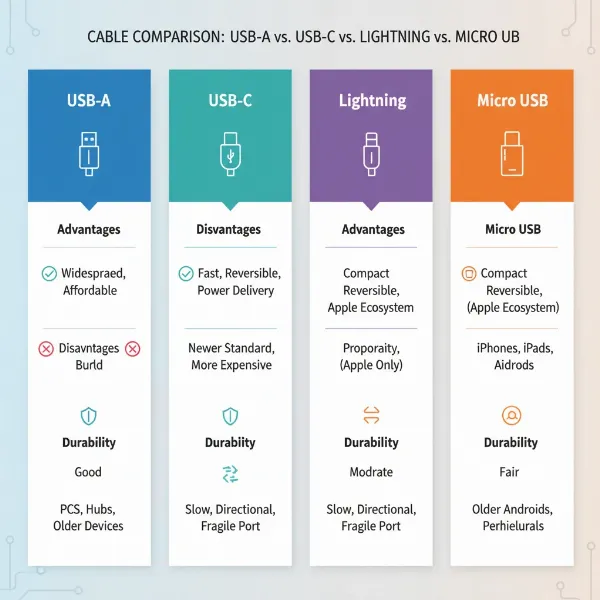
The market primarily features several common types of charging cables, each designed for different devices and functionalities. USB-A is the classic rectangular connector, widely found on older computers, wall adapters, and power banks. Micro-USB cables feature a small, trapezoidal connector, prevalent in older Android phones and various small electronic devices, though their use is rapidly declining. Lightning cables are proprietary to Apple, used for iPhones (up to iPhone 14), iPads, and other Apple accessories, known for their reversible design. The most modern and increasingly universal standard is USB-C, characterized by its small, oval, and fully reversible connector. USB-C supports significantly higher power delivery and faster data transfer speeds, making it the preferred choice for contemporary smartphones, tablets, laptops, and a growing number of other gadgets.
Key Factors When Choosing a Charging Cable
Selecting the right charging cable involves more than just picking one that fits your device. A truly effective cable optimizes charging speed, ensures data integrity, and offers long-term durability. Understanding the key factors at play will empower you to make an informed decision that safeguards your devices and enhances your charging experience.
Material and Durability
|
Our Picks for the Best Charging cable in 2026
As an Amazon Associate I earn from qualifying purchases.
|
||
| Num | Product | Action |
|---|---|---|
| 1 | Teeind USB Type C Cable Fast Charging, Tpc001 5 Pack(6Ft 3A) Braided C Charger Cables Compatible with Samsung S10e/note 9/s10/s9/s8 Plus/A80/A50/A20 |

|
| 2 | LISEN USB C to USB C Cable, 240W C to C Cable Fast Charging [6.6FT, 2 Pack] Type C Charger Fast Charging USBC to USBC Cable for iPhone 17 16 15 Pro Max iPad MacBook Neo Air Pro Samsung S26 S25 Ultra |
|
| 3 | Anker USB C to USB C Cable, Type-C 60W Fast Charging Cable (6 FT, 2Pack) for iPhone 17 Series, iPad mini 6 and More (Black) |
|
| 4 | AINOPE USB to USB C Cable [2-Pack, 6.6ft] 3.1A Type C Charger Fast Charging, Right Angle USB C Cable for iPhone 17 Carplay Cable, Galaxy S10+ S10 S9, Note 10 9, LG V30, Moto, iPhone 16 15 Charger Cord |
|
| 5 | iPhone Charger 3 Pack 10 ft Apple MFi Certified Lightning Nylon Braided Cable Fast Charging Cord Compatible with iPhone 13 12 11 Pro Max XR XS X 8 7 6 Plus SE iPad and More |
|
| 6 | Durcord USB C Cable, Upgarded 2Pack 10ft Fast USB Type C Charging Cable for Android/Phone/Pad/Laptop, Type C Charger Braided USB Cable Compatible withi Phone 17/16/15/Pro/Plus/Max/Sam.Sung-Silver |
|
| 7 | INIU USB C to USB C Cable, 240W Fast Charging Type C Charger Cord, Braided USBC Phone Charger Cable for iPhone 17 16 Pro Max Samsung S26 S25 Laptops MacBook Air 15 M3 iPad Switch [6.6ft+6.6ft Black] |
|
| 8 | USB Type-C to A Cable 5pack 6ft Braided Fast Charging 3A Quick Charger Cord, 6 Foot Compatible iPhone 17/17 Pro/16e/16/15 Pro Max,Samsung Galaxy S10 S9 S8 Plus, Note 10 9 8, LG V50 V40 G8 G7(Grey) |
|
| 9 | Anker Cable [2 Pack 6ft], USB A to USB C Cable for iPhone 17 Series,Samsung Galaxy S10 S10+, LG V30, Beats Fit Pro and More (Black). |
|
| 10 | LISEN USB C to USB C Cable, 5-Pack [3.3/3.3/6.6/6.6/10FT] for iPhone 17 Charger Cord, 60W C to C Cable Fast Charging for iPad, iPhone 16 15 Pro Max, Galaxy S25/S24 USBC to USBC Cable Gifts for Men |
|
The longevity and performance of a charging cable are heavily influenced by its construction materials. Cheap cables often feature thin internal wires and flimsy outer jackets, leading to premature fraying, cracking, and eventual failure. High-quality cables, however, are engineered to withstand daily wear and tear. Common materials for the outer jacket include PVC (polyvinyl chloride) and TPE (thermoplastic elastomer), which offer basic flexibility and protection. For superior durability, many premium cables utilize braided nylon or even Kevlar aramid fiber, providing enhanced resistance to bending, twisting, and abrasion. Reinforced connectors and strain relief designs at the cable ends are also critical, as these are common points of failure. Opting for cables with robust construction can significantly extend their lifespan, saving you money and reducing electronic waste in the long run. To further prolong cable life, avoid sharp bends, unplugging by pulling the cord itself rather than the connector, and exposing them to extreme temperatures.
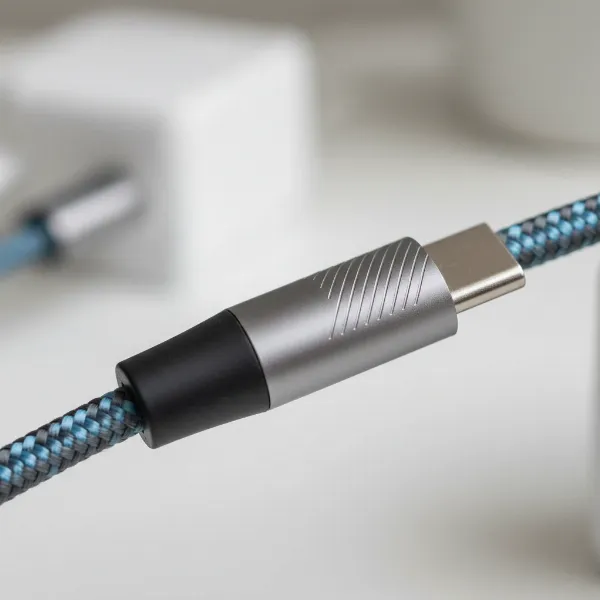 A close-up of a durable braided nylon charging cable, showcasing reinforced connectors and a flexible, robust texture.
Compatibility and Charging Speed
The fundamental requirement for any charging cable is compatibility with your device. You must match the connector type (USB-C, Lightning, Micro-USB) to the port on your phone, tablet, or laptop. However, compatibility extends beyond physical fit to include support for charging standards and data transfer capabilities. For rapid power replenishment, look for cables that support fast charging protocols such as USB Power Delivery (PD) and Qualcomm Quick Charge (QC). USB-C cables, particularly those with USB-IF certification, often support high wattages (e.g., 60W, 100W, 240W with PD 3.1), enabling quick charging for power-hungry devices like laptops. The internal wire gauge also plays a role; thicker wires (indicated by a lower AWG number) can carry more current, resulting in faster and more efficient charging.
Beyond power, many cables also facilitate data transfer, which is crucial for syncing devices or moving files. USB 2.0 cables offer a maximum data transfer speed of 480 Mbps, while newer USB 3.x standards can achieve speeds up to 10 Gbps. For the fastest data transfer, especially with external SSDs or high-resolution monitors, USB4 and Thunderbolt 3/4 cables can deliver speeds of 20-40 Gbps. Ensure your cable’s data speed rating matches your needs, particularly if you frequently transfer large files or connect to high-bandwidth peripherals.
Length and Design
The ideal charging cable length varies significantly depending on your usage scenarios. Shorter cables, typically under 3 feet (1 meter), are excellent for portability, reducing clutter in cars or when charging from a power bank. Standard lengths, ranging from 3 to 6 feet (1-2 meters), are versatile for desk use or bedside charging, offering a good balance of reach and manageability. For greater flexibility, such as charging from a distant wall outlet while using your device, longer cables (6-10 feet or 2-3 meters) are available. It’s important to note that excessively long cables, if not properly engineered with thicker internal wires, can sometimes lead to a slight drop in charging speed due to increased electrical resistance.
Beyond length, various design elements can enhance a cable’s usability and durability. Reversible connectors, found in USB-C and Lightning cables, eliminate the frustration of incorrect insertion. Some cables feature reinforced connectors with extended strain relief to prevent breakage at the cable-head junction. Innovations like magnetic connectors offer convenience and protect ports from accidental pulls, while LED indicators can visually confirm charging status. Right-angle connectors are ideal for gaming or using devices in cramped spaces, preventing cable interference. Consider how and where you primarily use your devices to choose a cable design that maximizes convenience and minimizes wear.
Popular Charging Cable Types Compared
The landscape of charging cables is diverse, with each type serving specific ecosystems and offering varying capabilities. Understanding the distinct characteristics, advantages, and limitations of USB-A, USB-C, Lightning, and Micro-USB cables is paramount for making an informed choice in today’s multi-device environment. While USB-C is rapidly becoming the universal standard, older technologies still hold relevance for a vast array of existing devices.
Detailed Comparison Table
| Criterion | USB-A Cable | USB-C Cable | Lightning Cable | Micro-USB Cable |
|---|---|---|---|---|
| Pros | Affordable, ubiquitous, compatible with older chargers | Fast charging/data, reversible, versatile, future-proof | Apple ecosystem integration, reversible design | Very common on older/budget devices, low cost |
| Cons | Slower charging/data (often), not reversible, aging standard | Can be pricier, confusing array of standards (USB 2.0, 3.x, 4, Thunderbolt) | Proprietary to Apple, generally higher cost, being phased out for new Apple devices | Slow charging/data, fragile connector, not reversible, outdated |
| Durability | Varies widely by brand and material quality | Generally high with quality materials; robust design | Can be prone to fraying (older versions), improved in newer braided Apple cables | Connector easily damaged with frequent use, prone to bending |
| Compatibility | Charger end is ubiquitous; device end depends on specific cable (e.g., USB-A to C) | Universal for modern smartphones, tablets, laptops, and many accessories | Exclusive to Apple iPhones (up to 14), iPads, AirPods, etc. | Older Android phones, e-readers, game controllers, budget electronics |
| Max Power | Typically up to 12W (USB-A to Micro-USB) or depends on paired connector (e.g., USB-A to C for ~18W) | Up to 240W (with USB PD 3.1 and e-marker chip) | Up to 27W (when paired with a USB-C Power Delivery charger) | Up to ~10W (typically 5V/2A) |
| Max Data Speed | Up to 480Mbps (USB 2.0) | Up to 40Gbps (with USB4/Thunderbolt 3/4) | Up to 480Mbps (USB 2.0) | Up to 480Mbps (USB 2.0) |
Comprehensive Charging Cable Buying Guide
Navigating the vast market of charging cables requires a clear understanding of your needs and the technical specifications available. This buying guide will walk you through the essential steps to ensure you select a cable that performs optimally for your devices and daily routine. Investing a little time upfront can prevent future frustration and expense.
Identifying Your Needs
Before you even consider brands or features, begin by clarifying what you need the cable for. First, identify your device and its port type. Are you charging an iPhone 15 (USB-C) or an older iPhone (Lightning)? A new Android phone (USB-C) or an older gadget (Micro-USB)? This is the foundational step. Next, determine your required charging and data transfer speeds. Do you need ultra-fast charging for a laptop, or is standard speed sufficient for your earbuds? Will you be transferring large files regularly, or is the cable primarily for power? Finally, consider your usage environment. Will the cable be confined to a desk, used in a car, tossed into a travel bag, or stretched across a living room? Your answers will guide your choices on length, durability, and special features.
Reputable Brands and Certifications
When it comes to charging cables, brand reputation often correlates directly with quality and safety. Well-known brands like Anker, Belkin, Aukey, Ugreen, and specialized names like Volta Max for magnetic cables, have built their standing on producing reliable products. These companies typically invest in robust materials, rigorous testing, and adhere to industry standards. Beyond brand, look for certifications. For Apple Lightning cables, MFi (Made for iPhone/iPad/iPod) certification is crucial; it ensures the cable meets Apple’s performance and safety standards, preventing compatibility issues or device damage. For USB-C cables, USB-IF (USB Implementers Forum) certification indicates compliance with USB specifications, which is vital given the complex array of USB-C capabilities (e.g., power delivery levels, data speeds). Certifications provide an extra layer of assurance that you are purchasing a safe and functional product.
Checking Specifications and Value
Once you’ve narrowed down your options based on needs and trusted brands, delve into the specific technical specifications. Examine the wattage and amperage ratings of the cable to ensure it matches or exceeds the charging requirements of your device and charger. For fast charging, both your charger and cable must support the same high wattage. Consider the data transfer speed rating if file syncing is a priority. Remember that a higher-gauge (thinner) wire can hinder power delivery over longer distances, so for extended cables, ensure they specify robust construction. Finally, evaluate the overall value. While it’s tempting to opt for the cheapest cable, highly inexpensive options often compromise on material quality, internal wiring, and safety features, leading to a shorter lifespan and potential harm to your devices. A slightly higher investment in a quality cable from a reputable brand with relevant certifications will likely save you money and headaches in the long run.
Top-Rated Charging Cables on the Market Today
The market is rich with innovative and high-performing charging cables designed to meet diverse needs. Here’s a look at some of the top-rated options, known for their blend of durability, speed, and specialized features.
For universal fast charging and data transfer, Anker’s Powerline III USB-C to USB-C cables are frequently lauded for their robust construction and support for up to 100W Power Delivery, making them ideal for laptops and high-end smartphones. If you’re an Apple user, Anker also offers excellent MFi-certified Lightning cables known for their durability. When it comes to extreme power delivery, the Belkin BoostCharge 240-watt charging cable stands out, supporting the highest USB Power Delivery rate currently available, perfect for demanding laptops and future-proof setups. For those seeking affordability without a significant drop in performance, the JSaux USB-C to USB-C 2-Pack often receives praise for offering good 100W charging capabilities at a budget-friendly price, even in longer lengths. Users in search of multi-functional and highly durable cables might consider options like Volta Max magnetic USB-C cables, which combine 240W PD, high-speed data, and a versatile 6-in-1 design for multiple device types, along with strong magnetic connections. For Apple users looking for robust and Apple-approved solutions, Apple’s own braided USB-C Charge Cable offers reliable 60W charging. These examples highlight the variety of specialized cables available, catering to specific device types, power demands, and user preferences, ensuring there’s a premium option for nearly every charging need.
“A charging cable is more than just a wire; it’s an investment in your device’s longevity and performance. Prioritize quality materials, appropriate power delivery, and reputable brands to ensure a seamless charging experience.” – Admin, Reviewasc.com, Lead Technician & Charging Cable Expert
Conclusion
Choosing the right charging cable is a critical decision that impacts not only the efficiency of your device charging but also its overall health and safety. As we’ve explored, the world of charging cables is diverse, encompassing various types like USB-A, Micro-USB, Lightning, and the increasingly dominant USB-C, each with distinct advantages and limitations. Key factors such as material durability, compatibility with fast charging standards like Power Delivery, and appropriate length for your usage environment are paramount to making a smart selection. By identifying your specific needs, opting for reputable brands with relevant certifications, and understanding the technical specifications, you can confidently select a charging cable that offers both reliable performance and lasting durability. Don’t let a flimsy cable compromise your valuable electronics; invest wisely. What’s the one feature you wish all charging cables possessed?
Frequently Asked Questions
What is the most durable charging cable material?
Braided nylon, often combined with reinforced connectors and Kevlar aramid fiber, is widely considered one of the most durable materials for charging cables. These materials provide exceptional resistance to bending, twisting, and general wear and tear, significantly extending the cable’s lifespan compared to standard PVC or TPE options.
Can any USB-C cable fast charge my device?
No, not all USB-C cables can fast charge your device. While USB-C is capable of fast charging, the cable must specifically support the necessary wattage (e.g., 60W, 100W, 240W for Power Delivery) and, for higher wattages, may require an e-marker chip. Always check the cable’s specifications and ensure it matches your device and charger’s fast-charging capabilities.
What does MFi certification mean for Apple users?
MFi stands for “Made for iPhone/iPad/iPod” and is a licensing program by Apple. An MFi-certified Lightning cable contains an authenticated chip that ensures it meets Apple’s stringent performance and safety standards. Using non-MFi certified cables can lead to compatibility issues, slower charging, or even damage to your Apple device.
Is a longer charging cable always slower?
Not necessarily. While extremely long cables (e.g., over 10 feet) can experience a slight drop in charging speed due to increased electrical resistance, this is often mitigated by quality cable construction. Reputable brands design longer cables with thicker internal wires to compensate, maintaining optimal charging speeds. It’s crucial to choose well-engineered long cables.
Why are some charging cables so expensive?
Expensive charging cables often justify their price through superior materials, advanced technology, and stringent quality control. They may feature durable braided jackets, reinforced connectors, thicker internal wiring for higher wattage delivery, integrated e-marker chips, and official certifications (like MFi or USB-IF). These factors contribute to better performance, greater safety, and a significantly longer lifespan.