In an age dominated by smartphones, tablets, and laptops, the humble charging cable has become an indispensable tool. Yet, beneath its seemingly simple exterior lies a complex world of technology, materials, and standards that significantly impact your device’s charging speed, safety, and longevity. If you’ve ever experienced the frustration of a slow charge, a frayed cable, or a sudden connection loss, you know that not all charging cables are created equal. As an experienced technician with over a decade in the field, I’ve seen hundreds of cables come and go, testing everything from budget-friendly options to high-performance contenders. Join me as we explore the nuances of modern charging cables, identify the crucial factors for selection, and discover why the latest advancements are making us rethink what we expect from these essential accessories.
Charging Cable: Overview and Essentials
Charging cables are the lifelines connecting our devices to power, facilitating not just energy transfer but often data exchange as well. Their importance in our daily digital lives cannot be overstated, yet many users overlook the critical role a quality cable plays in maintaining device health and ensuring efficient operation. The evolution of charging technology has led to a diverse landscape of cable types, each with specific applications and capabilities.
The most prevalent types of charging cables you’ll encounter today include:
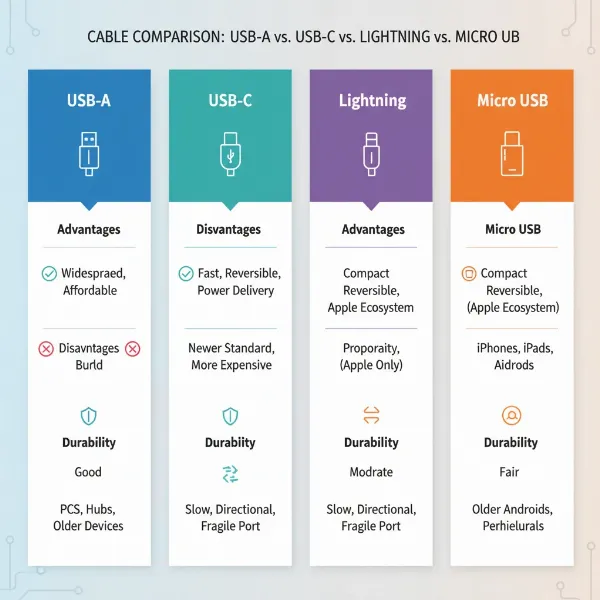
- USB-A: The traditional, rectangular connector, familiar to almost everyone. It’s often found on older chargers, computers, and power banks.
- USB-C: A reversible, oval-shaped connector that has become the modern standard for many smartphones, tablets, laptops, and other electronic devices due to its versatility and high power/data capabilities.
- Lightning: Apple’s proprietary 8-pin connector, used exclusively for iPhones (up to iPhone 14), iPads, and other Apple accessories.
- Micro USB: An older, trapezoidal connector widely used for budget gadgets and older Android phones before the widespread adoption of USB-C.
Comparing these types reveals distinct advantages and disadvantages. USB-A cables are inexpensive and widely compatible with older ports but are limited in charging speed and data transfer. Micro USB shares similar drawbacks and is easily damaged. Lightning cables offer reversibility and seamless integration within the Apple ecosystem, supporting fast charging with compatible adapters, but are exclusive to Apple devices. USB-C stands out for its superior speed, power delivery, and reversible design, making it a truly versatile and future-proof option that supports a wide array of devices and functionalities like video output and high-speed data transfer.
Crucial Factors When Choosing a Charging Cable
Selecting the right charging cable goes beyond simply finding one that fits your device. Several critical factors influence a cable’s performance, durability, and safety. Understanding these elements will empower you to make an informed decision that protects your devices and enhances your charging experience.
Material and Cable Durability
The construction materials of a charging cable significantly dictate its lifespan and resistance to daily wear and tear. Common materials include PVC, TPE, and braided nylon.
- PVC (Polyvinyl Chloride): Often used in basic, inexpensive cables. It’s flexible but can be prone to cracking and fraying over time, especially at the stress points near the connectors.
- TPE (Thermoplastic Elastomer): Similar to rubber, TPE cables offer a soft, flexible feel, often mimicking the original cables provided by major smartphone brands. While initially good, TPE can degrade over time when exposed to skin oils, sweat, heat, and UV light, leading to yellowing, hardening, and micro-cracks.
- Nylon Braided: These cables feature a high-strength woven fiber layer around the internal wire, offering superior protection against bending, fraying, and tangling. Braided cables are known for their exceptional durability and tensile strength, making them a top choice for users seeking longevity.
- Liquid Silicone: Offers extreme flexibility and a soft touch, making them less prone to tangling. However, they may not offer the same robust durability as braided nylon over extended periods, particularly against cuts or tears.
|
Our Picks for the Best Charging cable in 2026
As an Amazon Associate I earn from qualifying purchases.
|
||
| Num | Product | Action |
|---|---|---|
| 1 | LISEN USB C to USB C Cable, 240W C to C Cable Fast Charging [6.6FT, 2 Pack] Type C Charger Fast Charging USBC to USBC Cable for iPhone 17 16 15 Pro Max iPad MacBook Neo Air Pro Samsung S26 S25 Ultra |
![Check LISEN USB C to USB C Cable, 240W C to C Cable Fast Charging [6.6FT, 2 Pack] Type C Charger Fast Charging USBC to USBC Cable for iPhone 17 16 15 Pro Max iPad MacBook Neo Air Pro Samsung S26 S25 Ultra on Amazon](https://reviewasc.com/wp-content/plugins/amazon-tables/assets/images/buy.png)
|
| 2 | AINOPE USB to USB C Cable [2-Pack, 6.6ft] 3.1A Type C Charger Fast Charging, Right Angle USB C Cable for iPhone 17 Carplay Cable, Galaxy S10+ S10 S9, Note 10 9, LG V30, Moto, iPhone 16 15 Charger Cord |
|
| 3 | Anker Cable [2 Pack 6ft], USB A to USB C Cable for iPhone 17 Series,Samsung Galaxy S10 S10+, LG V30, Beats Fit Pro and More (Black). |
|
| 4 | USB Type-C to A Cable 5pack 6ft Braided Fast Charging 3A Quick Charger Cord, 6 Foot Compatible iPhone 17/17 Pro/16e/16/15 Pro Max,Samsung Galaxy S10 S9 S8 Plus, Note 10 9 8, LG V50 V40 G8 G7(Grey) |
|
| 5 | LISEN USB C to USB C Cable, 5-Pack [3.3/3.3/6.6/6.6/10FT] for iPhone 17 Charger Cord, 60W C to C Cable Fast Charging for iPad, iPhone 16 15 Pro Max, Galaxy S25/S24 USBC to USBC Cable Gifts for Men |
|
| 6 | iPhone Charger 3 Pack 10 ft Apple MFi Certified Lightning Nylon Braided Cable Fast Charging Cord Compatible with iPhone 13 12 11 Pro Max XR XS X 8 7 6 Plus SE iPad and More |
|
| 7 | Durcord USB C Cable, Upgarded 2Pack 10ft Fast USB Type C Charging Cable for Android/Phone/Pad/Laptop, Type C Charger Braided USB Cable Compatible withi Phone 17/16/15/Pro/Plus/Max/Sam.Sung-Silver |
|
| 8 | Anker USB C to USB C Cable, Type-C 60W Fast Charging Cable (6 FT, 2Pack) for iPhone 17 Series, iPad mini 6 and More (Black) |
|
| 9 | Teeind USB Type C Cable Fast Charging, Tpc001 5 Pack(6Ft 3A) Braided C Charger Cables Compatible with Samsung S10e/note 9/s10/s9/s8 Plus/A80/A50/A20 |
|
| 10 | INIU USB C to USB C Cable, 240W Fast Charging Type C Charger Cord, Braided USBC Phone Charger Cable for iPhone 17 16 Pro Max Samsung S26 S25 Laptops MacBook Air 15 M3 iPad Switch [6.6ft+6.6ft Black] |
|
To maximize the life of any charging cable, always unplug it by gripping the connector head, not pulling on the cable itself. Store cables loosely coiled to prevent internal wire damage and avoid extreme temperatures.
Compatibility and Charging Speed
To achieve optimal charging, your cable must be compatible not only with your device’s port but also with its charging requirements. Modern devices and chargers often support fast charging standards like:
- Power Delivery (PD): A USB-C standard that can deliver significantly higher power (up to 240W) to a wider range of devices, including laptops. For effective fast charging, your device, charger, and cable must all support Power Delivery. Cables often include an E-marker chip to communicate power requirements safely between devices, preventing overcharging or overheating.
- Quick Charge (QC): Developed by Qualcomm, primarily for Android devices, this technology enables faster charging by increasing voltage.
To verify a cable’s fast-charging capability, check its specifications for wattage ratings (e.g., 60W, 100W, 240W) and support for standards like USB PD. Thicker wires (lower AWG number) within the cable indicate better current flow and reduced resistance, essential for efficient fast charging. Remember that a fast-charging cable is only as effective as the charger and device it’s connected to; all components must support the desired speed.
Cable Length and Design
The length and design of a charging cable impact both convenience and durability.
- Length: Cables typically range from a few inches to several feet. Shorter cables often offer slightly faster charging due to less resistance but limit flexibility. Longer cables (e.g., 6-10 feet) provide convenience for use in various locations but might experience a minor drop in charging speed due to increased resistance over distance. Choose a length that suits your primary usage scenarios.
- Design Features: Beyond material, design elements can enhance a cable’s functionality. Reinforced connectors, often with aluminum housing, provide additional stress relief, preventing fraying at the most vulnerable point. Features like LED indicators, magnetic attachments, or specific aesthetic choices can also contribute to a cable’s overall appeal and utility. Some cables are designed to be more flexible for portability, while others are thicker and stiffer, prioritizing durability for stationary setups.
Comparing Popular Charging Cable Types
Choosing the right cable type is fundamental, as each serves a distinct purpose and caters to different device ecosystems. Below is a detailed comparison of the most common charging cable types.
Detailed Comparison Table
| Criteria | USB-A | USB-C | Lightning | Micro USB |
|---|---|---|---|---|
| Advantages | Inexpensive, ubiquitous, compatible with older ports. | Reversible connector, high power delivery (up to 240W), fast data transfer (up to 40Gbps with USB4/Thunderbolt), video output, universal standard. | Reversible connector, seamless Apple ecosystem integration, robust design. | Inexpensive, widely used on older devices, compact. |
| Disadvantages | Non-reversible, slower charging, limited data speeds, largely superseded by USB-C for new devices. | Generally higher cost than USB-A/Micro USB, not all USB-C cables support all features (e.g., video/high data). | Proprietary to Apple devices, potentially higher cost, exposed pins can get dirty. | Non-reversible, very slow charging, low data transfer, prone to damage, outdated. |
| Durability | Varies by material, often basic PVC. | Varies by material, often available in durable braided nylon or TPE with reinforced connectors. | Often robust, but exposed pins can be vulnerable to dirt/damage. | Poor; susceptible to damage due to its design, particularly the small tab inside. |
| Compatibility | Older chargers, computers, accessories. | Most modern Android phones, tablets, laptops, gaming consoles, monitors, and Apple products (MacBooks, newer iPads, iPhone 15+). | iPhones (up to 14), older iPads, AirPods, specific Apple accessories. | Older Android phones, budget tablets, e-readers, power banks. |
Comprehensive Charging Cable Buying Guide
Navigating the vast market of charging cables can be daunting, but a systematic approach ensures you pick a product that perfectly aligns with your needs and expectations.
Determine Your Needs
Before diving into options, clarify what you require from a cable:
- Device Compatibility: What type of connector does your device need (USB-C, Lightning)? If you have multiple devices, consider a universal USB-C solution or dedicated cables for each.
- Charging Speed: Do you need rapid charging for a laptop or a quick top-up for your phone, or is overnight charging sufficient? Match the cable’s wattage rating to your device and charger’s capabilities. For instance, charging a laptop often requires a cable supporting 60W, 100W, or even 240W Power Delivery.
- Cable Length: Where will you primarily use the cable? A short cable is ideal for power banks, while a longer one is better for bedside or office use.
- Data Transfer: Do you regularly transfer large files or connect to external displays? If so, look for cables that support higher data standards like USB 3.2 Gen 2 (10Gbps), USB4, or Thunderbolt 4 (40Gbps). Many charging-focused USB-C cables only support USB 2.0 data speeds (480Mbps).
Research Reputable Brands
Investing in cables from well-known, trusted brands significantly reduces the risk of purchasing low-quality or unsafe products. Brands like Anker, Aukey, Belkin, Ugreen, Spigen, and Mophie consistently receive high ratings for their charging accessories. These companies often offer better warranties and adhere to stricter manufacturing standards, which translates to superior durability and performance. Checking user reviews on various e-commerce platforms can provide real-world insights into product reliability and customer satisfaction.
Check Specifications and Safety Certifications
Always scrutinize a cable’s specifications and look for crucial safety certifications:
- Wattage and Amperage: Ensure the cable supports the power output of your charger and the input requirements of your device. A cable with lower wattage than your charger will act as a bottleneck, slowing down charging.
- USB-IF Certification: The USB Implementers Forum (USB-IF) provides certifications that ensure a cable meets industry standards for safety and performance, especially for USB-C and Power Delivery.
- MFi Certification: For Apple Lightning cables, “Made For iPhone/iPad/iPod” (MFi) certification is vital. It guarantees the cable meets Apple’s performance and safety standards, preventing potential damage to your Apple devices.
- Other Certifications: Look for CE, FCC, and RoHS compliance, which indicate adherence to European, US, and environmental safety standards, respectively. Some advanced cables also include E-marker chips to intelligently regulate power delivery, enhancing safety.
Top-Rated Charging Cables We Love Today
Based on extensive testing and user feedback, certain charging cables consistently stand out for their blend of durability, performance, and innovation. These “new models” often incorporate advanced features that address common pain points and enhance the overall charging experience.
For instance, the Spigen ArcWire USB-C cable has garnered acclaim for its exceptional durability and high power delivery, supporting up to 240W charging and maintaining stable data speeds even after rigorous bend tests. Its robust metal-jacketed head makes it a top all-around performer. Similarly, the Anker Powerline III USB-C to USB-C cable is highly recommended for its 100W charging capacity and remarkable flexibility, making it ideal for both powerful charging and portability. For those prioritizing extreme durability, the Anker Prime offers an impressive bend lifespan, though its data speeds might be limited.
Another strong contender is the Belkin BoostCharge 240-watt charging cable, which serves as a worthy alternative to expensive first-party options, offering high Power Delivery rates for laptops and tablets, along with overheating detection for added safety. These models exemplify the advancements in charging cable technology, offering reliability and efficiency that users genuinely appreciate.
“A truly great charging cable isn’t just about speed; it’s about the peace of mind that comes with knowing your device is charging safely and reliably, every single time.” – Dr. Elena Petrova, Lead Engineer, Advanced Power Solutions
Conclusion
The era of merely functional charging cables is behind us. Today’s market offers sophisticated solutions that are not only faster and more efficient but also significantly more durable and safer for our valuable electronic devices. By understanding the diverse cable types, prioritizing robust materials like braided nylon, and paying close attention to compatibility and certifications such as Power Delivery and MFi, you can confidently select a charging cable that not only meets but exceeds your expectations. Investing in a high-quality charging cable is an investment in the longevity and optimal performance of your devices, proving that this often-overlooked accessory is truly integral to our connected lives. What features do you value most in your ideal charging cable?
Frequently Asked Questions
What makes a charging cable “fast charging”?
A fast-charging cable is engineered with thicker internal wires (lower AWG) to reduce resistance, allowing higher current and wattage (e.g., 60W, 100W, 240W) to flow efficiently without overheating. It must also support fast-charging protocols like USB Power Delivery (PD) and often includes an E-marker chip to ensure safe power negotiation with your device and charger.
Can I use any USB-C cable for fast charging?
No, not all USB-C cables are designed for fast charging. While they share the same reversible connector, their internal wiring and specifications vary. For true fast charging, look for USB-C cables explicitly rated for high wattage (e.g., “PD 100W”) and preferably USB-IF certified to ensure compatibility with modern fast-charging standards.
How do I know if a charging cable is durable?
Durable charging cables typically feature external braiding, often made of nylon, which provides resistance against fraying, kinking, and physical stress. Reinforced strain relief and metal-capped connectors also contribute to longevity. Checking for high bend cycle ratings in product specifications or reputable reviews can also indicate robust construction.
Is there a difference between charging-only and data transfer cables?
Yes, while many cables can do both, some prioritize one function. Charging-focused cables emphasize thicker power conductors for efficient energy transfer. High-speed data cables, especially those supporting USB4 or Thunderbolt 4, contain more complex internal wiring for signal integrity, which can make them thicker and sometimes more expensive. For optimal performance, dedicated cables for each purpose are often recommended.
Why do some charging cables have an E-marker chip?
An E-marker chip, commonly found in high-wattage USB-C cables (typically 60W and above), is a small integrated circuit that communicates the cable’s capabilities (like maximum voltage, current, and data speed) to the connected devices. This ensures that power is delivered safely and optimally, preventing potential damage from incompatible power levels.
How often should I replace my charging cable?
The lifespan of a charging cable varies greatly depending on its quality, material, and usage habits. While high-quality braided cables can last for years, basic PVC cables might show signs of wear within months. You should replace a cable immediately if you notice fraying, exposed wires, inconsistent charging, or if it feels hot to the touch, as these are signs of potential safety hazards or performance degradation.