In our increasingly connected world, charging cables are more than mere accessories; they are vital lifelines keeping our devices powered and ready. Yet, with a dizzying array of options, choosing the right charging cable can feel overwhelming. From understanding different connector types to evaluating material durability and fast-charging capabilities, a quality cable profoundly impacts your device’s performance and longevity. This guide, brought to you by the Admin of Reviewasc.com, a technician with over a decade of specialized experience in charging cables, will navigate you through the essentials, helping you discover the best charging cable tailored to your needs.
Charging Cable: Overview and Essential Knowledge
Charging cables are the unsung heroes of our digital lives, facilitating power delivery and data transfer between devices. Their importance has grown with the proliferation of smartphones, tablets, laptops, and a myriad of other electronics that demand reliable and efficient power. A good charging cable ensures your devices stay powered up, maintain data integrity, and support the latest charging technologies, while a subpar one can lead to slow charging, data corruption, or even device damage.
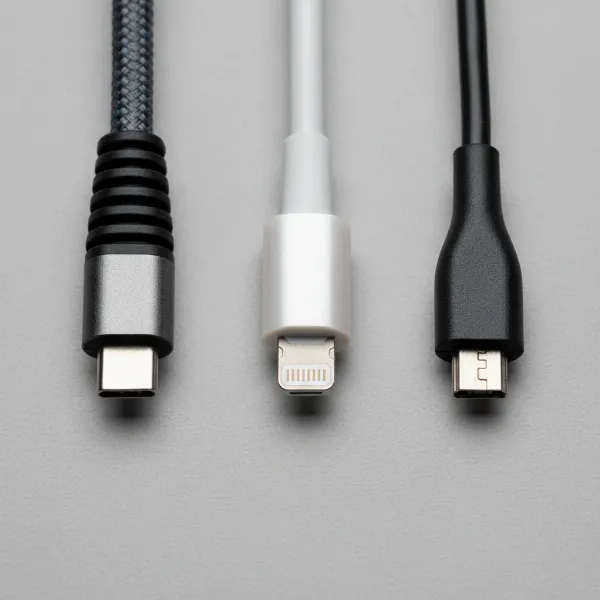
Today, the market is dominated by several key charging cable types, each with distinct characteristics. USB-A is the classic, rectangular connector, widely recognized and still found on many older devices and power adapters. While functional, it’s not reversible and generally offers slower data and charging speeds compared to newer standards. Micro USB once served as the standard for many Android phones and smaller electronics, identifiable by its trapezoid shape. It’s compact but often less durable and supports slower speeds, gradually being phased out by more advanced options.
USB-C has rapidly emerged as the modern universal standard. This small, oval-shaped connector is reversible, incredibly versatile, and supports high-speed data transfer, video output, and robust power delivery, including fast charging for a wide range of devices from smartphones to laptops. Its adoption is widespread across new Android devices, laptops, and even newer Apple products. Lightning is Apple’s proprietary connector, known for its slim, reversible design, used primarily for iPhones and older iPads. While convenient, Lightning cables typically offer slower data and charging speeds compared to high-end USB-C cables and are exclusive to Apple’s ecosystem.
Each cable type offers a unique set of advantages and disadvantages. USB-C excels in speed and versatility but requires devices with compatible ports. Lightning provides seamless integration for Apple users, though at a premium and with limited power capabilities compared to USB-C. USB-A and Micro USB remain relevant for older electronics, but their limitations in speed and design are apparent in an evolving tech landscape.
Key Factors When Choosing a Charging Cable
Selecting the perfect charging cable goes beyond simply matching the connector type. Several crucial factors influence a cable’s performance, durability, and suitability for your specific devices and usage patterns. Understanding these elements ensures you make an informed decision that safeguards your electronics and optimizes your charging experience.
Cable Material and Durability
|
Our Picks for the Best Charging cable in 2026
As an Amazon Associate I earn from qualifying purchases.
|
||
| Num | Product | Action |
|---|---|---|
| 1 | Teeind USB Type C Cable Fast Charging, Tpc001 5 Pack(6Ft 3A) Braided C Charger Cables Compatible with Samsung S10e/note 9/s10/s9/s8 Plus/A80/A50/A20 |

|
| 2 | Durcord USB C Cable, Upgarded 2Pack 10ft Fast USB Type C Charging Cable for Android/Phone/Pad/Laptop, Type C Charger Braided USB Cable Compatible withi Phone 17/16/15/Pro/Plus/Max/Sam.Sung-Silver |
|
| 3 | USB Type-C to A Cable 5pack 6ft Braided Fast Charging 3A Quick Charger Cord, 6 Foot Compatible iPhone 17/17 Pro/16e/16/15 Pro Max,Samsung Galaxy S10 S9 S8 Plus, Note 10 9 8, LG V50 V40 G8 G7(Grey) |
|
| 4 | AINOPE USB to USB C Cable [2-Pack, 6.6ft] 3.1A Type C Charger Fast Charging, Right Angle USB C Cable for iPhone 17 Carplay Cable, Galaxy S10+ S10 S9, Note 10 9, LG V30, Moto, iPhone 16 15 Charger Cord |
|
| 5 | Anker Cable [2 Pack 6ft], USB A to USB C Cable for iPhone 17 Series,Samsung Galaxy S10 S10+, LG V30, Beats Fit Pro and More (Black). |
|
| 6 | LISEN USB C to USB C Cable, 240W C to C Cable Fast Charging [6.6FT, 2 Pack] Type C Charger Fast Charging USBC to USBC Cable for iPhone 17 16 15 Pro Max iPad MacBook Neo Air Pro Samsung S26 S25 Ultra |
|
| 7 | iPhone Charger 3 Pack 10 ft Apple MFi Certified Lightning Nylon Braided Cable Fast Charging Cord Compatible with iPhone 13 12 11 Pro Max XR XS X 8 7 6 Plus SE iPad and More |
|
| 8 | LISEN USB C to USB C Cable, 5-Pack [3.3/3.3/6.6/6.6/10FT] for iPhone 17 Charger Cord, 60W C to C Cable Fast Charging for iPad, iPhone 16 15 Pro Max, Galaxy S25/S24 USBC to USBC Cable Gifts for Men |
|
| 9 | INIU USB C to USB C Cable, 240W Fast Charging Type C Charger Cord, Braided USBC Phone Charger Cable for iPhone 17 16 Pro Max Samsung S26 S25 Laptops MacBook Air 15 M3 iPad Switch [6.6ft+6.6ft Black] |
|
| 10 | Anker USB C to USB C Cable, Type-C 60W Fast Charging Cable (6 FT, 2Pack) for iPhone 17 Series, iPad mini 6 and More (Black) |
|
The external jacket material of a charging cable significantly impacts its lifespan and resistance to daily wear and tear. Three common materials dominate the market, each offering distinct advantages in durability and flexibility.
PVC (Polyvinyl Chloride) cables are often the most affordable option. They are generally rigid and can become brittle, especially in cold temperatures. PVC is prone to cracking and fraying, particularly near the connectors, and may yellow over time with exposure to skin oils and UV light. Their lifespan is typically the shortest, often lasting only 6-12 months under regular use.
TPE (Thermoplastic Elastomer) cables offer a softer, more flexible, and often eco-friendly alternative to PVC. They mimic rubber’s elasticity and are more resistant to bending stress, surviving approximately 5,000-7,000 bend cycles. TPE cables are commonly used for original equipment manufacturer (OEM) cables due to their pleasant feel and good balance of durability and flexibility. However, they can still fray over time, especially if not handled with care.
Braided cables, typically made from nylon, polyester, or sometimes Kevlar fibers woven around an inner core, are renowned for their superior durability. This construction provides exceptional tensile strength, making them highly resistant to abrasion, bending, twisting, and tangling. They can withstand over 10,000-20,000 bend cycles, often outlasting PVC cables by four times or more. Braided cables are ideal for heavy use, travel, or environments where cables face significant stress, though they may be slightly thicker and less flexible than TPE.
To prolong your charging cable’s life, avoid sharp bends, excessive pulling, or wrapping it too tightly. Store cables neatly when not in use, and regularly inspect them for signs of wear, especially near the connectors, where most damage occurs.
[image-1|durable-charging-cable-materials|Close-up of three different charging cable materials: PVC, TPE, and braided nylon, showcasing their textures and durability differences in a clean, studio setting with soft lighting.|
A close-up, studio shot illustrating three distinct charging cable materials: a smooth, rigid grey PVC cable; a soft, flexible white TPE cable; and a tightly woven, rugged black nylon braided cable. The image emphasizes the tactile differences and inherent strength of each material. The background is a clean, minimalistic white, with soft, even lighting highlighting the textures.]
Compatibility and Charging Speed
Understanding your device’s requirements and the cable’s capabilities is paramount for optimal charging and data transfer. Not all cables are created equal, even within the same connector type.
First, identify your device’s connector type: USB-A, USB-C, Lightning, or Micro USB. Using an incorrect cable can prevent charging or, in some cases, damage the port. Beyond the physical connector, consider the cable’s power delivery (wattage) capabilities. For fast charging, especially for smartphones and laptops, look for cables that support standards like USB Power Delivery (PD) or Qualcomm Quick Charge. USB-C cables, in particular, can support high wattages (e.g., 60W, 100W, or even up to 240W), crucial for rapidly charging power-hungry devices. Ensure the cable’s wattage rating matches or exceeds your device’s charging requirements for efficient fast charging.
Data transfer speeds are another critical factor, especially if you frequently move large files. Older USB standards (like USB 2.0) offer speeds of up to 480 Mbps, which can be slow for significant data transfers. Newer USB-C cables can support much faster standards such as USB 3.2 Gen 2 (up to 10 Gbps) or Thunderbolt 3/4 (up to 40 Gbps), dramatically reducing transfer times. Check the cable’s specifications for its data transfer rate if this is a priority for you.
To verify a cable’s fast charging support, check the product description for mentions of Power Delivery (PD), Quick Charge, or specific wattage ratings. Many quality cables will explicitly state their capabilities. If you’re unsure, consulting your device’s manual or the manufacturer’s website can provide necessary charging and data specifications.
Cable Length and Design
The length and design of your charging cable might seem like minor details, but they significantly impact convenience, usability, and even durability.
Cable length should be chosen based on your typical usage scenarios. Shorter cables (e.g., 0.3m to 1m) are excellent for portability, reducing clutter, and connecting devices close to a power source, like charging from a laptop or power bank. Longer cables (e.g., 2m to 3m) offer greater flexibility, allowing you to use your device comfortably while it’s charging, whether you’re relaxing on a sofa or working from bed. However, excessively long cables can be more prone to tangling and may experience slight power loss over very long distances, though this is usually negligible for standard charging.
Design elements can also enhance a cable’s practicality and durability. Features like reinforced strain relief at the connector ends help prevent common points of failure, where the cable often bends and frays. Flat or tangle-free designs can make storage and retrieval easier, reducing frustration. Some cables incorporate LED indicators to show charging status, while magnetic designs offer easy attachment and detachment, which can be particularly convenient in certain settings, like a car. The overall aesthetic, including color and finish, can also be a consideration for those who value coordination with their devices or personal style.
Comparison of Popular Charging Cable Types
Choosing the right charging cable often comes down to understanding the nuances of each major type. Here’s a detailed comparison to help you distinguish between USB-A, USB-C, Lightning, and Micro USB.
Detailed Comparison Table
| Feature / Type | USB-A | USB-C | Lightning | Micro USB |
|---|---|---|---|---|
| Connector Shape | Rectangular | Oval | Slim, reversible | Trapezoid |
| Reversibility | No | Yes | Yes | No |
| Common Devices | Older laptops, wall adapters, TVs | Modern smartphones (Android, new iPhones), laptops, tablets, gaming consoles | Older iPhones, iPads, AirPods | Older Android phones, small electronics, power banks |
| Max Data Speed (Typical) | Up to 5 Gbps (USB 3.0), 480 Mbps (USB 2.0) | Up to 40 Gbps (Thunderbolt/USB4) | Up to 480 Mbps (USB 2.0) | Up to 480 Mbps (USB 2.0) |
| Max Power Delivery (Typical) | Up to 10W-12W | Up to 240W (with PD 3.1) | Up to 27W (with USB-C PD adapter) | Up to 10W-12W |
| Durability | Varies by build, connector pins can bend | Generally robust, pins in port | Prone to exposed pin damage | Less durable, internal pins wear |
| Pros | Widely compatible with older devices, affordable | Universal, fast charging, high data speeds, reversible, versatile | Reversible, Apple ecosystem integration | Common for older devices, inexpensive |
| Cons | Not reversible, slower speeds, being phased out | Not all cables support high speeds/power, can be more expensive | Proprietary (Apple only), limited speeds/power compared to USB-C | Not reversible, fragile, slower speeds, being phased out |
USB-C stands out as the most versatile and future-proof option, offering superior speeds and power delivery for a vast array of devices. Lightning remains a strong choice for existing Apple users but is gradually being supplanted by USB-C in newer Apple hardware. USB-A and Micro USB, while still prevalent for legacy devices, represent older technology with significant limitations in modern charging and data transfer environments. The shift towards USB-C as a universal standard aims to reduce cable clutter and enhance compatibility across the tech landscape.
Detailed Charging Cable Buying Guide
Navigating the multitude of charging cables can be complex, but a structured approach can simplify the process. This buying guide outlines the steps to ensure you select a cable that perfectly aligns with your technical requirements, usage habits, and budget.
Determine Your Usage Needs
Before diving into specifications, clarify how and where you’ll use the cable. Start by identifying which device(s) the cable is for. Is it a smartphone, a tablet, a laptop, or a specialized gadget? This will dictate the necessary connector type (e.g., USB-C for a modern Android phone, Lightning for an older iPhone, or potentially USB-A for a legacy accessory).
Next, consider your charging speed requirements. Do you need the fastest possible charge for a busy lifestyle, or is standard charging sufficient for overnight power-ups? If fast charging is crucial, ensure your device supports it and look for cables explicitly stating support for standards like USB Power Delivery (PD) or Quick Charge with appropriate wattage ratings (e.g., 60W, 100W).
Finally, think about cable length and portability. A short, compact cable (0.3m-1m) is ideal for travel or connecting to a power bank, minimizing tangles. If you need to use your device while charging from a distant outlet, a longer cable (2m-3m) offers greater convenience. For high data transfer needs, look for cables rated for higher speeds (e.g., USB 3.2 Gen 2 or Thunderbolt).
Research Reputable Brands
Investing in a cable from a trusted brand often ensures better quality, durability, and safety. Well-known manufacturers adhere to industry standards and often offer warranties.
Anker is widely recognized for its high-quality power accessories, including charging cables. Their PowerLine series is particularly praised for its durability, fast charging capabilities, and robust build, often featuring braided nylon. Aukey also offers a range of reliable and affordable charging solutions, frequently delivering good performance and value. Belkin is another established brand known for producing durable and reliable cables, often favored for its MFi (Made for iPhone/iPad) certified Lightning cables, ensuring compatibility and safety for Apple devices. Other notable brands include UGREEN, RAVPower, and Native Union, which offer premium designs and enhanced durability.
When evaluating brands, look for positive customer reviews, clear product specifications, and certifications. A brand’s reputation for customer service and warranty support can also be a good indicator of their product quality and commitment. While budget options exist, remember that a slightly higher investment in a reputable brand can save you money and frustration in the long run by providing a more reliable and safer charging experience.
Check Technical Specifications and Safety Certifications
Crucial for both performance and safety, scrutinize the cable’s technical specifications and ensure it meets relevant safety standards.
Technical specifications to verify include the cable’s maximum wattage (W) for charging and its data transfer speed (e.g., Mbps or Gbps). For fast charging, ensure the cable supports the Power Delivery (PD) profile your device requires. For example, a laptop requiring 65W PD needs a cable rated for at least 65W.
Safety certifications are paramount to prevent risks like overheating, electrical shorts, or device damage. Look for certifications such as:
- CE (Conformité Européenne): Indicates compliance with European Union health, safety, and environmental protection directives.
- FCC (Federal Communications Commission): Mandatory for electronic devices sold in the United States, ensuring the product does not cause harmful electromagnetic interference.
- RoHS (Restriction of Hazardous Substances): A global standard, particularly important in the EU, ensuring the cable does not contain harmful levels of hazardous materials like lead, mercury, or cadmium.
- UL (Underwriters Laboratories): While often for the entire power system, UL certification is relevant for the cable part itself, indicating electrical safety.
- MFi (Made For iPhone/iPad): For Lightning cables, this Apple certification guarantees compatibility, performance, and safety with Apple devices, preventing potential issues with non-certified accessories.
“A charging cable might seem simple, but its material, power rating, and safety certifications are critical. Always prioritize certified cables from reputable brands; it’s an investment in your device’s health and your own safety.” – Admin, Reviewasc.com, Charging Cable Expert
While a USB cable itself might not carry all these certifications (as some apply more to the power adapter), the inclusion of RoHS and, for MFi cables, the MFi badge, are strong indicators of a quality and safe product. Check the packaging or product description carefully for these marks.
[image-2|charging-cable-safety-certifications|A close-up of a charging cable package displaying various safety certification logos like CE, FCC, RoHS, and MFi, with a blurred background of tech devices.|
A clear, detailed shot of a charging cable’s retail packaging. The foreground features the package with distinct, legible logos for CE, FCC, RoHS, and MFi certifications prominently displayed. The background is softly blurred, showing outlines of modern tech devices like a smartphone and laptop, suggesting the cable’s use. The lighting is bright and even, highlighting the certification marks.]
Top Charging Cables in 2024
Based on current market trends, user reviews, and expert analysis, several charging cables consistently stand out for their performance, durability, and value. Here are some top recommendations catering to different needs and budgets:
-
Best Overall USB-C Cable (High Performance): Anker 712 USB-C to USB-C Cable (100W/240W). Known for exceptional durability with a braided nylon exterior and robust construction, these cables support high Power Delivery ratings, making them ideal for fast charging laptops, tablets, and smartphones. They also offer reliable high-speed data transfer.
-
Best Durable USB-C Cable (Braided): Belkin BoostCharge Pro Flex USB-C to USB-C Cable. Belkin’s Pro Flex series features an ultra-durable braided silicone jacket that resists tangles and kinking. These cables are designed to withstand tens of thousands of bends, perfect for users who are tough on their accessories. They often support fast charging up to 100W.
-
Best Value USB-C Cable (2-Pack): JSaux USB-C to USB-C 2-Pack (100W). JSaux offers excellent bang for your buck, providing two high-quality, fast-charging (up to 100W) braided USB-C cables at a competitive price point. They are durable and suitable for everyday charging needs without breaking the bank.
-
Best Lightning Cable (MFi Certified): Anker PowerLine III Flow USB-C to Lightning Cable. For Apple users, this MFi-certified cable combines Anker’s renowned durability with a soft-touch silicone finish that prevents tangling. It supports fast charging for iPhones and iPads when paired with a compatible USB-C power adapter.
-
Best Multi-Functional Cable: inCharge 6 Max. This versatile cable features multiple adapters, allowing it to connect USB-A to USB-C, USB-A to Lightning, USB-A to Micro USB, USB-C to USB-C, USB-C to Lightning, and USB-C to Micro USB. It’s a perfect all-in-one solution for travelers or those with multiple device types, though speeds might vary across connectors.
When making your choice, consider these top picks in conjunction with your specific device requirements and budget. Prioritize a cable that offers a good balance of durability, the necessary charging speed, and compatibility with your ecosystem. Reading recent reviews and checking for current deals can also help you find the best option.
Conclusion
Choosing the right charging cable is more than a trivial decision; it’s an investment in the efficiency, longevity, and safety of your valuable electronic devices. We’ve explored the diverse landscape of charging cables, from the widespread USB-A and Micro USB to the versatile USB-C and proprietary Lightning. Understanding key factors like material durability, charging speed compatibility (especially Power Delivery), and crucial safety certifications like CE, FCC, and RoHS empowers you to make an informed choice.
Ultimately, the best charging cable for you depends on your specific devices, daily usage, and priorities—whether it’s raw charging speed, exceptional durability, or universal compatibility. By identifying your needs, researching reputable brands like Anker, Belkin, and JSaux, and verifying technical specifications and safety marks, you can confidently select a charging cable that not only meets but exceeds your expectations. With the right charging cable, you ensure your devices stay powered up, ready to keep pace with your dynamic life.
What is the single most important factor you consider when buying a new charging cable?
Frequently Asked Questions
What makes a charging cable “fast charging”?
A “fast charging” cable is designed to support higher power delivery (wattage) and often utilizes specific protocols like USB Power Delivery (PD) or Qualcomm Quick Charge. These cables are built with thicker wires and internal components to safely transmit more power, allowing compatible devices to charge significantly faster than with standard cables.
Is it safe to use a third-party charging cable?
Yes, it is generally safe to use third-party charging cables, provided they are from reputable brands and have relevant safety certifications (e.g., MFi for Apple devices, CE, FCC, RoHS). Cheap, uncertified cables can pose risks like overheating, slow charging, or even damage to your device.
How can I tell if my USB-C cable supports high-speed data transfer?
High-speed data transfer support in USB-C cables is indicated by specific USB standards like USB 3.2 Gen 2 (10 Gbps), USB 3.2 Gen 2×2 (20 Gbps), or Thunderbolt 3/4 (40 Gbps). These specifications are usually listed in the product description or on the packaging. Basic USB-C cables might only support USB 2.0 speeds (480 Mbps).
What is the ideal length for a charging cable?
The ideal length depends on your usage. Shorter cables (0.3m-1m) are great for portability and minimizing clutter, such as when charging from a power bank or laptop. Longer cables (2m-3m) offer more flexibility, allowing you to use your device comfortably from a distant power outlet.
Why do some cables yellow over time?
Cables, particularly those made from PVC or certain TPE compounds, can yellow over time due to exposure to UV light, heat, sweat, and oils from skin. This is a common form of material degradation and, while often cosmetic, can sometimes indicate a reduction in the cable’s overall integrity.