In our increasingly connected world, where smartphones, tablets, and laptops are extensions of ourselves, a dead battery can bring productivity to a screeching halt. Charging cables, often an overlooked accessory, are the unsung heroes keeping our digital lives powered. But with a bewildering array of options available, from basic USB-A to advanced USB-C and proprietary Lightning, understanding which charging cable offers true value is essential. This comprehensive guide will help you navigate the landscape of charging cables, ensuring you make informed choices that meet your needs for speed, durability, and safety.
Charging Cable: Overview and Essential Knowledge
A charging cable is more than just a wire; it’s the lifeline for your electronic devices, delivering the power needed to keep them running. Its importance has grown exponentially as our reliance on portable electronics intensifies. The evolution of charging technology has brought forth various cable types, each with distinct features and applications.
Popular Charging Cable Types
The market is dominated by several key connector types, each serving specific devices and ecosystems:
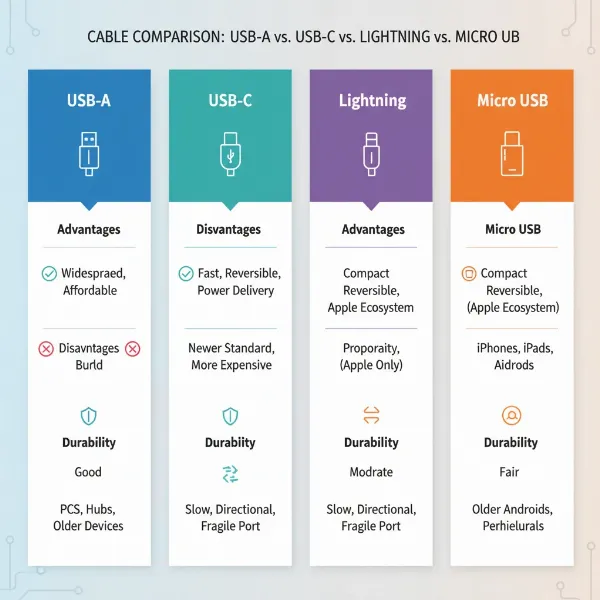
- USB-A: This is the traditional, rectangular connector that most people recognize. While still widely used in power adapters and older computers, its data transfer and power delivery capabilities are limited compared to newer standards. USB-A typically acts as the “host” end of a cable, connecting to a power source.
- USB-C: The newest and most versatile standard, USB-C features a small, reversible connector, meaning it can be plugged in either way. It supports high-speed data transfer and significantly higher power delivery, making it the industry standard for modern smartphones, laptops, and tablets. USB-C can deliver up to 240W with the latest Power Delivery (PD) 3.1 standard.
- Lightning: Apple’s proprietary connector, exclusively used for iPhones (up to iPhone 14), iPads, and other Apple accessories. While robust, its functionality is limited to the Apple ecosystem. Newer iPhones (iPhone 15 and later) have transitioned to USB-C.
- Micro USB: Once the standard for many Android phones and small electronic devices, Micro USB is a trapezoidal connector. It’s largely been superseded by USB-C due to its slower charging speeds and non-reversible design, but it can still be found on older devices.
|
Our Picks for the Best Charging cable in 2026
As an Amazon Associate I earn from qualifying purchases.
|
||
| Num | Product | Action |
|---|---|---|
| 1 | Anker Cable [2 Pack 6ft], USB A to USB C Cable for iPhone 17 Series,Samsung Galaxy S10 S10+, LG V30, Beats Fit Pro and More (Black). |
![Check Anker Cable [2 Pack 6ft], USB A to USB C Cable for iPhone 17 Series,Samsung Galaxy S10 S10+, LG V30, Beats Fit Pro and More (Black). on Amazon](https://reviewasc.com/wp-content/plugins/amazon-tables/assets/images/buy.png)
|
| 2 | AINOPE USB to USB C Cable [2-Pack, 6.6ft] 3.1A Type C Charger Fast Charging, Right Angle USB C Cable for iPhone 17 Carplay Cable, Galaxy S10+ S10 S9, Note 10 9, LG V30, Moto, iPhone 16 15 Charger Cord |
|
| 3 | USB Type-C to A Cable 5pack 6ft Braided Fast Charging 3A Quick Charger Cord, 6 Foot Compatible iPhone 17/17 Pro/16e/16/15 Pro Max,Samsung Galaxy S10 S9 S8 Plus, Note 10 9 8, LG V50 V40 G8 G7(Grey) |
|
| 4 | Teeind USB Type C Cable Fast Charging, Tpc001 5 Pack(6Ft 3A) Braided C Charger Cables Compatible with Samsung S10e/note 9/s10/s9/s8 Plus/A80/A50/A20 |
|
| 5 | Anker USB C to USB C Cable, Type-C 60W Fast Charging Cable (6 FT, 2Pack) for iPhone 17 Series, iPad mini 6 and More (Black) |
|
| 6 | LISEN USB C to USB C Cable, 5-Pack [3.3/3.3/6.6/6.6/10FT] for iPhone 17 Charger Cord, 60W C to C Cable Fast Charging for iPad, iPhone 16 15 Pro Max, Galaxy S25/S24 USBC to USBC Cable Gifts for Men |
|
| 7 | LISEN USB C to USB C Cable, 240W C to C Cable Fast Charging [6.6FT, 2 Pack] Type C Charger Fast Charging USBC to USBC Cable for iPhone 17 16 15 Pro Max iPad MacBook Neo Air Pro Samsung S26 S25 Ultra |
|
| 8 | INIU USB C to USB C Cable, 240W Fast Charging Type C Charger Cord, Braided USBC Phone Charger Cable for iPhone 17 16 Pro Max Samsung S26 S25 Laptops MacBook Air 15 M3 iPad Switch [6.6ft+6.6ft Black] |
|
| 9 | iPhone Charger 3 Pack 10 ft Apple MFi Certified Lightning Nylon Braided Cable Fast Charging Cord Compatible with iPhone 13 12 11 Pro Max XR XS X 8 7 6 Plus SE iPad and More |
|
| 10 | Durcord USB C Cable, Upgarded 2Pack 10ft Fast USB Type C Charging Cable for Android/Phone/Pad/Laptop, Type C Charger Braided USB Cable Compatible withi Phone 17/16/15/Pro/Plus/Max/Sam.Sung-Silver |
|
Comparing Cable Types
| Criterion | USB-A | USB-C | Lightning | Micro USB |
|---|---|---|---|---|
| Pros | Affordable, widely compatible with older devices | High-speed charging, reversible, versatile, high data transfer | Exclusive Apple ecosystem compatibility | Common on older devices, compact |
| Cons | Slower charging, not reversible, lower data speeds | Potentially higher cost, not all USB-C cables support all features | Only for Apple devices, proprietary | Slow charging, not reversible, less durable |
| Durability | Varies by material | Generally robust, material-dependent | Varies by material | Prone to damage at connector |
| Compatibility | Limited to older devices and chargers | Broad compatibility across new devices, universal standard | Exclusively Apple devices | Primarily older Android and small electronics |
Key Factors When Choosing a Charging Cable
Selecting the right charging cable requires attention to several critical aspects beyond just the connector type. These factors significantly influence a cable’s performance, longevity, and safety.
Cable Material and Durability
The external material and internal construction of a charging cable are paramount to its lifespan. Flimsy cables often fray or break at the connector due to repeated bending and pulling, leading to unreliable charging and frequent replacements.
-
Common Materials:
- TPE (Thermoplastic Elastomer): Often used in original charging cables for its soft, flexible feel and cost efficiency. However, TPE can degrade over time when exposed to skin oils, sweat, heat, and UV light, leading to yellowing, hardening, and micro-cracks.
- Nylon Braided: These cables feature a high-strength woven fiber layer around the internal jacket, offering excellent tensile strength, pull resistance, and anti-bending performance. Nylon braided cables are known for being rugged and less prone to tangling.
- Liquid Silicone: Offers a very soft, skin-friendly texture with outstanding rebound elasticity. Liquid silicone is resistant to oils, sweat, and temperature changes, and it quickly returns to its original shape after bending or coiling, solving common issues of TPE and nylon.
- PVC (Polyvinyl Chloride): Once common for its flame resistance and strength, PVC has largely been replaced by TPE due to TPE’s superior performance and environmental benefits.
-
Internal Construction: Beyond the outer jacket, a durable cable often includes a reinforced tensile core, such as aramid fiber (Kevlar), to absorb pulling forces and protect the copper conductors, ensuring signal stability. Thicker internal wires also contribute to better charging speed by reducing electrical resistance.
Compatibility and Charging Speed
To achieve fast charging, all components—the device, the power adapter, and the cable—must support the same fast-charging standard.
- Fast Charging Standards:
- USB Power Delivery (PD): The industry-standard protocol that runs over USB-C, allowing a charger and device to negotiate optimal voltage and current. PD 3.1 supports up to 240W, enabling fast charging for smartphones, tablets, and even high-power laptops.
- Qualcomm Quick Charge (QC): A proprietary technology developed by Qualcomm, primarily for Android phones with Snapdragon chipsets. Newer versions of QC (QC4/QC5) are compatible with USB-PD.
- Proprietary Standards: Brands like Apple (USB PD for fast charging), Samsung (Super Fast Charging, based on USB PD 3.0), OnePlus (SuperVooc), and Motorola (TurboPower) often have their own optimized versions or implementations of fast charging.
- Checking for Fast Charging: Look for wattage (W) ratings on the cable and charger. For instance, cables supporting 60W or 100W, especially with an E-Marked chip, are designed for fast charging. The E-Marked chip in USB-C cables facilitates safe power management between the device and charger.
Cable Length and Design
The ideal cable length depends on your usage scenarios. Short cables (1-3 ft) are ideal for power banks or car use, minimizing clutter. Standard lengths (3-6 ft) are versatile for desks and bedside charging, while longer cables (6-10 ft) offer flexibility for distant outlets.
Cable design elements, such as reinforced strain relief at the connectors, are critical to preventing common points of failure. Some cables also include features like LED indicators for charging status or magnetic connectors for easy attachment and detachment, which can enhance convenience and prevent accidental yanks.
Comparing Popular Charging Cable Types on the Market
Choosing the right charging cable can feel overwhelming with many options available. Here’s a detailed comparison to help clarify the strengths and weaknesses of the most prevalent types:
| Criterion | USB-A Cable | USB-C Cable | Lightning Cable | Micro USB Cable |
|---|---|---|---|---|
| Advantages | Affordable, widespread, backward compatible with older peripherals. | Reversible connector, supports USB Power Delivery (PD) for fast charging up to 240W, high data transfer speeds (up to 10Gbps or 20Gbps for USB 3.2 Gen 2×2, 40Gbps for USB4). | Exclusive to Apple devices, MFi certification ensures compatibility and safety. | Compact, still found on many older budget devices and accessories. |
| Disadvantages | Not reversible, limited power output (up to 15W), slower data transfer speeds (typically USB 2.0 at 480Mbps). | Higher cost for full-featured cables, not all USB-C cables support the highest power/data speeds (check specifications). | Proprietary (only for Apple devices), can be expensive, slower data transfer than USB-C. | Not reversible, limited power output (typically 10W), fragile connector prone to damage. |
| Durability (General) | Varies significantly based on build material; basic PVC can be prone to fraying. | Often features more robust materials like braided nylon; internal components designed for higher power. | Apple’s standard cables can be prone to fraying; third-party MFi-certified cables often offer better durability. | Historically less durable due to small, delicate connector; easily bent or broken. |
| Compatibility | Connects to older computers, wall chargers, and power banks. | Universal standard for new smartphones, laptops, tablets, and many other modern devices. | Compatible only with Apple iPhones (up to iPhone 14), iPads, and AirPods. | Compatible with older Android smartphones, e-readers, cameras, and various small gadgets. |
Detailed Charging Cable Buying Guide
Choosing the ideal charging cable involves more than just picking a pretty color. It’s about matching the cable to your lifestyle, devices, and safety expectations.
Identify Your Usage Needs
Start by assessing what you need the cable for:
- Device Type: Is it for an iPhone, Android phone, tablet, laptop, or other gadget? This dictates the connector type (Lightning, USB-C, Micro USB).
- Charging Speed: Do you need rapid charging for a laptop or just a slow charge for an older accessory? Look for cables supporting USB Power Delivery (PD) for fast charging modern devices, especially if they are USB-C.
- Length: A shorter cable (1-3 ft) is great for portability and car charging, minimizing clutter. A standard length (3-6 ft) is versatile for home or office use, while longer options (6-10 ft) provide flexibility if power outlets are far away.
- Environment: Will the cable be subjected to heavy use, travel, or a home with pets or children? This informs the required durability.
Research Reputable Brands
Investing in cables from trusted brands can save you frustration and money in the long run. Brands like Anker, Belkin, and Aukey are consistently recommended for their quality and reliability. Anker, for example, is known for robust, safe, and reliable chargers and cables, often featuring good strain relief and USB-IF certification. Belkin is recognized for its clean build quality and MFi-certified Lightning/USB-C cables. While Amazon Basics offers affordable cables, their durability might be inconsistent, with higher failure rates reported for high-power charging.
Verify Technical Specifications and Safety Certifications
- Power Output (Wattage): Ensure the cable supports the wattage required by your device and charger. For fast charging, look for cables rated 60W, 100W, or even 240W (for PD 3.1 Extended Power Range) if your devices require it.
- Data Transfer Speed: If you need to sync files, check the USB version supported. USB 2.0 (480 Mbps) is standard, but USB 3.x (5-10 Gbps) or USB4 (20-40 Gbps) offers significantly faster data transfer, crucial for large files or video output.
- Safety Certifications: Always prioritize cables with recognized safety certifications like CE, FCC, or UL. These certifications confirm that the product has undergone rigorous testing and meets specific safety and performance standards, protecting your devices from issues like overheating and overcharging. High-quality USB-C cables often include an E-Marked chip to safely manage power delivery, especially at higher wattages.
“True fast charging happens when your cable, charger, and device all support the same fast-charging standard, like USB Power Delivery, working together seamlessly.” — KEUTEK, Fast Charging Cables: The Ultimate 2024 Guide
Top Charging Cables on the Market
While specific models constantly evolve, several brands consistently deliver high-quality charging cables that meet diverse needs.
- Anker: Widely regarded for their PowerLine series, Anker cables offer excellent durability, often featuring braided nylon exteriors and strong strain relief. Their USB-C cables frequently support high wattage (e.g., 60W, 100W, up to 240W) and are USB-IF certified, making them reliable for fast charging and data transfer. Anker’s silicone cables, like the Powerline III, are praised for their flexibility and tangle-free design.
- Belkin: Known for producing high-quality, MFi-certified Lightning cables and robust USB-C cables, Belkin products generally boast clean build quality and thick outer jackets. They often incorporate the latest charging technologies for optimal performance.
- UGREEN: A strong contender in the accessory space, UGREEN offers good value for money with many models supporting PD fast charging and solid data transfer speeds. Their cables often receive positive customer reviews for performance and durability.
When choosing, consider these brands and look for features like braided exteriors, reinforced connectors, and explicit support for high wattage (e.g., 100W, 240W) and fast charging standards like USB PD. Many of these brands also offer various lengths and specialized cables, such as those with right-angle connectors or LED indicators, to cater to specific user preferences.
Conclusion
Choosing the right charging cable is a small decision with significant implications for your daily life. Investing in a quality charging cable ensures not only faster power-ups but also superior durability and crucial safety for your valuable devices. By understanding the different types of connectors, recognizing the importance of materials like braided nylon or liquid silicone, and verifying compatibility with fast charging standards like USB Power Delivery, you can confidently select a cable that truly offers value. Don’t compromise on this essential accessory; a well-chosen charging cable is an investment in reliability and peace of mind.
What kind of charging cable challenges do you face most often, and what features would make your ideal cable?
Frequently Asked Questions
Do all USB-C cables support fast charging?
No, not all USB-C cables support fast charging. While USB-C is capable of high power delivery, the actual charging speed depends on the cable’s internal construction, its wattage rating (e.g., 60W, 100W, 240W), and whether it supports fast-charging protocols like USB Power Delivery (PD). Always check the product specifications for wattage and PD support to ensure it can deliver fast charging.
Can a charging cable damage my phone battery?
Modern fast-charging technology is designed with battery health in mind. Your device has a built-in battery management system that communicates with the charger and cable to regulate power flow, preventing overcharging and managing heat. As long as you use a high-quality, certified fast-charging cable and compatible charger, it should not harm your battery.
How can I tell if a charging cable is good quality?
Look for several indicators of a good quality charging cable: check for safety certifications (CE, FCC, UL), durable materials like braided nylon or liquid silicone, reinforced stress points at the connectors, and clear specifications regarding power delivery (watts) and data transfer speeds. An E-Marked chip in USB-C cables is also a sign of quality for managing higher power safely.
Is a longer charging cable slower than a shorter one?
Generally, for cables of the same material and quality, shorter cables tend to offer faster charging and data transfer speeds due to less electrical resistance over a shorter distance. However, high-quality, well-constructed longer cables can still deliver excellent performance by using thicker internal wires to compensate for the added length.
What does “MFi certified” mean for Apple cables?
“MFi” stands for “Made for iPhone/iPad/iPod.” This certification from Apple ensures that third-party accessories, including Lightning cables, meet Apple’s performance and quality standards. MFi-certified cables are guaranteed to be compatible and safe for Apple devices, unlike uncertified cables that may cause charging issues or damage.