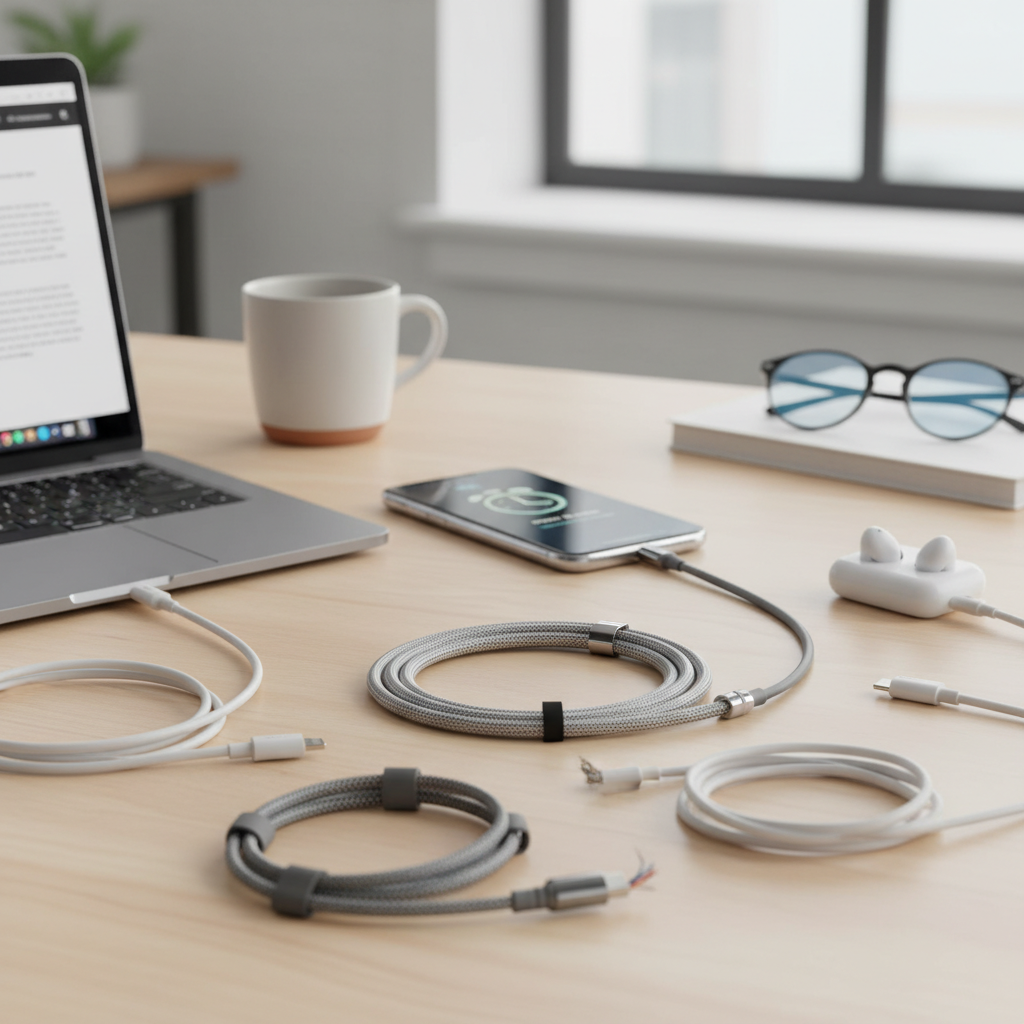
In our hyper-connected world, a charging cable is far more than just a simple accessory; it’s the lifeline of your digital existence. From powering up your smartphone for that crucial morning alarm to keeping your laptop running through a late-night work session, these unassuming wires play an indispensable role. Yet, with a marketplace flooded with countless options, many wonder if there’s truly a difference between a cheap, generic cord and a premium, certified cable. As an admin at Reviewasc.com with over a decade of deep experience in charging technology, I can confidently tell you: not all charging cables are created equal. Choosing the right one can significantly impact charging speed, device safety, and the longevity of your gadgets. This comprehensive guide is designed to cut through the confusion, empowering you to select a quality, durable, and perfectly compatible charging cable for all your needs.
Charging Cable: Overview and What You Need to Know
A charging cable acts as the essential bridge, facilitating both power delivery and data transfer between your electronic devices and their power sources. Understanding the various types available is the first step toward making an informed choice. Over the years, connector types have evolved significantly, driven by advancements in device technology and the demand for faster, more efficient charging.
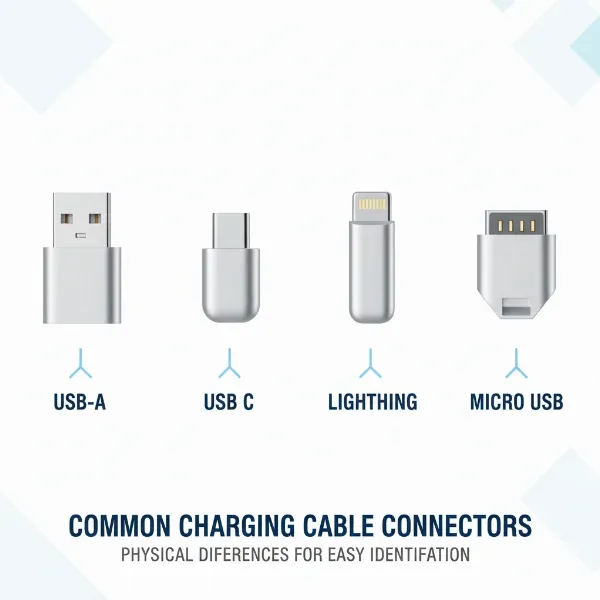
Currently, the most prevalent types you’ll encounter are USB-A, USB-C, Lightning, and Micro-USB. Each has distinct characteristics, compatibility, and performance levels that cater to different devices and user requirements. Using an incompatible or low-quality cable can lead to slow charging, inconsistent power delivery, or even potential damage to your valuable electronics. Modern fast-charging innovations, for instance, necessitate cables specifically designed to handle higher currents safely and efficiently.
Popular Charging Cable Types: A Quick Look
- USB-A: This is the classic, rectangular connector that has been ubiquitous for decades. You’ll find USB-A ports on older laptops, wall adapters, power banks, and many peripherals. While still common, USB-A typically supports slower charging and data transfer speeds compared to newer standards. Cables usually have a USB-A on one end and another connector (like USB-C, Lightning, or Micro-USB) on the other.
- USB-C: The latest and most versatile standard, USB-C features a small, oblong, and reversible connector. This means you can plug it in either way, eliminating frustration. USB-C cables are designed for significantly faster charging (supporting up to 240W with Power Delivery 3.1) and higher data transfer rates (up to 40Gbps, even 120Gbps with Thunderbolt 4). It is the standard for most new Android smartphones, modern laptops, tablets, and even newer Apple devices like the iPhone 15 and recent iPad Pro models.
- Lightning: Apple’s proprietary connector, introduced with the iPhone 5 in 2012. Like USB-C, it’s reversible, a major convenience over older USB-A and Micro-USB types. Lightning cables are primarily used for iPhones (up to the iPhone 14), older iPads, and various Apple accessories. While it supports fast charging with a compatible USB-C power adapter, its data transfer speeds are comparable to older USB 2.0 (around 480Mbps), which is significantly slower than USB-C.
- Micro-USB: Once the standard for most Android smartphones and many portable electronics like Bluetooth speakers, power banks, and e-readers, Micro-USB is now largely being phased out. It has a distinct trapezoidal shape and is not reversible. Micro-USB cables are known for being less durable due to their tiny internal pins, which can wear out with frequent use, and they offer slower charging and data transfer speeds (USB 2.0).
|
Our Picks for the Best Charging cable in 2026
As an Amazon Associate I earn from qualifying purchases.
|
||
| Num | Product | Action |
|---|---|---|
| 1 | USB Type-C to A Cable 5pack 6ft Braided Fast Charging 3A Quick Charger Cord, 6 Foot Compatible iPhone 17/17 Pro/16e/16/15 Pro Max,Samsung Galaxy S10 S9 S8 Plus, Note 10 9 8, LG V50 V40 G8 G7(Grey) |

|
| 2 | Anker USB C to USB C Cable, Type-C 60W Fast Charging Cable (6 FT, 2Pack) for iPhone 17 Series, iPad mini 6 and More (Black) |
|
| 3 | iPhone Charger 3 Pack 10 ft Apple MFi Certified Lightning Nylon Braided Cable Fast Charging Cord Compatible with iPhone 13 12 11 Pro Max XR XS X 8 7 6 Plus SE iPad and More |
|
| 4 | INIU USB C to USB C Cable, 240W Fast Charging Type C Charger Cord, Braided USBC Phone Charger Cable for iPhone 17 16 Pro Max Samsung S26 S25 Laptops MacBook Air 15 M3 iPad Switch [6.6ft+6.6ft Black] |
|
| 5 | Anker Cable [2 Pack 6ft], USB A to USB C Cable for iPhone 17 Series,Samsung Galaxy S10 S10+, LG V30, Beats Fit Pro and More (Black). |
|
| 6 | Teeind USB Type C Cable Fast Charging, Tpc001 5 Pack(6Ft 3A) Braided C Charger Cables Compatible with Samsung S10e/note 9/s10/s9/s8 Plus/A80/A50/A20 |
|
| 7 | AINOPE USB to USB C Cable [2-Pack, 6.6ft] 3.1A Type C Charger Fast Charging, Right Angle USB C Cable for iPhone 17 Carplay Cable, Galaxy S10+ S10 S9, Note 10 9, LG V30, Moto, iPhone 16 15 Charger Cord |
|
| 8 | LISEN USB C to USB C Cable, 5-Pack [3.3/3.3/6.6/6.6/10FT] for iPhone 17 Charger Cord, 60W C to C Cable Fast Charging for iPad, iPhone 16 15 Pro Max, Galaxy S25/S24 USBC to USBC Cable Gifts for Men |
|
| 9 | Durcord USB C Cable, Upgarded 2Pack 10ft Fast USB Type C Charging Cable for Android/Phone/Pad/Laptop, Type C Charger Braided USB Cable Compatible withi Phone 17/16/15/Pro/Plus/Max/Sam.Sung-Silver |
|
| 10 | LISEN USB C to USB C Cable, 240W C to C Cable Fast Charging [6.6FT, 2 Pack] Type C Charger Fast Charging USBC to USBC Cable for iPhone 17 16 15 Pro Max iPad MacBook Neo Air Pro Samsung S26 S25 Ultra |
|
[image-1|charging-cable-types-comparison|Different types of charging cable connectors (USB-A, USB-C, Lightning, Micro-USB) laid out for comparison, highlighting their distinct shapes and sizes on a clean, technical background with soft, even lighting in an illustrative style. |
A conceptual illustration of various charging cable connector types: USB-A (rectangular), USB-C (oval, reversible), Apple Lightning (thin, reversible), and Micro-USB (trapezoidal). Each connector is clearly visible, differentiated by shape and size, arranged neatly on a light-colored, slightly textured surface. The background is simple and uncluttered, with soft studio lighting. The style is clean, informative, and slightly technical, suitable for a product review blog.]
Key Factors When Choosing a Charging Cable
Selecting the perfect charging cable involves more than just matching the connector shape. Several crucial factors influence a cable’s performance, durability, and safety. Understanding these elements will help you invest wisely.
Material and Durability of the Cable
The physical construction of a charging cable is paramount to its longevity and efficiency. High-quality materials and robust design prevent fraying, internal wire damage, and overheating, ensuring your cable lasts longer and charges consistently.
- Conductor Material: The core wires inside the cable are typically made of copper or tinned copper. Copper is an excellent conductor, offering low electrical resistance, which is crucial for efficient power delivery and faster charging. Cheaper cables might use aluminum conductors, which have higher resistance, leading to slower charging speeds and a greater risk of heat buildup.
- Insulation and Jacket: The outer jacket protects the internal wires. Common materials include PVC (Polyvinyl Chloride) and TPE (Thermoplastic Elastomer). For enhanced durability, many modern cables feature braided nylon exteriors. Braided nylon, sometimes reinforced with materials like Kevlar aramid fiber, provides superior resistance to bending, tangling, and general wear and tear. This makes braided cables an excellent choice for everyday use, especially if you frequently coil and uncoil your cables.
- Connector Quality: The points where the cable meets your device and charger are often the most vulnerable. Look for cables with reinforced connectors, often made from aluminum alloy or featuring extended strain relief. These design elements help prevent internal wire breakage from repeated plugging and unplugging. Gold-plated connectors can also resist corrosion and maintain a stable connection over time.
To maximize the lifespan of your charging cables, always unplug them by gripping the connector itself, not pulling on the wire. Store cables loosely coiled rather than tightly wrapped or sharply bent, which can stress the internal wiring.
Compatibility and Charging Speed
The world of charging technology is rapidly advancing, with “fast charging” becoming a standard expectation. However, achieving optimal charging speed requires compatibility across your device, charger, and cable.
- Device Compatibility: This is the most fundamental aspect. Ensure the cable’s connectors precisely match the ports on your device and charger. For instance, an iPhone 15 requires a USB-C to USB-C cable for optimal charging, while older iPhones need a USB-C to Lightning cable to utilize fast charging with a USB-C power adapter.
- Fast Charging Standards:
- USB Power Delivery (USB-PD): This is the leading universal fast-charging standard, primarily associated with USB-C. USB-PD allows for higher power delivery (from 18W up to 240W with PD 3.1) and intelligently negotiates the optimal voltage and current with your device. To fully leverage USB-PD, both your charger and the cable must support the standard and the desired wattage. High-wattage USB-C cables often contain an “E-Marker chip” that communicates the cable’s capabilities to the connected devices, ensuring safe and efficient power transfer.
- Qualcomm Quick Charge: Another popular fast-charging protocol, often found in Android devices. While USB-PD is becoming more universal, Quick Charge remains prevalent in many Android smartphones and compatible chargers.
- Verifying Fast Charging: A cable specifically designed for fast charging will have thicker wires (lower AWG number) to reduce resistance and allow more current to flow without overheating. The cable’s packaging or description should explicitly state its wattage support (e.g., “Supports 60W PD” or “100W Fast Charging”). Remember, even if you have a fast charger, a regular cable will limit the charging speed to its lower capacity, often around 10-15W.
Cable Length and Design
While often overlooked, the length and design of your charging cable significantly impact convenience and, to some extent, performance.
- Length: Charging cables are available in various lengths, typically ranging from a few inches to 10 feet or more. Choose a length that suits your primary usage scenarios. A shorter cable (e.g., 1-2 feet) is ideal for portable power banks or keeping your desk tidy, while a longer cable (e.g., 6-10 feet) offers flexibility to use your device comfortably while plugged into a distant outlet. It’s worth noting that very long cables (over 6 feet) can sometimes experience a slight drop in charging efficiency due to increased electrical resistance, although this is often negligible for standard device charging.
- Design Features:
- Reversibility: As mentioned, USB-C and Lightning connectors are reversible, making them incredibly user-friendly. USB-A and Micro-USB are not, requiring careful orientation.
- LED Indicators: Some cables, like certain Belkin BoostCharge models, incorporate small LED lights that indicate the charging status (e.g., red for charging, green for fully charged), providing a quick visual cue.
- Magnetic Connectors: Innovative designs, such as the Statik 360, feature magnetic tips that can be left in your device’s port. The cable then snaps on magnetically, offering quick attachment and detachment while protecting the port from wear.
- Multi-Connector Cables: For users with multiple device types, universal cables like the Anker Powerline II 3-in-1 offer interchangeable tips (USB-C, Micro-USB, Lightning) on a single cable, reducing clutter and ensuring you always have the right connector on hand.
Comparing Popular Charging Cable Types on the Market
To help you visualize the differences and choose effectively, here’s a detailed comparison of the main charging cable types:
Detailed Comparison Table
| Criteria | Cáp sạc USB-A | Cáp sạc USB-C | Cáp sạc Lightning | Cáp sạc Micro USB |
|---|---|---|---|---|
| Pros | Affordable, widespread on older devices, simple design | Fast charging (PD up to 240W), high data transfer (up to 40Gbps), reversible connector, versatile (power, data, video) | Reversible connector, seamless Apple ecosystem integration, decent fast charging for iPhones | Common on many older devices, very affordable, compact for its time |
| Cons | Slower charging & data, not reversible, bulky, being phased out | Can be pricier, not universally backward compatible with very old chargers | Apple exclusive, slower data than USB-C (480Mbps), can be expensive | Slowest charging & data, not reversible, fragile connector (pins wear out), largely obsolete |
| Durability | Varies widely by brand and material; connector less reinforced than newer types | Excellent, especially with braided materials and reinforced connectors; designed for high current | Good, especially MFi certified cables with robust strain relief | Prone to damage at the connector, often made with less durable materials |
| Compatibility | Older laptops, wall adapters, desktop PCs, game consoles, some accessories | Modern smartphones (Android, iPhone 15+), laptops, tablets, latest game controllers, monitors, peripherals | iPhone (up to 14), older iPads, AirPods, various Apple accessories | Older Android phones, basic tablets, Bluetooth speakers, e-readers, some digital cameras |
In-depth Charging Cable Buying Guide
Navigating the vast selection of charging cables can be daunting, but with a structured approach, you can confidently find the best fit for your devices and lifestyle.
Determine Your Needs
Before you even start looking, clearly define what you need the cable for. This will narrow down your options significantly.
- Which devices do you need to charge? List all your primary gadgets: smartphone (Android or iPhone, and specific model), tablet, laptop, earbuds, smartwatch, gaming controllers, etc. This instantly tells you the connector types required (e.g., USB-C to USB-C, USB-A to Lightning).
- Do you require fast charging? Check if your devices and wall adapters support fast charging standards like USB Power Delivery (PD) or Quick Charge. If so, you’ll need a cable explicitly rated to handle those higher wattages. If your device only supports standard charging, an expensive high-wattage cable might be overkill.
- What length do you need? Consider where you typically charge. A short cable might be perfect for a power bank or car, while a 6-foot cable offers more flexibility for bedside or couch use. Remember the minor efficiency trade-off with very long cables.
- Any special features? Do you travel often and need a multi-connector cable? Do you appreciate the convenience of a magnetic attachment? Are LED indicators a helpful feature for you? Thinking about these specifics can enhance your user experience.
Research Reputable Brands
Investing in cables from trusted manufacturers is crucial for safety, performance, and peace of mind. These brands typically adhere to higher quality control standards and offer customer support and warranties.
- Top Brands to Consider: Anker, Belkin, UGREEN, Aukey, RAVPower, Native Union, and for Apple devices, Apple’s own or MFi-certified third-party brands like those mentioned.
- Why Brand Matters: Reputable brands are known for:
- Durability: Using high-quality materials like reinforced connectors and braided nylon.
- Performance: Consistently delivering stated charging speeds and data transfer rates.
- Safety: Meeting international safety standards and preventing issues like overheating.
- Warranty and Support: Offering reliable customer service and product warranties, which can be invaluable if you encounter any issues.
“A quality charging cable is an investment in your device’s health and your daily convenience. Never compromise on certified products from trusted brands.” – Admin, Reviewasc.com
Check Technical Specifications and Safety Certifications
This is where you differentiate truly reliable cables from potentially risky ones. Always verify the following:
- Safety Certifications:
- MFi (Made for iPhone/iPad/iPod): Absolutely essential for Apple Lightning cables. MFi certification ensures the cable contains an authentic Apple-licensed chip, guaranteeing compatibility, safe charging, and proper data syncing without annoying error messages. Uncertified Lightning cables can damage your device or simply stop working after an iOS update.
- USB-IF (USB Implementers Forum) Certification: For USB-C cables, this certification indicates that the product adheres to USB standards for power delivery, data transfer, and safety. Look for logos like “USB Certified Cable” or “USB PD Certified” on the packaging. This is especially important for high-wattage USB-C cables.
- UL Listed or ETL Certified: These are general safety certifications that indicate the product has been tested to meet specific safety standards for electrical components, reducing risks like fire or electric shock.
- Technical Specifications: Look for clear indications of:
- Wattage (W) and Amperage (A): Ensure these match or exceed the requirements of your device and charger for optimal performance. For example, if your phone supports 25W fast charging, your cable should be rated for at least 25W.
- Data Transfer Speed: If you need to sync files, check the cable’s data speed rating (e.g., 480Mbps for USB 2.0, 5Gbps for USB 3.0/3.1 Gen 1, 10Gbps for USB 3.1 Gen 2, 20Gbps for USB 3.2, 40Gbps for USB4/Thunderbolt 3/4).
- Avoid Pitfalls: Be wary of cables that are unusually lightweight, feel flimsy, have vague specifications, or are priced suspiciously low. These are often signs of inferior materials and potentially dangerous construction. A damaged or frayed cable should be replaced immediately, as it can pose a safety risk.
Top-Rated Charging Cables for Today’s Market
Based on current trends, user reviews, and expert testing, here are some highly-regarded charging cables that exemplify quality and performance across different needs:
- Anker Powerline III USB-C to USB-C: A consistently top-rated choice for its robust construction, flexible silicone finish, and support for up to 100W Power Delivery. Ideal for fast-charging both smartphones and many laptops.
- JSaux USB-C to USB-C 2-Pack: An excellent budget-friendly option offering 100W fast charging and available in longer lengths, providing great value for everyday use.
- Belkin BoostCharge 240-watt charging cable: For those needing serious power, this USB-C to USB-C cable supports the highest USB Power Delivery rates, coming from a recognized brand known for quality. It’s a strong alternative to Apple’s premium cables.
- Anker Powerline+ USB-C to USB-A 3.0 (or Anker Premium Nylon USB-A to C): If you still rely on older USB-A wall adapters or computer ports, these cables offer a durable and reliable way to connect your newer USB-C devices, though at slower charging and data speeds.
- Anker USB C to Lightning Cable: An MFi-certified cable that reliably delivers fast charging for compatible iPhones when paired with a USB-C power adapter. Known for its durability and consistent performance.
- Belkin BoostCharge Smart LED USB-C to Lightning Cable: Combines MFi certification with a smart LED indicator that visibly confirms charging status, adding a layer of convenience.
- Anker Powerline II 3-in-1 Charging Cable: The ultimate versatile option for multi-device households. This single cable features interchangeable USB-C, Micro-USB, and Lightning connectors, allowing you to charge almost any portable device without carrying multiple cords.
Each of these options offers a balance of durability, performance, and reliability, catering to different requirements and budgets.
Conclusion
The humble charging cable is an indispensable tool in our daily lives, and its importance should not be underestimated. From ensuring your devices are powered quickly and safely to protecting their long-term health, choosing the right charging cable is a decision that truly pays off. We’ve explored the diverse types, critical factors like material durability, compatibility with fast-charging standards, and smart design choices. Remember, a cable isn’t just about making a connection; it’s about making a reliable and safe connection. By understanding your specific needs, researching reputable brands, and prioritizing safety certifications like MFi and USB-IF, you empower yourself to make informed decisions. Investing in a high-quality charging cable is an investment in the longevity and optimal performance of all your electronic devices. Make the smart choice today to ensure seamless power delivery tomorrow.
What charging cable challenges do you face most often, and how do you decide which one to buy?
Câu Hỏi Thường Gặp
Are all USB-C cables fast charging?
No, not all USB-C cables support fast charging. While USB-C is capable of high power delivery, the cable itself must be designed with thicker wires and potentially an E-Marker chip to handle higher wattages (e.g., 60W, 100W, 240W) and comply with fast-charging standards like USB Power Delivery (USB-PD). Always check the cable’s specifications and look for USB-IF certification to ensure it supports the fast charging speed you need.
Can a cheap charging cable damage my phone?
Yes, a cheap or uncertified charging cable can potentially damage your phone. Low-quality cables often use inferior materials, leading to higher electrical resistance, overheating, slow charging, or inconsistent power delivery. In severe cases, they can short-circuit or cause battery degradation. Always opt for certified cables from reputable brands to protect your device.
How long do charging cables last?
The lifespan of a charging cable varies greatly depending on its quality, materials, usage frequency, and care. High-quality cables with braided nylon jackets and reinforced connectors can last several years with proper care. Cheaper cables, especially those with thin PVC jackets, might only last a few months before showing signs of fraying or internal damage.
What is MFi certification?
MFi stands for “Made for iPhone/iPad/iPod” and is Apple’s official licensing program for third-party accessories. An MFi-certified Lightning cable contains an authentic Apple-licensed chip, guaranteeing compatibility, safe charging, and proper data synchronization with Apple devices. This certification ensures the cable meets Apple’s strict performance and safety standards, preventing error messages or potential damage.
Is a longer charging cable slower?
Longer charging cables can indeed be slightly slower than shorter ones due to increased electrical resistance over a greater length. This resistance can cause a minimal voltage drop, leading to a small reduction in charging efficiency. However, for most standard phone charging, this difference is often negligible. For high-wattage fast charging (e.g., for laptops), it’s generally advisable to use the shortest practical cable length.