In our hyper-connected world, a reliable charging cable is more than just an accessory; it’s the lifeline to our digital existence. From powering our smartphones and tablets to keeping our laptops running, the humble charging cable plays a pivotal role. Yet, with an overwhelming array of options, from budget-friendly generics to premium, feature-rich variants, many wonder: is a charging cable truly worth investing in? This article will dive deep into the world of charging cables, exploring their significance, dissecting key features, and guiding you toward making an informed decision that ensures both performance and peace of mind.
Charging Cable: An Overview and Essential Knowledge
Charging cables are indispensable tools that bridge your devices to power sources, facilitating both energy transfer and data communication. They are the unsung heroes behind our always-on lifestyle, enabling us to work, communicate, and entertain without interruption. Understanding the different types and their implications is crucial for making the right choice.
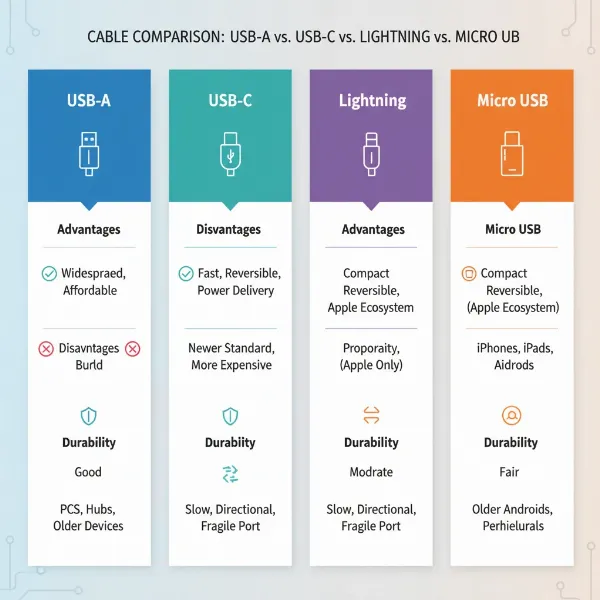
The market is dominated by several popular charging cable types, each designed for specific device ecosystems and functionalities:
- USB-A: The classic, rectangular connector found on older chargers, computers, and power banks. It’s widely compatible but typically offers slower charging and data transfer speeds.
- USB-C: A reversible, oval-shaped connector rapidly becoming the industry standard. USB-C supports faster charging (including Power Delivery), higher data transfer rates, and can even carry video signals. It’s versatile and can be found on modern smartphones, laptops, and various peripherals.
- Lightning: Apple’s proprietary connector for iPhones, iPads, and AirPods. While unique to Apple devices, Lightning cables are known for their durability and consistent performance within the Apple ecosystem.
- Micro USB: An older, trapezoidal connector common on many pre-2019 Android devices, cameras, and other portable electronics. It’s gradually being phased out in favor of USB-C due to its slower speeds and non-reversible design.
Each cable type presents its own set of advantages and disadvantages. USB-A cables are affordable and ubiquitous but lack modern speed. USB-C offers superior speed and versatility but comes at a slightly higher cost. Lightning cables provide seamless integration for Apple users but are exclusive to their devices. Micro USB remains relevant for legacy devices but offers limited performance. Understanding these distinctions is the first step in determining what “worth it” means for your specific needs.
[image-1|charging-cable-types-comparison|Detailed comparison of USB-A, USB-C, Lightning, and Micro USB charging cable types with their connectors|
An illustrative infographic showcasing four distinct charging cable connectors: USB-A, USB-C, Lightning, and Micro USB. Each connector is clearly labeled with its name, a simplified visual representation, and small icons representing common devices it connects to (e.g., older phone for Micro USB, modern laptop for USB-C, iPhone for Lightning). The background is clean and technical, using a light color palette.]
Key Factors When Choosing a Charging Cable
Selecting the right charging cable goes beyond merely picking up the cheapest option. Several critical factors influence a cable’s performance, durability, and ultimately, its value.
Material and Durability of the Cable
The materials used in a charging cable significantly impact its longevity and resistance to wear and tear. A durable cable can save you money and frustration in the long run.
Common materials for charging cables include:
- PVC (Polyvinyl Chloride): Often found in basic, inexpensive cables. PVC is flexible but can become brittle over time, especially with frequent bending or exposure to extreme temperatures. It’s prone to fraying and cracking.
- TPE (Thermoplastic Elastomer): A more premium rubber-like material that offers greater flexibility and resistance to tangles compared to PVC. TPE cables feel softer and are generally more durable, though they can still suffer from wear with heavy use.
- Braided Nylon: Widely considered the most durable option, nylon-braided cables feature a woven exterior that protects the inner wires from stress, bends, and abrasions. They are highly resistant to tangling and can withstand significant abuse, making them an excellent investment for heavy users.
|
Our Picks for the Best Charging cable in 2026
As an Amazon Associate I earn from qualifying purchases.
|
||
| Num | Product | Action |
|---|---|---|
| 1 | USB Type-C to A Cable 5pack 6ft Braided Fast Charging 3A Quick Charger Cord, 6 Foot Compatible iPhone 17/17 Pro/16e/16/15 Pro Max,Samsung Galaxy S10 S9 S8 Plus, Note 10 9 8, LG V50 V40 G8 G7(Grey) |

|
| 2 | Anker USB C to USB C Cable, Type-C 60W Fast Charging Cable (6 FT, 2Pack) for iPhone 17 Series, iPad mini 6 and More (Black) |
|
| 3 | LISEN USB C to USB C Cable, 240W C to C Cable Fast Charging [6.6FT, 2 Pack] Type C Charger Fast Charging USBC to USBC Cable for iPhone 17 16 15 Pro Max iPad MacBook Neo Air Pro Samsung S26 S25 Ultra |
|
| 4 | INIU USB C to USB C Cable, 240W Fast Charging Type C Charger Cord, Braided USBC Phone Charger Cable for iPhone 17 16 Pro Max Samsung S26 S25 Laptops MacBook Air 15 M3 iPad Switch [6.6ft+6.6ft Black] |
|
| 5 | AINOPE USB to USB C Cable [2-Pack, 6.6ft] 3.1A Type C Charger Fast Charging, Right Angle USB C Cable for iPhone 17 Carplay Cable, Galaxy S10+ S10 S9, Note 10 9, LG V30, Moto, iPhone 16 15 Charger Cord |
|
| 6 | Teeind USB Type C Cable Fast Charging, Tpc001 5 Pack(6Ft 3A) Braided C Charger Cables Compatible with Samsung S10e/note 9/s10/s9/s8 Plus/A80/A50/A20 |
|
| 7 | iPhone Charger 3 Pack 10 ft Apple MFi Certified Lightning Nylon Braided Cable Fast Charging Cord Compatible with iPhone 13 12 11 Pro Max XR XS X 8 7 6 Plus SE iPad and More |
|
| 8 | LISEN USB C to USB C Cable, 5-Pack [3.3/3.3/6.6/6.6/10FT] for iPhone 17 Charger Cord, 60W C to C Cable Fast Charging for iPad, iPhone 16 15 Pro Max, Galaxy S25/S24 USBC to USBC Cable Gifts for Men |
|
| 9 | Anker Cable [2 Pack 6ft], USB A to USB C Cable for iPhone 17 Series,Samsung Galaxy S10 S10+, LG V30, Beats Fit Pro and More (Black). |
|
| 10 | Durcord USB C Cable, Upgarded 2Pack 10ft Fast USB Type C Charging Cable for Android/Phone/Pad/Laptop, Type C Charger Braided USB Cable Compatible withi Phone 17/16/15/Pro/Plus/Max/Sam.Sung-Silver |
|
To maximize the lifespan of any charging cable, regardless of its material, avoid harsh bending at the connectors, unplug it by gripping the connector head rather than pulling the cord, and store it neatly to prevent tangles. A well-maintained cable, especially one made from high-quality materials, will reliably serve you for years.
Compatibility and Charging Speed
Ensuring your charging cable is compatible with your device and supports the desired charging speed is paramount for optimal performance.
First, identify the connector type your device requires. Modern devices often use USB-C, while Apple products primarily use Lightning. Older devices might still use Micro USB or USB-A. Mismatched cables will either not work or will charge at significantly reduced speeds.
Next, understand charging standards. Fast charging technologies like Qualcomm Quick Charge and USB Power Delivery (PD) can drastically reduce charging times. Power Delivery, commonly found with USB-C, allows for much higher wattages, enabling rapid charging for smartphones, tablets, and even laptops. For Apple devices, ensure the cable is MFi (Made for iPhone/iPad/iPod) certified for guaranteed compatibility and safety with fast charging.
To check if a cable supports fast charging, look for certifications like “PD” or “QC” on the packaging or product description. Also, verify its wattage rating (e.g., 60W, 100W). A higher wattage capability usually indicates support for faster charging, provided your charger and device also support those speeds. Without a compatible cable, even a powerful wall adapter won’t deliver its full potential.
Cable Length and Design
The length and design of a charging cable may seem like minor details, but they significantly impact usability and convenience.
Choosing the right cable length depends entirely on your usage habits. A short 1-foot cable is perfect for charging with a power bank or reducing clutter in a car, while a 6-foot or 10-foot cable offers flexibility for charging across a room or while lounging in bed. Excessively long cables can introduce clutter and minor voltage drop issues over extreme distances, though this is usually negligible for standard consumer use. Conversely, a cable that’s too short can lead to inconvenient charging positions or constant stretching, potentially damaging the cable over time.
Beyond length, various design elements enhance a cable’s durability and functionality:
- Reinforced connectors: Many high-quality cables feature strengthened stress points where the cable meets the connector, preventing fraying.
- Angled connectors: L-shaped or 90-degree connectors can be useful for gaming or using a device while charging, reducing strain on the cable.
- LED indicators: Some cables integrate small LEDs to show charging status, which can be convenient in low-light conditions.
- Magnetic features: Cables with magnetic tips or cable organizers help keep your charging setup neat and prevent tangles.
These design considerations, combined with appropriate length, contribute to a cable that is not only functional but also enhances your overall user experience, making it a more “worthwhile” purchase.
Comparing Popular Charging Cable Types on the Market
To help you navigate the options, here’s a detailed comparison of the most prevalent charging cable types:
Detailed Comparison Table
| Criterion | USB-A Cable | USB-C Cable | Lightning Cable | Micro USB Cable |
|---|---|---|---|---|
| Pros | Affordable, widely available, universal for older devices | Fast charging (PD), high data transfer, reversible connector, versatile (data, video, power) | MFi certified for Apple, robust build, consistent performance within Apple ecosystem | Very widespread on older devices, extremely low cost |
| Cons | Slower charging & data, non-reversible, being phased out | Can be more expensive than USB-A/Micro USB, not universally compatible with all older devices | Apple exclusive, higher cost than generic alternatives, proprietary design | Slowest charging & data, non-reversible, fragile connector (easy to damage) |
| Durability | Varies greatly by material (PVC often low, braided higher) | Generally good, especially with reinforced or braided designs | High, often with reinforced connectors and robust casing | Lowest, connector easily bent or broken with frequent use |
| Compatibility | Older smartphones, power banks, wall adapters, computers | Modern smartphones, laptops, tablets, gaming consoles, new accessories | iPhones, iPads, AirPods, specific Apple accessories | Older Android phones, e-readers, Bluetooth headphones, many basic electronics |
| Max Power | Up to 12W (5V/2.4A) generally, some older fast charge | Up to 240W (USB-PD 3.1) | Up to 27W (for fast charging iPhone) | Up to 10W (5V/2A) |
[image-2|charging-cable-selection-guide|Person comparing various charging cable options for their devices, focusing on features|
A person’s hands holding up two different charging cables, a braided USB-C and a standard PVC Micro USB, against a blurred background of various electronic devices (phone, tablet, laptop). The person is thoughtfully examining the cables, representing the decision-making process for choosing the right one. The lighting is soft and natural, emphasizing detail on the cables and hands. Editorial style.]
Comprehensive Charging Cable Buying Guide
Making an informed decision about a charging cable involves more than just picking a color. Follow this guide to ensure you get the best value for your money and needs.
Identify Your Usage Needs
Before you even begin browsing, clarify what you need the cable for:
- What device(s) will you be charging? This determines the connector type (USB-C, Lightning, Micro USB). A multi-device household might benefit from a mix of types or multi-connector cables.
- Do you require fast charging? If your device and charger support it (e.g., Power Delivery, Quick Charge), ensure your cable is rated for those speeds and wattages. This is especially crucial for modern smartphones and laptops.
- What length do you need? Consider where you typically charge. A bedside table might need a longer cable, while a car charger might benefit from a shorter, less tangled option.
- How often will you use it, and where? A cable for occasional home use might not need the same durability as one that travels frequently and is subjected to constant bending and pulling.
Research Reputable Brands
Investing in cables from well-known brands often translates to better quality, durability, and adherence to safety standards. Some of the most trusted names in the charging accessory space include:
- Anker: Renowned for their high-quality, durable, and reliable cables, often featuring braided nylon and robust connectors.
- Aukey: Offers a wide range of charging solutions, including affordable yet dependable cables that support fast charging standards.
- Belkin: Known for its MFi-certified Lightning cables and a variety of USB-C options, often with strong warranty support.
- RAVPower: Provides sturdy and fast-charging cables, particularly in the USB-C category, known for good value.
These brands typically invest in better materials and stricter quality control, reducing the risk of faulty products and potential damage to your devices. While they might be slightly more expensive, the longevity and peace of mind they offer make them a worthwhile choice.
Verify Technical Specifications and Safety Certifications
A cable’s true value is often hidden in its technical details and safety features. Never overlook these crucial aspects.
Ensure the cable’s specifications (voltage and current rating) match or exceed your device’s requirements. For fast charging, check the wattage rating. For instance, if your laptop charges at 60W, you need a USB-C cable rated for at least 60W (or higher, like 100W for future-proofing). Using an under-spec cable can result in slower charging or, in rare cases, damage.
More importantly, verify safety certifications. Look for universally recognized marks such as:
- CE (Conformité Européenne): Indicates compliance with European health, safety, and environmental protection standards.
- FCC (Federal Communications Commission): Certifies that the product’s electromagnetic interference is under limits approved by the US.
- RoHS (Restriction of Hazardous Substances): Ensures the cable is free from certain hazardous materials.
- MFi (Made for iPhone/iPad/iPod): Essential for Lightning cables, guaranteeing compatibility and safety with Apple devices. Non-MFi cables can cause damage or cease to function with iOS updates.
These certifications confirm that the cable has undergone rigorous testing and meets industry safety benchmarks, protecting both your device and yourself from potential hazards like overheating or electrical shorts.
“A cheap cable can be the most expensive purchase if it damages your device or, worse, poses a safety risk. Always prioritize certifications and reputable brands.” – Sarah Chen, Electrical Engineer & Tech Reviewer
Top Charging Cables on the Market Today
Based on performance, durability, and user reviews, several charging cables consistently stand out as top choices.
For USB-C to USB-C, the Anker PowerLine III Flow series is highly recommended. These cables are incredibly flexible, durable (silicone coating), support up to 100W Power Delivery, and come in various appealing colors. They are ideal for fast-charging laptops, tablets, and modern smartphones. Another excellent option is the Belkin BoostCharge Pro Flex USB-C to USB-C which features a double-braided nylon exterior and reinforced connectors for extreme durability, supporting up to 100W PD.
For Lightning cables, the Anker PowerLine III Flow USB-C to Lightning stands out for its soft-touch finish and impressive flexibility, supporting fast charging for iPhones. Alternatively, the Native Union Belt Cable Pro offers a stylish design with a robust braided construction and a leather strap for tidy storage, also MFi certified for full Apple compatibility.
For a versatile USB-A to USB-C cable, the Aukey Braided Nylon USB-A to USB-C is a reliable choice, offering good durability and fast charging compatibility for many Android devices and older power adapters. It’s a solid, budget-friendly option for everyday use.
Choosing from these top-tier options ensures you’re getting a cable that not only performs exceptionally but also withstands the rigors of daily use, making the investment truly “worth it.”
Conclusion
Ultimately, the question of whether a charging cable is “worth it” depends on recognizing its role as a critical component, not just a simple wire. Investing in a high-quality, durable charging cable that matches your device’s needs and adheres to safety standards is a decision that pays dividends in reliability, performance, and long-term savings. Prioritizing features like material, compatibility, and certifications over sheer low cost will ensure your devices are powered safely and efficiently.
What factors do you consider most important when choosing your next charging cable?
Frequently Asked Questions
Why do some charging cables stop working quickly?
Many charging cables fail due to cheap materials in the wiring or weak stress points at the connectors. Frequent bending, pulling, and general wear and tear on low-quality insulation cause internal wires to break, leading to intermittent charging or complete failure.
Are expensive charging cables always better than cheap ones?
While price isn’t the only indicator, more expensive cables from reputable brands generally offer superior durability, better materials (like braided nylon), support for faster charging protocols, and crucial safety certifications (e.g., MFi), making them a more reliable and safer long-term investment.
Can a bad charging cable damage my phone?
Yes, a poorly made or faulty charging cable can potentially damage your device. It might deliver inconsistent power, overheat, or even short-circuit, which could harm your device’s battery or charging port. Always choose certified cables from trusted manufacturers to mitigate these risks.
How can I tell if a charging cable supports fast charging?
Look for explicit mentions of fast charging standards like “Power Delivery” (PD) or “Quick Charge” (QC) on the cable’s packaging or product description. Also, check the cable’s wattage rating; higher wattage (e.g., 60W, 100W) usually indicates fast charging capability, provided your device and charger also support it.