In a world brimming with electronics, from the smallest smartwatch to powerful laptops, our reliance on consistent and safe power is absolute. Yet, managing the myriad of charging needs can often feel like a tangled mess. We frequently find ourselves at a crossroads: should we rely on individual charging cables with their dedicated adapters, or centralize our power solutions with multi plugs, power strips, and specialized multiport chargers? This article delves into the nuances of each, exploring their strengths, weaknesses, and ultimately, guiding you to become the real winner in efficient and secure power management.
Understanding the Fundamentals: Charging Cables
Charging cables are far more than simple wires; they are the critical conduits that bridge your device to its power source. Their quality and specifications directly impact charging speed, safety, and overall device longevity. A well-chosen cable ensures your gadgets receive the optimal power they need, while a subpar one can lead to frustration and even potential hazards.
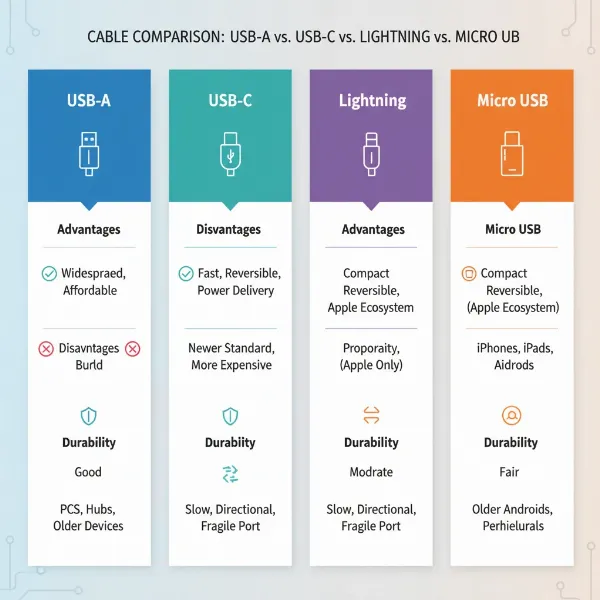
At the core of modern charging are several types of cables, each designed for specific device ecosystems and power requirements. The ubiquitous USB-A (Universal Serial Bus Type-A) features a flat, rectangular connector, commonly found on older computers, wall adapters, and charging blocks. While still prevalent, its unidirectional design and slower data transfer speeds are gradually giving way to newer technologies. Micro-USB connectors, smaller and trapezoidal, were once standard for many Android phones, headphones, and portable accessories but are now mostly found on older or more budget-friendly devices. Apple’s proprietary Lightning connector, known for its reversibility, has been the standard for iPhones, iPads, and other Apple accessories for years, though newer Apple devices are transitioning to USB-C. The true game-changer, however, is USB-C. This reversible, oval-shaped connector has emerged as the industry standard, offering superior data transfer rates and robust power delivery capabilities, making it ideal for everything from smartphones and tablets to laptops and monitors.
The speed at which your devices charge is largely dictated by advancements in fast charging technology, primarily USB Power Delivery (PD) and Qualcomm Quick Charge (QC). USB Power Delivery, often leveraging USB-C connections, is an open standard that allows for significantly higher power transfer, capable of delivering up to 240 watts with the latest PD 3.1 and Extended Power Range (EPR) specifications. It achieves this by intelligently negotiating voltage and current between the charger and the device. Qualcomm Quick Charge is a proprietary technology developed by Qualcomm, also designed to accelerate charging times, with newer versions offering compatibility with USB-PD. The key to unlocking these speeds lies not just in a compatible charger, but also in the cable itself. Fast charging cables are engineered with thicker wires and often include special “E-Marker” chips (especially in USB-C) to safely handle higher power loads, reducing resistance and preventing overheating. In contrast, “normal” cables, with their thinner wires, will bottleneck even the most powerful fast charger, limiting power delivery and extending charging times.
Durability is another critical factor influencing cable performance and lifespan. Common materials include PVC (polyvinyl chloride), TPE (thermoplastic elastomer), and braided nylon. While PVC is economical, it can be prone to cracking and fraying. TPE offers more flexibility and resistance to tangles. Nylon braided cables are often the most durable, providing enhanced protection against bends, twists, and everyday wear and tear, making them a worthwhile investment for frequently used charging setups.
[image-1|charging-cable-types|Various types of charging cables including USB-A, USB-C, Lightning, and Micro-USB.|
A clean, well-lit studio shot showcasing a collection of modern charging cables, including USB-A, USB-C, Lightning, and Micro-USB. Cables are neatly coiled and labeled, highlighting their different connector types. The background is a soft, neutral color. Editorial style, focus on detail and clarity.]
Understanding the Fundamentals: Multi Plugs and Power Solutions
Beyond individual cables, multi plugs and power solutions are essential for managing multiple devices in a home or office environment. These devices expand the utility of a single wall outlet, providing numerous ports for various electronics. However, they come in different forms, each with distinct features, benefits, and crucial safety considerations.
At their simplest, multi-plug adapters are compact devices that convert a single wall outlet into two or three outlets. They are designed for light-duty applications, such as charging a phone or powering a small lamp, and are particularly useful for travel or temporary setups. Stepping up in functionality, power strips typically offer a block of multiple AC outlets, allowing users to connect several devices simultaneously. While some power strips include basic overload protection, they primarily serve to extend outlet capacity.
A more advanced and often critical category is surge protectors. These are specialized power strips engineered to safeguard electronic devices from unexpected voltage spikes or surges, which can occur due to lightning strikes, power outages, or fluctuations in the electrical grid. Surge protectors contain components that detect excess voltage and divert it away from connected devices to the ground wire, preventing potential damage. Their protective capacity is often indicated by a “joule rating,” with higher ratings signifying greater protection. For sensitive and valuable electronics like computers, televisions, and gaming consoles, a high-quality surge protector is an indispensable investment.
A modern and increasingly popular solution is the multiport USB charger. This is a single charging block or power strip specifically designed with multiple USB-A and USB-C ports, often incorporating fast charging technologies like USB Power Delivery. These chargers intelligently distribute power across multiple connected devices, streamlining the charging process, reducing cable clutter, and minimizing the need for numerous individual wall adapters. High-end multiport chargers often utilize advanced Gallium Nitride (GaN) components for a more compact design and enhanced efficiency, along with multiple protection certifications (UL, FCC) to ensure safety.
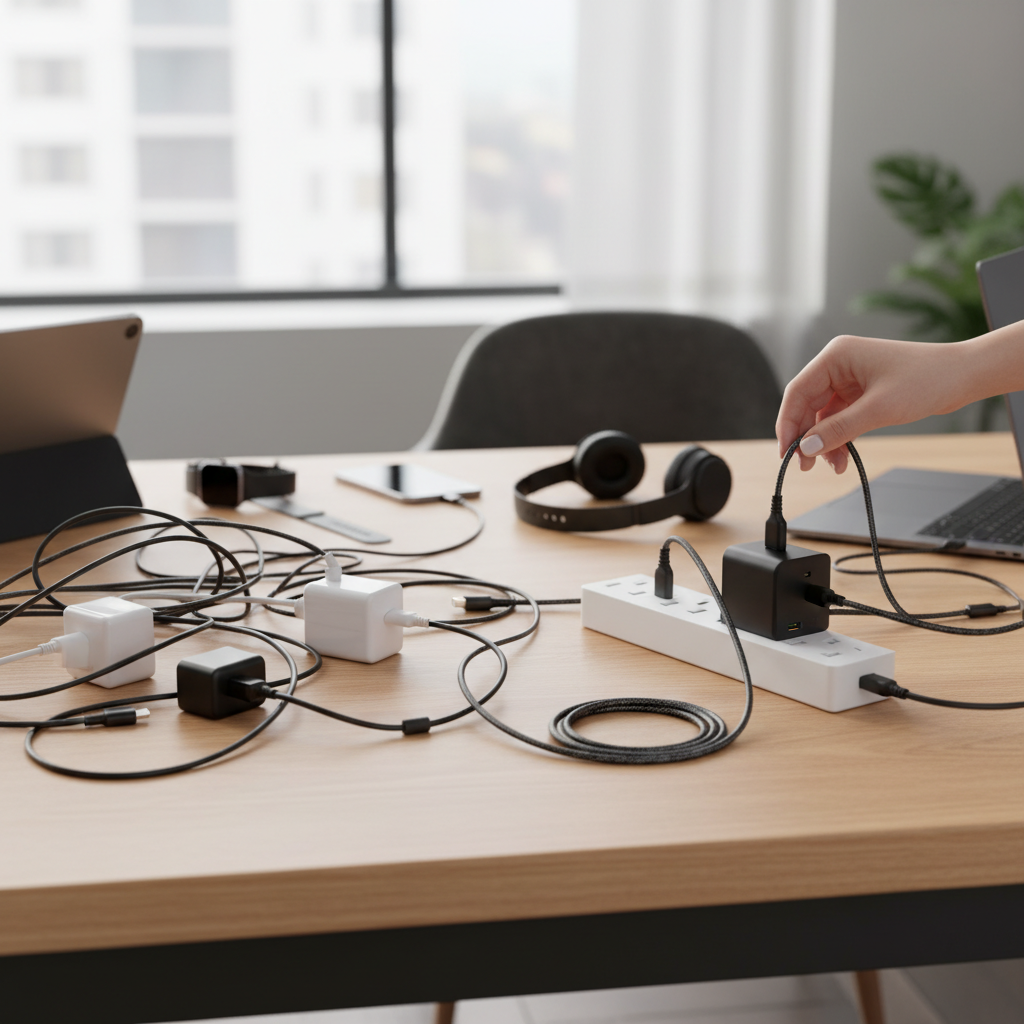
While multi plugs offer undeniable convenience, their misuse can lead to significant safety risks. One of the most common dangers is overloading. Plugging too many high-power devices (like heaters, microwaves, or air conditioners) into a single multi plug can exceed its maximum current rating, causing the unit, its wires, and the wall socket to overheat, melt, and potentially ignite a fire. The term “multi-plug” does not imply limitless power; all outlets on a strip draw from the same single wall socket, maintaining its overall current limit. Another highly hazardous practice is daisy-chaining, which involves plugging one multi plug or extension cord into another. This exponentially increases the risk of overloading and should be strictly avoided. To ensure safety, always purchase multi plugs from reputable manufacturers that include essential safety features such as overload protection and circuit breakers. Proper ventilation is also crucial; avoid placing multi plugs under rugs, behind furniture, or in enclosed spaces where heat cannot dissipate. Regular inspection for frayed cords, scorch marks, or a burning smell can also help prevent accidents. It’s also worth noting that power cords and surge protectors have a limited lifespan, typically needing replacement every 3 to 5 years, or after a significant power surge, as their protective capabilities degrade over time.
[image-2|multi-plug-power-strip-safety|A multi-plug power strip with several devices plugged in, highlighting safety features like surge protection and avoiding overload.|
A modern, sleek multi-plug power strip in a home office setting. Several devices like a laptop charger, phone charger, and a desk lamp are neatly plugged in. The power strip has clear indicator lights for surge protection and a visible circuit breaker button. The image emphasizes good cable management and adequate ventilation around the power strip. Realistic, editorial photography.]
Charging Cable vs Multi Plugs: A Head-to-Head Battle
Deciding between relying on individual charging cables with their adapters and incorporating multi plugs into your setup involves a direct comparison across several critical aspects. Each approach presents distinct advantages and disadvantages that influence safety, speed, convenience, and cost.
Safety and Protection
When it comes to safety, both charging cables and multi plugs have their own sets of considerations. High-quality charging cables, particularly those designed for fast charging, are built with internal safeguards, thicker wires, and proper insulation to prevent overheating and ensure stable power delivery. However, cheap, uncertified cables can be a significant hazard, often leading to slower charging, excessive heat generation, and a risk of fire or device damage. Multi-head charging cables (e.g., 3-in-1) can also pose risks if they attempt to support fast charging on multiple outputs simultaneously, often compromising safety to offer convenience.
Multi plugs, on the other hand, introduce the risk of electrical overload if too many high-wattage devices are connected, potentially causing overheating and fire. The dangerous practice of “daisy-chaining” (plugging one power strip into another) further exacerbates these risks. However, purpose-built surge protectors offer a critical layer of defense against external voltage spikes, shielding your valuable electronics from damage. Quality multi plugs with built-in circuit breakers and overload protection are designed to cut power before a hazardous situation escalates.
“While individual cables ensure a direct power path, it’s the quality of your multi-plug solution, especially surge protectors, that provides a broader shield against unforeseen electrical hazards.” – Dr. Elena Petrova, Electrical Safety Engineer
- Winner: For comprehensive protection against electrical irregularities and the expansion of outlets, a high-quality surge protector combined with certified charging cables offers the superior safety profile.
|
Our Picks for the Best Charging cable in 2026
As an Amazon Associate I earn from qualifying purchases.
|
||
| Num | Product | Action |
|---|---|---|
| 1 | Anker Cable [2 Pack 6ft], USB A to USB C Cable for iPhone 17 Series,Samsung Galaxy S10 S10+, LG V30, Beats Fit Pro and More (Black). |
![Check Anker Cable [2 Pack 6ft], USB A to USB C Cable for iPhone 17 Series,Samsung Galaxy S10 S10+, LG V30, Beats Fit Pro and More (Black). on Amazon](https://reviewasc.com/wp-content/plugins/amazon-tables/assets/images/buy.png)
|
| 2 | INIU USB C to USB C Cable, 240W Fast Charging Type C Charger Cord, Braided USBC Phone Charger Cable for iPhone 17 16 Pro Max Samsung S26 S25 Laptops MacBook Air 15 M3 iPad Switch [6.6ft+6.6ft Black] |
|
| 3 | AINOPE USB to USB C Cable [2-Pack, 6.6ft] 3.1A Type C Charger Fast Charging, Right Angle USB C Cable for iPhone 17 Carplay Cable, Galaxy S10+ S10 S9, Note 10 9, LG V30, Moto, iPhone 16 15 Charger Cord |
|
| 4 | Durcord USB C Cable, Upgarded 2Pack 10ft Fast USB Type C Charging Cable for Android/Phone/Pad/Laptop, Type C Charger Braided USB Cable Compatible withi Phone 17/16/15/Pro/Plus/Max/Sam.Sung-Silver |
|
| 5 | LISEN USB C to USB C Cable, 240W C to C Cable Fast Charging [6.6FT, 2 Pack] Type C Charger Fast Charging USBC to USBC Cable for iPhone 17 16 15 Pro Max iPad MacBook Neo Air Pro Samsung S26 S25 Ultra |
|
| 6 | LISEN USB C to USB C Cable, 5-Pack [3.3/3.3/6.6/6.6/10FT] for iPhone 17 Charger Cord, 60W C to C Cable Fast Charging for iPad, iPhone 16 15 Pro Max, Galaxy S25/S24 USBC to USBC Cable Gifts for Men |
|
| 7 | iPhone Charger 3 Pack 10 ft Apple MFi Certified Lightning Nylon Braided Cable Fast Charging Cord Compatible with iPhone 13 12 11 Pro Max XR XS X 8 7 6 Plus SE iPad and More |
|
| 8 | Anker USB C to USB C Cable, Type-C 60W Fast Charging Cable (6 FT, 2Pack) for iPhone 17 Series, iPad mini 6 and More (Black) |
|
| 9 | USB Type-C to A Cable 5pack 6ft Braided Fast Charging 3A Quick Charger Cord, 6 Foot Compatible iPhone 17/17 Pro/16e/16/15 Pro Max,Samsung Galaxy S10 S9 S8 Plus, Note 10 9 8, LG V50 V40 G8 G7(Grey) |
|
| 10 | Teeind USB Type C Cable Fast Charging, Tpc001 5 Pack(6Ft 3A) Braided C Charger Cables Compatible with Samsung S10e/note 9/s10/s9/s8 Plus/A80/A50/A20 |
|
Charging Speed and Efficiency
The efficiency of your charging setup is a major differentiator. Individual fast charging cables are engineered to leverage advanced protocols like USB Power Delivery (PD) and Qualcomm Quick Charge (QC). When paired with a compatible fast-charging wall adapter, these cables can deliver maximum wattage to a single device, significantly reducing charging times. A low-quality cable will always be the weakest link, preventing your device from achieving its fastest charging speed, even if the charger is capable.
Standard multi plugs (power strips) typically offer only AC outlets, meaning you still need to plug in your individual device adapters, and the charging speed will depend entirely on those adapters and their respective cables. However, modern multiport USB chargers integrate dedicated USB-A and, more importantly, high-wattage USB-C PD ports. These intelligent chargers can effectively manage and distribute power across multiple connected devices without necessarily slowing down all of them, especially if they use technologies like Programmable Power Supply (PPS) for fine-tuned power delivery.
- Winner: For optimizing the charging speed of a single device, a dedicated, high-quality fast charging cable with a compatible single-port fast charger is paramount. For charging multiple devices efficiently from one outlet, a high-performance multiport USB charger stands out.
Portability and Convenience
Portability and convenience are often at odds with each other in the charging landscape. A single, well-chosen charging cable offers the ultimate in portability, easily fitting into any bag or pocket. Multi-head cables (with different connectors on one end) provide convenience by reducing the number of cables you need to carry, but often at the cost of fast charging capabilities or data transfer, and can pose safety issues if not designed correctly.
Multi plugs, particularly compact multiport USB chargers, excel in consolidating charging needs. They reduce desk clutter by replacing several bulky wall adapters with one sleek unit, making them excellent for organized home or office setups. For travelers with multiple gadgets, a single multiport charger can drastically simplify their packing list. Larger power strips are less portable due to their size but offer extensive outlet expansion for stationary setups.
- Winner: For pure device-specific mobility, a single, high-quality charging cable is unmatched. For managing the charging of multiple devices with minimal clutter, especially for travel or a fixed workspace, a compact multiport USB charger is the clear winner.
Cost and Durability
The cost spectrum for both charging cables and multi plugs is vast, directly correlating with quality, features, and durability. Inexpensive, generic charging cables are widely available but often sacrifice quality, leading to poor performance and a shorter lifespan. Investing in premium, braided cables from reputable brands typically yields greater durability and reliability, justifying the higher upfront cost.
Similarly, basic power strips are very affordable. However, surge protectors and advanced multiport USB chargers come with a higher price tag due reflecting their sophisticated internal components, advanced safety features, and intelligent power management. While the initial investment is greater, the protection they offer against costly device damage or potential electrical fires can result in significant long-term savings. Moreover, power strips and surge protectors, like cables, have a limited lifespan and should be replaced every few years, an ongoing cost to consider.
- Winner: This category is subjective, depending heavily on individual budget and priorities. However, prioritizing quality and features for both cables and multi plugs often proves to be the most cost-effective approach in the long run due to enhanced durability and device protection.
[image-3|charging-solution-comparison|Infographic comparing charging cables and multi plugs across safety, speed, portability, and cost.|
A modern, clean infographic illustrating a side-by-side comparison. One side represents “Charging Cables” with icons for speed and portability. The other side represents “Multi Plugs” with icons for safety features (like surge protection) and multiple outlets. Both sides have bullet points summarizing pros and cons for safety, speed, convenience, and cost. Use a distinct color palette for each side.]
The Real Winners: Making the Right Choice for Your Needs (Buying Guide)
Navigating the multitude of charging options requires a thoughtful approach tailored to your specific demands. There’s no single “best” solution, but rather an optimal blend of tools that collectively form the real winners in your personal charging ecosystem.
Assessing Your Charging Ecosystem
Before making any purchases, take stock of your current and future charging needs. Consider the types of devices you own—smartphones, tablets, laptops, wearables, gaming consoles—and identify their specific charging port requirements (USB-C, Lightning, Micro-USB). Understand which of your devices support fast charging technologies like USB Power Delivery or Qualcomm Quick Charge, as this will dictate the type of cables and chargers you need. Also, think about where you primarily charge: at a single desk, across multiple rooms, or frequently on the go? Your answers will guide your selection towards solutions that prioritize speed, safety, portability, or a balance of all three. For instance, a home office with multiple high-value electronics will benefit greatly from a robust surge protector, while a minimalist traveler might favor a compact multiport USB charger.
Essential Considerations for Both Cables and Multi Plugs
Regardless of whether you are investing in new cables or multi plugs, always prioritize certifications and brand reputation. For charging cables, look for USB-IF (USB Implementers Forum) certification, especially for USB-C cables, as this ensures they meet quality standards for power delivery and data transfer. For multi plugs and chargers, certifications like UL (Underwriters Laboratories), FCC (Federal Communications Commission), and RoHS (Restriction of Hazardous Substances) indicate compliance with safety and environmental standards. Reputable brands such as Anker, Aukey, and Belkin consistently produce high-quality, certified products that incorporate essential safety features like over-voltage, over-current, and short-circuit protection.
Always pay close attention to power ratings. For fast charging cables, ensure their wattage rating matches or exceeds that of your charger and device to avoid bottlenecks and safely deliver maximum power. For surge protectors, a higher joule rating indicates a greater capacity to absorb electrical surges, providing superior protection for your sensitive electronics. Finally, consider length. While a longer charging cable might offer convenience, excessively long cables can sometimes lead to voltage drop and slower charging. Conversely, a power strip with a cord that is too short can lead to daisy-chaining or tripping hazards. Choose lengths that are practical for your setup without compromising performance or safety.
[image-4|charging-station-setup|A well-organized charging station featuring a multiport USB charger, various charging cables, and a surge protector.|
A meticulously organized charging station on a modern wooden desk. A sleek multiport USB charger is visible, connected to a power strip with surge protection. Several high-quality, color-coded charging cables (USB-C, Lightning) are neatly routed and connected to various devices (smartphone, tablet, wireless earbuds). Soft, indirect lighting highlights the clean, functional setup. Realistic, product-focused photography.]
Top Recommendations for Optimal Charging Setups
To truly win the charging game, combine the best aspects of both cables and multi plugs to create a synergistic power ecosystem.
For maximum individual device speed and data transfer, nothing beats a dedicated, high-quality fast charging cable (ideally USB-C with PD 3.0/3.1 support) paired with a powerful single-port fast charger (e.g., a GaN charger). This setup ensures your device receives optimal power without compromise.
For multiple devices in a home or office environment requiring protection, a premium surge protector is essential. Look for models with a high joule rating (1500+ joules) and integrated USB-C Power Delivery ports. This allows you to protect valuable AC-powered equipment while simultaneously fast-charging your mobile devices from a centralized, safe hub.
For travel or a minimalist, clutter-free setup, a compact, high-wattage GaN-based multiport USB charger is a game-changer. These small but mighty devices can provide multiple fast-charging USB-C and USB-A ports, allowing you to charge your laptop, phone, tablet, and other accessories all from a single wall outlet, eliminating the need for numerous bulky adapters.
Finally, always remember to avoid “dangerous convenience.” Be wary of uncertified, generic multi-head charging cables that promise fast charging for all devices. These often cut corners on safety and performance. Similarly, never daisy-chain power strips. Prioritize certified products and proper usage to ensure safety above all else.
The modern digital lifestyle demands smart power solutions. Both charging cables and multi plugs play indispensable roles, but their true “winning” potential is realized when understood and utilized correctly. By prioritizing quality, safety, and compatibility, you can craft a charging ecosystem that is not only efficient and convenient but also secure. Evaluate your unique needs, invest in reliable products, and embrace practices that safeguard your devices and your environment. How will evolving charging technologies continue to simplify and secure our power needs in the years to come?
Frequently Asked Questions
What is the primary risk of using cheap charging cables?
Cheap charging cables can be manufactured with thin wires and poor insulation, leading to inefficient charging, increased heat generation, and potential safety hazards such as overheating, short circuits, or even fire, especially when attempting fast charging.
Can I plug a multi-plug into another multi-plug?
No, plugging one multi-plug (power strip or extension cord) into another, known as “daisy-chaining,” is a highly dangerous practice. It can easily overload the original wall outlet and electrical circuit, leading to overheating, fire hazards, and potential damage to connected devices.
How often should I replace my surge protector?
Surge protectors have a limited capacity to absorb electrical surges, and their protective components degrade over time. It is generally recommended to replace surge protectors every 3 to 5 years, or immediately after a significant power surge, to ensure continued effectiveness.
Do all USB-C cables support fast charging?
No, while the USB-C connector is capable of supporting fast charging standards like USB Power Delivery, not all USB-C cables are designed to handle high wattages. Fast charging requires cables with specific internal wiring and often an “E-Marker” chip to safely and efficiently transmit increased power.
What is the difference between a power strip and a surge protector?
A power strip primarily functions to expand the number of available electrical outlets from a single wall socket. A surge protector, on the other hand, is a specialized type of power strip that includes components to protect connected devices from damaging voltage spikes by diverting excess electrical current away from them.