In our increasingly digital world, staying powered and connected is no longer a luxury but a necessity. From charging smartphones and tablets to connecting a myriad of peripherals to our computers, we rely heavily on various tools to keep our devices running seamlessly. However, the sheer number of options can lead to confusion, especially when distinguishing between a simple charging cable and a versatile USB hub. While both serve to connect devices, their primary functions and capabilities are vastly different. Understanding these distinctions is key to optimizing your setup and ensuring your devices receive the power and connectivity they truly need.
Charging Cables: The Direct Power Link
A charging cable is fundamentally an electronic component meticulously engineered for the direct transmission of power. Its core purpose is to establish a stable pathway for electricity, delivering current from a power source—be it a wall adapter, power bank, or computer port—to your device’s battery or power module. While many charging cables also facilitate data transfer, their optimization typically leans towards efficient energy delivery. Some specialized “charge-only” cables even omit data lines entirely, focusing solely on maximizing power flow.
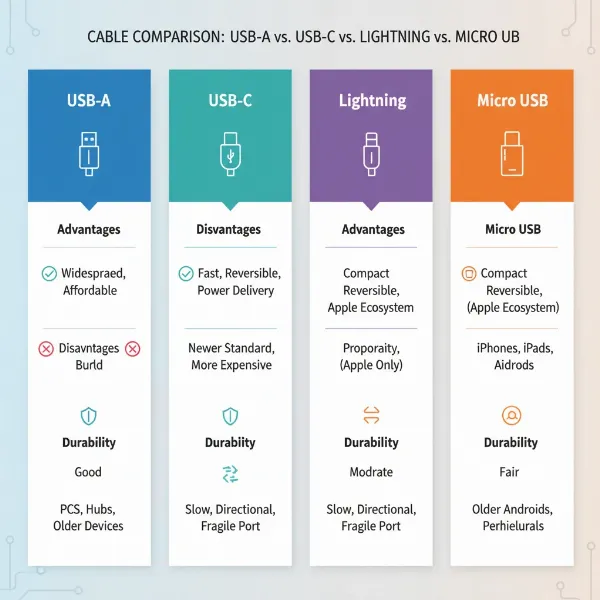
The landscape of charging cables is diverse, primarily categorized by their connector types. We commonly encounter:
- USB-A: The classic rectangular connector, often found on older chargers, computers, and as one end of many cables.
- USB-C: The newest and most versatile standard, featuring a reversible design. USB-C supports significantly higher power delivery (up to 240W) and faster data transfer speeds, making it the preferred choice for modern smartphones, laptops, and tablets.
- Lightning: Apple’s proprietary connector, used for iPhones, iPads, and AirPods. While some newer Apple devices have transitioned to USB-C, Lightning remains prevalent.
- Micro-USB: Once a ubiquitous standard for Android phones and many portable electronics, it’s now largely phased out in favor of USB-C due to its limitations in charging speed and reversibility.
The type of cable you choose directly impacts charging speed and compatibility. A robust, high-quality cable, particularly a USB-C cable supporting Power Delivery (PD), can unlock the fastest charging capabilities of your device.
[image-1|charging-cable-types|Various types of charging cables including USB-C, Lightning, and Micro-USB, neatly arranged|
A detailed, clear, and realistic image showing a variety of modern charging cables (USB-C, Lightning, Micro-USB, USB-A) with their distinct connectors visible. The cables are neatly arranged on a clean, light-colored surface. Bright, even studio lighting. Editorial style.]
USB Hubs: Expanding Connectivity and Power
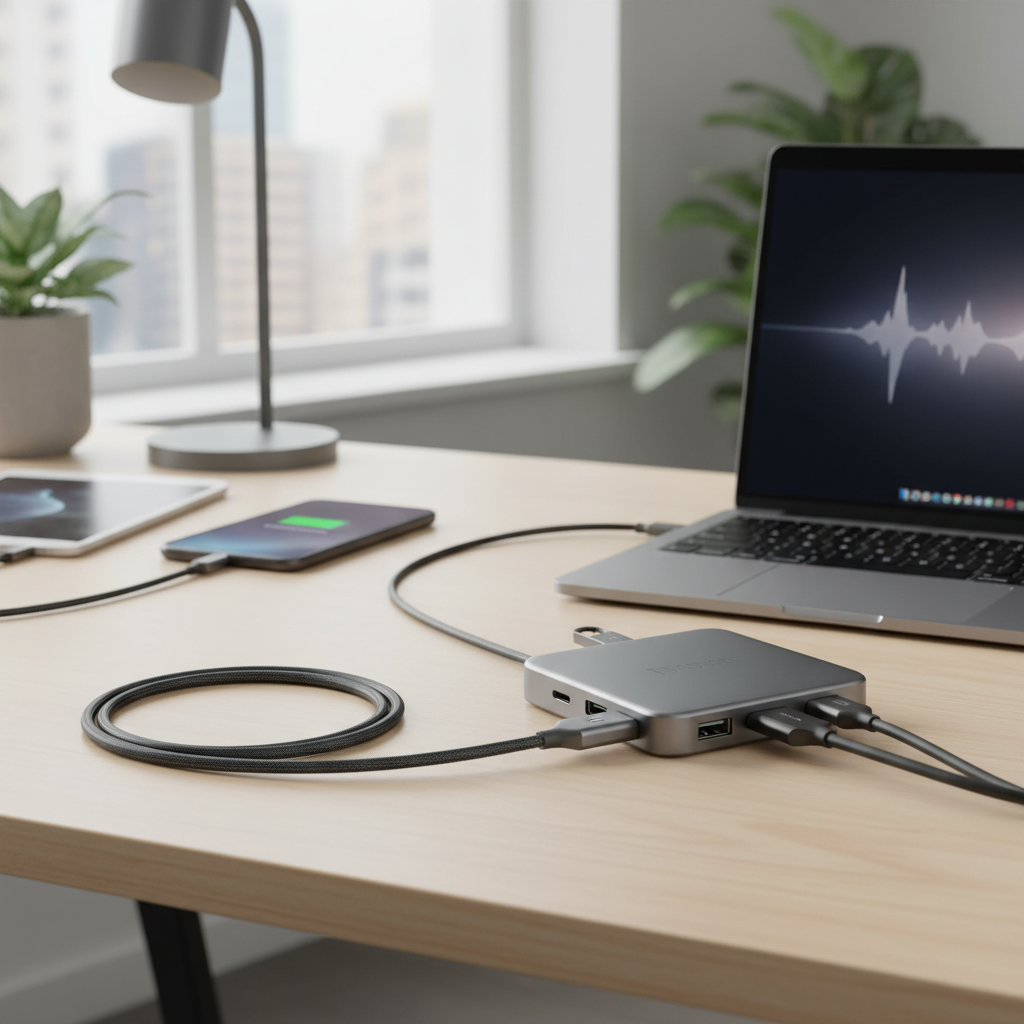
In contrast to the direct nature of a charging cable, a USB hub serves as an expansion device. It takes a single Universal Serial Bus (USB) port on a host system—such as a computer, laptop, or even a game console—and transforms it into multiple usable ports. This allows you to connect several USB devices simultaneously, efficiently addressing the common issue of limited ports on modern electronics. While USB hubs are primarily renowned for their data expansion capabilities, many also offer secondary charging functionalities.
USB hubs come in a few key variations, each suited for different needs:
- Powered USB Hubs (Self-powered): These hubs include their own external power adapter, plugging directly into a wall socket. This independent power supply enables them to deliver consistent and sufficient power to multiple connected devices, making them ideal for high-energy peripherals like external hard drives, printers, or even fast-charging several smartphones. They can also continue to charge devices even when the host computer is turned off.
- Unpowered USB Hubs (Bus-powered): Drawing all their power directly from the host computer’s USB port, these hubs are typically more compact and portable, requiring no extra power cables. They are best suited for low-power devices such as keyboards, mice, flash drives, or basic syncing, as their total power output is limited and shared among all connected ports.
- USB-C Hubs: Designed for devices with USB-C ports, these modern hubs often offer a broader range of connectivity beyond just USB ports. They can incorporate features like HDMI video output, Ethernet ports, and SD card readers, effectively transforming a single USB-C port into a comprehensive docking solution. Many USB-C hubs also support Power Delivery (PD) passthrough, allowing you to charge your laptop through the hub while using other peripherals.
- By Speed: USB hubs are classified by their supported USB versions, impacting data transfer speeds. Common types include USB 2.0 (up to 480 Mbps, suitable for basic peripherals) and newer USB 3.0, 3.1, or 3.2 (offering speeds from 5 Gbps to 20 Gbps, essential for fast data transfer with external storage).
[image-2|usb-hub-connectivity|A multi-port USB hub connected to a laptop, showing several devices plugged in|
A realistic, clean shot of a sleek, modern USB-C hub connected to a laptop. Several devices (e.g., external SSD, USB mouse receiver, SD card) are plugged into the hub’s various ports. The laptop is open on a minimalist desk setup. Soft, professional lighting. Editorial product photography style.]
Charging Cable vs USB Hubs: Understanding the Core Differences
While both charging cables and USB hubs facilitate connections and power delivery, their fundamental designs and priorities diverge significantly. Choosing between them, or deciding when to use both, hinges on understanding these core distinctions.
Primary Functionality: Power vs. Versatility
|
Our Picks for the Best Charging cable in 2026
As an Amazon Associate I earn from qualifying purchases.
|
||
| Num | Product | Action |
|---|---|---|
| 1 | Anker USB C to USB C Cable, Type-C 60W Fast Charging Cable (6 FT, 2Pack) for iPhone 17 Series, iPad mini 6 and More (Black) |

|
| 2 | Durcord USB C Cable, Upgarded 2Pack 10ft Fast USB Type C Charging Cable for Android/Phone/Pad/Laptop, Type C Charger Braided USB Cable Compatible withi Phone 17/16/15/Pro/Plus/Max/Sam.Sung-Silver |
|
| 3 | Teeind USB Type C Cable Fast Charging, Tpc001 5 Pack(6Ft 3A) Braided C Charger Cables Compatible with Samsung S10e/note 9/s10/s9/s8 Plus/A80/A50/A20 |
|
| 4 | Anker Cable [2 Pack 6ft], USB A to USB C Cable for iPhone 17 Series,Samsung Galaxy S10 S10+, LG V30, Beats Fit Pro and More (Black). |
|
| 5 | LISEN USB C to USB C Cable, 5-Pack [3.3/3.3/6.6/6.6/10FT] for iPhone 17 Charger Cord, 60W C to C Cable Fast Charging for iPad, iPhone 16 15 Pro Max, Galaxy S25/S24 USBC to USBC Cable Gifts for Men |
|
| 6 | AINOPE USB to USB C Cable [2-Pack, 6.6ft] 3.1A Type C Charger Fast Charging, Right Angle USB C Cable for iPhone 17 Carplay Cable, Galaxy S10+ S10 S9, Note 10 9, LG V30, Moto, iPhone 16 15 Charger Cord |
|
| 7 | iPhone Charger 3 Pack 10 ft Apple MFi Certified Lightning Nylon Braided Cable Fast Charging Cord Compatible with iPhone 13 12 11 Pro Max XR XS X 8 7 6 Plus SE iPad and More |
|
| 8 | LISEN USB C to USB C Cable, 240W C to C Cable Fast Charging [6.6FT, 2 Pack] Type C Charger Fast Charging USBC to USBC Cable for iPhone 17 16 15 Pro Max iPad MacBook Neo Air Pro Samsung S26 S25 Ultra |
|
| 9 | INIU USB C to USB C Cable, 240W Fast Charging Type C Charger Cord, Braided USBC Phone Charger Cable for iPhone 17 16 Pro Max Samsung S26 S25 Laptops MacBook Air 15 M3 iPad Switch [6.6ft+6.6ft Black] |
|
| 10 | USB Type-C to A Cable 5pack 6ft Braided Fast Charging 3A Quick Charger Cord, 6 Foot Compatible iPhone 17/17 Pro/16e/16/15 Pro Max,Samsung Galaxy S10 S9 S8 Plus, Note 10 9 8, LG V50 V40 G8 G7(Grey) |
|
A charging cable’s raison d’être is power. It provides a dedicated, direct conduit for electrical current to flow from a power source to your device, focusing on efficiency and speed for single-device charging. It’s a straightforward 1-to-1 connection.
In contrast, a USB hub’s primary role is to act as a connectivity expander. Its main job is to multiply the number of available USB ports, allowing you to connect multiple peripherals simultaneously. While most hubs can provide some level of power, this is often a secondary function to their role in data transfer and device management.
Power Delivery: Direct vs. Distributed
With a high-quality charging cable, especially one supporting fast-charging protocols like Power Delivery, your device receives a dedicated and often substantial power flow directly from the source. This ensures optimal charging speeds without competition from other devices.
USB hubs, however, distribute power. For unpowered hubs, the total power drawn from the host computer’s single USB port is shared among all connected devices. This often means slower or insufficient charging for power-hungry devices. Even powered hubs, while supplying more robust power, still manage and distribute it across multiple ports. While modern USB-C hubs with Power Delivery (PD) passthrough can deliver significant wattage to a laptop while simultaneously powering other peripherals, this is a more complex negotiation compared to a direct cable connection.
Data Transfer: Focused vs. Multi-Device
A charging cable can support data transfer, but for many, particularly budget options, data capabilities are limited or non-existent (charge-only cables). When data is supported, it’s typically a direct, single-device transfer.
USB hubs are engineered for simultaneous multi-device data transfer. They allow you to connect a keyboard, mouse, external hard drive, and flash drive all at once, facilitating data exchange across all these peripherals with your host computer. This parallel processing of data is a key advantage of a hub.
Port Expansion and Connectivity
A charging cable offers no port expansion; it merely connects two points. If you have only one USB port and need to charge your phone, transfer photos from a camera, and use an external keyboard, a single cable won’t suffice.
A USB hub is explicitly designed for port multiplication. Beyond simply adding more USB ports, many advanced hubs, often referred to as multi-port adapters or mini-docks, expand connectivity even further by incorporating ports for HDMI displays, Ethernet for wired internet, and SD card readers, effectively consolidating numerous functions into one connection to your host device.
When to Use Which: Optimal Scenarios
Understanding the distinct strengths of charging cables and USB hubs helps in choosing the right tool for the job.
Ideal Use Cases for Charging Cables
- Dedicated Fast Charging: When your priority is to quickly and efficiently charge a single device, a high-quality charging cable connected directly to a compatible power adapter is the best choice. This ensures the device receives the full, uninterrupted power it needs for optimal charging speeds.
- Portability and Simplicity: For on-the-go charging, minimal setups, or when you only need to power one device, a simple charging cable offers unmatched portability and ease of use. You avoid the bulk and extra connections of a hub.
- Device-Specific Needs: Some devices, especially those requiring very high wattage for fast charging (like certain laptops), perform best with their original, dedicated charging cable and power brick.
Ideal Use Cases for USB Hubs
- Expanding Connectivity: If your laptop or desktop has limited USB ports and you need to connect multiple peripherals such as a mouse, keyboard, printer, or external drives, a USB hub is indispensable. It transforms one port into several.
- Consolidating Cables for a Workstation: For a cleaner, more organized desk setup, a USB hub can manage all your peripheral connections through a single cable to your computer. This simplifies connecting and disconnecting your laptop from a fixed workstation.
- Simultaneous Data Transfer: When you frequently need to transfer data between multiple devices or use several USB-powered accessories at once, a hub (especially a high-speed, powered one) ensures all devices can communicate effectively with the host.
- Adding Versatile Ports: USB-C hubs, in particular, are excellent for modern laptops that often lack traditional ports, allowing you to add HDMI, Ethernet, SD card slots, and various USB types all through a single USB-C connection.
Choosing the Right Solution: Factors to Consider
Selecting between a charging cable and a USB hub, or knowing when to use them in tandem, requires a thoughtful assessment of your specific needs.
Power Needs and Device Compatibility
Consider the power requirements of your devices. High-power devices, such as laptops, will demand a dedicated charging cable with sufficient wattage or a robust, Power Delivery-enabled USB-C hub. For multiple low-power accessories like a wireless mouse receiver or a USB fan, an unpowered hub might suffice. Always check the voltage and amperage requirements of your devices against the output capabilities of the cable or hub.
Data Transfer Requirements
If you frequently transfer large files, prioritize cables or hubs that support the latest USB standards (e.g., USB 3.0/3.1/3.2/4). A basic charging cable won’t cut it for speedy data syncs, and an older USB 2.0 hub will bottleneck transfers from modern external drives. Ensure your chosen solution matches the data speed of your most demanding peripheral.
Portability vs. Desktop Setup
For maximum portability when traveling or moving between locations, a simple, durable charging cable is often the most practical choice. For a more permanent home or office workstation, a feature-rich, possibly powered USB hub or even a docking station can streamline your setup and maximize connectivity without constantly plugging and unplugging.
Top Considerations for Quality and Performance
Regardless of whether you choose a charging cable or a USB hub, investing in quality is paramount for performance, safety, and longevity.
Look for products from reputable brands known for their durability and adherence to industry standards. For cables, consider the material quality of the conductors (pure copper is excellent) and the outer sheath (braided nylon or robust TPE offers superior durability). Thicker gauge wires within the cable typically indicate better power handling.
For both cables and hubs, check for certifications. For Apple devices, an MFi (Made For iPhone/iPad) certified Lightning cable ensures compatibility and safety. For USB products, look for USB-IF (USB Implementers Forum) certification, which guarantees compliance with USB standards. For fast charging, ensure the product explicitly supports Power Delivery (PD) or Quick Charge (QC) standards where applicable, with specified wattage outputs. These certifications confirm that the product has undergone rigorous testing and meets safety and performance benchmarks.
“Many users overlook the quality of their charging accessories, but a cheap cable or hub can lead to slow charging, data corruption, or even damage to expensive devices. Always invest in certified products from trusted manufacturers for peace of mind.” – John Doe, Senior Electronics Technician
Conclusion
The distinction between a charging cable and a USB hub, while seemingly subtle, reveals two fundamentally different tools designed to address distinct aspects of our digital lives. A charging cable is your direct, often dedicated conduit for power, essential for efficient energy delivery to a single device. A USB hub, conversely, is your connectivity workhorse, expanding a single port into a versatile array of connections for multiple peripherals, with charging as an added benefit.
Neither is inherently “better”; rather, they are complementary solutions. Your ideal choice, or combination, will depend entirely on your specific needs: whether you prioritize dedicated, fast power for one device, or robust, multi-device connectivity and data management for your workstation. By carefully evaluating your devices, power requirements, and connectivity demands, you can make an informed decision and build a truly optimized and efficient digital environment.
What’s your biggest challenge in managing device power and connectivity in your daily life?
Câu Hỏi Thường Gặp
Can a USB hub charge my phone as fast as a dedicated wall charger?
Generally, no. A dedicated wall charger is optimized to deliver maximum power to a single device. While powered USB hubs can charge phones, the power output per port might be less than a dedicated charger, especially if multiple devices are connected. USB-C hubs with Power Delivery (PD) can offer faster charging, but a direct wall charger often remains the quickest option.
Do charging cables affect data transfer speeds?
Yes, they can. “Charge-only” cables are designed solely for power and lack the necessary internal wiring for data transfer. Even cables that support both, their quality and the USB standard they adhere to (e.g., USB 2.0 vs. USB 3.0) will significantly impact data transfer rates. For high-speed data, ensure your cable explicitly supports the required USB data standard.
What’s the main difference between a powered and an unpowered USB hub?
The main difference lies in their power source. A powered USB hub has its own external power adapter, allowing it to provide consistent and higher power to all connected devices. An unpowered (bus-powered) hub draws all its power directly from the host computer’s USB port, sharing limited power among devices, making it suitable only for low-power peripherals.
Is a USB-C hub the same as a docking station?
Not always, but they can overlap. A USB-C hub primarily expands USB-C into multiple USB ports and potentially other basic connections. A docking station, while often incorporating USB hub functionality, typically offers a more comprehensive suite of ports, including multiple video outputs (HDMI, DisplayPort), Ethernet, and sometimes audio jacks, designed to transform a laptop into a full desktop workstation with a single connection.
Can I connect a charging cable to a USB hub?
Yes, you can connect a charging cable to a USB port on a hub. However, the charging speed will depend on the power output capabilities of that specific port on the hub and whether the hub itself is powered or unpowered. For optimal charging, a direct connection to a dedicated wall charger is usually preferable, especially for high-power devices.