In today’s interconnected world, a reliable charging cable is no longer just an accessory; it’s the lifeline of your home office workstation. From powering essential devices like laptops and tablets to keeping your smartphone ready for calls, the right charging cable ensures uninterrupted productivity and seamless workflow. But with countless options flooding the market, how do you choose a charging cable that is not only efficient but also durable and perfectly suited for your unique setup? This comprehensive guide will navigate the complexities of charging cables, helping you identify the best choices for a productive and clutter-free home office environment.
Charging Cable: Overview and What You Need to Know
A charging cable is a fundamental component that bridges your electronic devices with a power source, facilitating battery replenishment and often data transfer. Its importance in a modern home office cannot be overstated; a malfunctioning or incompatible cable can bring your work to a grinding halt. Understanding the various types and their respective applications is the first step toward optimizing your workstation’s power needs.
The most common types of charging cables you’ll encounter today include USB-A, USB-C, Lightning, and Micro USB. Each serves distinct purposes and boasts different capabilities. USB-A, the rectangular connector, has been a long-standing standard, primarily for older chargers and devices. USB-C, with its reversible oval connector, has emerged as the universal standard for its versatility, faster charging speeds, and high data transfer rates. Lightning cables are proprietary to Apple devices, specifically iPhones, iPads, and AirPods, while Micro USB, a smaller trapezoidal connector, is still found on many older Android devices, power banks, and accessories.
Comparing these types, USB-C clearly leads in terms of modern utility. Its ability to deliver higher power (Power Delivery) makes it ideal for charging laptops and multiple devices efficiently. USB-A is generally slower but remains widely compatible with legacy ports. Lightning offers robust performance for Apple users but lacks the universal compatibility of USB-C. Micro USB is largely being phased out due to its slower speeds and less durable design. The choice often depends on your existing device ecosystem and future-proofing your home office setup.
Key Factors When Choosing a Charging Cable for Your Home Office
Selecting the ideal charging cable for your home office involves more than just picking the first one you see. Several critical factors contribute to a cable’s performance, durability, and overall suitability. Prioritizing these elements will ensure your investment supports a productive and organized workspace, keeping all your essential devices powered up without compromise.
Material and Durability of the Cable
|
Our Picks for the Best Charging cable in 2026
As an Amazon Associate I earn from qualifying purchases.
|
||
| Num | Product | Action |
|---|---|---|
| 1 | LISEN USB C to USB C Cable, 240W C to C Cable Fast Charging [6.6FT, 2 Pack] Type C Charger Fast Charging USBC to USBC Cable for iPhone 17 16 15 Pro Max iPad MacBook Neo Air Pro Samsung S26 S25 Ultra |
![Check LISEN USB C to USB C Cable, 240W C to C Cable Fast Charging [6.6FT, 2 Pack] Type C Charger Fast Charging USBC to USBC Cable for iPhone 17 16 15 Pro Max iPad MacBook Neo Air Pro Samsung S26 S25 Ultra on Amazon](https://reviewasc.com/wp-content/plugins/amazon-tables/assets/images/buy.png)
|
| 2 | Teeind USB Type C Cable Fast Charging, Tpc001 5 Pack(6Ft 3A) Braided C Charger Cables Compatible with Samsung S10e/note 9/s10/s9/s8 Plus/A80/A50/A20 |
|
| 3 | USB Type-C to A Cable 5pack 6ft Braided Fast Charging 3A Quick Charger Cord, 6 Foot Compatible iPhone 17/17 Pro/16e/16/15 Pro Max,Samsung Galaxy S10 S9 S8 Plus, Note 10 9 8, LG V50 V40 G8 G7(Grey) |
|
| 4 | INIU USB C to USB C Cable, 240W Fast Charging Type C Charger Cord, Braided USBC Phone Charger Cable for iPhone 17 16 Pro Max Samsung S26 S25 Laptops MacBook Air 15 M3 iPad Switch [6.6ft+6.6ft Black] |
|
| 5 | Anker Cable [2 Pack 6ft], USB A to USB C Cable for iPhone 17 Series,Samsung Galaxy S10 S10+, LG V30, Beats Fit Pro and More (Black). |
|
| 6 | iPhone Charger 3 Pack 10 ft Apple MFi Certified Lightning Nylon Braided Cable Fast Charging Cord Compatible with iPhone 13 12 11 Pro Max XR XS X 8 7 6 Plus SE iPad and More |
|
| 7 | AINOPE USB to USB C Cable [2-Pack, 6.6ft] 3.1A Type C Charger Fast Charging, Right Angle USB C Cable for iPhone 17 Carplay Cable, Galaxy S10+ S10 S9, Note 10 9, LG V30, Moto, iPhone 16 15 Charger Cord |
|
| 8 | LISEN USB C to USB C Cable, 5-Pack [3.3/3.3/6.6/6.6/10FT] for iPhone 17 Charger Cord, 60W C to C Cable Fast Charging for iPad, iPhone 16 15 Pro Max, Galaxy S25/S24 USBC to USBC Cable Gifts for Men |
|
| 9 | Durcord USB C Cable, Upgarded 2Pack 10ft Fast USB Type C Charging Cable for Android/Phone/Pad/Laptop, Type C Charger Braided USB Cable Compatible withi Phone 17/16/15/Pro/Plus/Max/Sam.Sung-Silver |
|
| 10 | Anker USB C to USB C Cable, Type-C 60W Fast Charging Cable (6 FT, 2Pack) for iPhone 17 Series, iPad mini 6 and More (Black) |
|
The longevity of a charging cable is heavily influenced by its construction materials. Common materials include PVC (Polyvinyl Chloride), TPE (Thermoplastic Elastomer), and braided nylon. PVC cables are typically the most affordable but can be prone to cracking and fraying over time, especially at stress points. TPE offers a softer, more flexible feel, often found in original equipment manufacturer (OEM) cables, providing better resistance to bends and twists than basic PVC.
Braided nylon cables are often considered the gold standard for durability. The woven nylon exterior provides an extra layer of protection, making them highly resistant to tangles, pulls, and general wear and tear. They typically feature reinforced stress relief (SR) at the connector joints, preventing the common issue of cables breaking where the wire meets the plug. To prolong a cable’s life, avoid sharp bends, unplug it by gripping the connector (not the cable itself), and store it neatly to prevent kinks and knots.
Compatibility and Charging Speed
Understanding your devices’ specific charging needs is paramount. Modern laptops often require USB-C cables that support Power Delivery (PD) to charge efficiently, typically needing 60W, 100W, or even higher power ratings. Smartphones, tablets, and other peripherals might utilize Quick Charge (QC), Adaptive Fast Charging, or other proprietary fast-charging standards. Always verify the output capabilities of your charger and the input requirements of your device to ensure optimal performance.
To check if a charging cable supports fast charging, look for specific labels on the product packaging or description, such as “PD compatible,” “Quick Charge 3.0/4.0,” or a wattage rating (e.g., “100W”). A high-quality cable will clearly state its power delivery capacity and often its data transfer speed. Using a cable with insufficient power delivery for a fast-charging device will result in slower charging or, in some cases, no charging at all, making it a critical consideration for a busy home office.
Cable Length and Design
The ideal cable length for a home office workstation largely depends on your setup. A 3-foot (1-meter) cable might be sufficient for charging devices very close to your computer or wall outlet. However, for more flexibility, such as reaching outlets further away, charging a device while using it comfortably, or routing cables neatly, 6-foot (2-meter) or even 10-foot (3-meter) cables are often preferred. Overly long cables can lead to clutter, while too short can restrict movement and placement.
Design elements also impact a cable’s utility and durability. Flat cables are less prone to tangling than round ones. Right-angle connectors can be incredibly useful for devices in tight spaces or to reduce strain on the port. Some cables feature LED indicators to confirm charging status, magnetic attachments for easy storage, or even built-in cable management straps. These specialized designs can significantly enhance convenience and maintain a tidy workstation, crucial for an efficient home office.
Comparing Popular Charging Cables on the Market
Understanding the nuances between various charging cable types is essential for making informed decisions, especially when outfitting a versatile home office. Each type comes with its own set of advantages and limitations, influencing compatibility, charging speed, and overall user experience. This detailed comparison helps illuminate which cables are best suited for different devices and office scenarios.
Detailed Comparison Table
| Criterion | USB-A Cable | USB-C Cable | Lightning Cable | Micro USB Cable |
|---|---|---|---|---|
| Advantages | Inexpensive, ubiquitous, compatible with older ports. | Fast charging (PD), reversible connector, high data transfer, versatile, universal standard for modern devices. | Proprietary to Apple, robust, durable connector, MFi certified ecosystem. | Found on many older devices, power banks, and budget accessories. |
| Disadvantages | Slower charging speeds, limited power delivery, non-reversible, becoming obsolete. | Potentially higher initial cost, wide range of quality/standards can be confusing, requires USB-C power adapter for full benefit. | Exclusive to Apple devices, not universally compatible, MFi certification can make them more expensive. | Slow charging, fragile connector (easily damaged), non-reversible, being phased out. |
| Durability | Varies greatly by material (PVC often less durable), prone to fraying at connectors. | Generally robust, especially with braided nylon and reinforced stress points. | Typically good durability, MFi certified cables often built to Apple’s standards. | Connector prone to damage over time, less robust than USB-C or Lightning. |
| Compatibility | Broad with older devices, computers, and power adapters. | Wide compatibility with modern laptops, smartphones, tablets, and peripherals (Android, Windows, macOS). | Exclusive to Apple iPhones, iPads, and AirPods (post-2012 models). | Older Android phones, e-readers, cameras, and various small electronics. |
Detailed Guide to Buying a Charging Cable (Buying Guide)
Navigating the vast market of charging cables requires a systematic approach to ensure you select products that meet your specific needs and maintain a high standard of quality and safety. A thoughtful buying process will prevent common frustrations like slow charging, device incompatibility, or premature cable failure, ultimately enhancing your home office efficiency.
Identify Your Usage Needs
Before purchasing, take stock of your devices and their charging requirements. Do you primarily need a cable for a USB-C laptop that requires high-wattage Power Delivery? Or are you looking for a robust Lightning cable for your iPhone and iPad? Consider the number of devices you charge simultaneously and whether you need data transfer capabilities in addition to power. For a tidy desk, you might opt for a mix of short cables for devices directly on your desk and longer ones for wall outlets. Also, think about the environment – if cables are frequently moved or bent, durability becomes a top priority.
Research Reputable Brands
Investing in cables from well-known and respected brands can save you headaches in the long run. Companies like Anker, Aukey, Belkin, Ugreen, and Native Union are widely recognized for their quality and reliability in the charging accessories market. Anker, for instance, is praised for its innovative charging solutions and robust PowerLine series. Belkin offers a range of high-quality, MFi-certified Lightning cables and reliable USB-C options. Ugreen provides excellent value with durable, high-performance cables. While generic cables might be cheaper, they often fall short on durability, safety, and consistent performance.
“For a home office, reliability isn’t a luxury; it’s a necessity. Skimping on charging cables often leads to frustration and can even risk your expensive devices. Always opt for brands with a proven track record of quality and safety certifications.” – John Smith, Tech Reviewer, Reviewasc.com
Check Technical Specifications and Safety Certifications
Always scrutinize the technical specifications to ensure compatibility and optimal performance. For USB-C cables, check the wattage (e.g., 60W, 100W) to match your device’s power requirements. For data transfer, look for USB 3.0, USB 3.1 Gen 2, or Thunderbolt 3/4 designations. Safety certifications like CE (Conformité Européenne), FCC (Federal Communications Commission), and RoHS (Restriction of Hazardous Substances) are crucial indicators that the cable meets international safety and environmental standards. For Apple Lightning cables, ensure they are MFi (Made For iPhone/iPad) certified, which guarantees compatibility and safety with Apple devices. This prevents potential damage to your devices from non-compliant accessories.
Top Charging Cables for Home Office Workstations
Choosing the right charging cable can significantly enhance the efficiency and organization of your home office. Here are some of the top-rated charging cables known for their durability, fast charging capabilities, and suitability for various home office setups.
For versatile high-speed charging, the Anker PowerLine III Flow USB-C to USB-C Cable is an excellent choice. It supports up to 100W Power Delivery, making it ideal for charging laptops like MacBooks, Dell XPS, and other modern USB-C devices quickly. Its soft, silicone finish is tangle-resistant and exceptionally durable, designed to withstand over 25,000 bends, perfect for a dynamic home office environment. 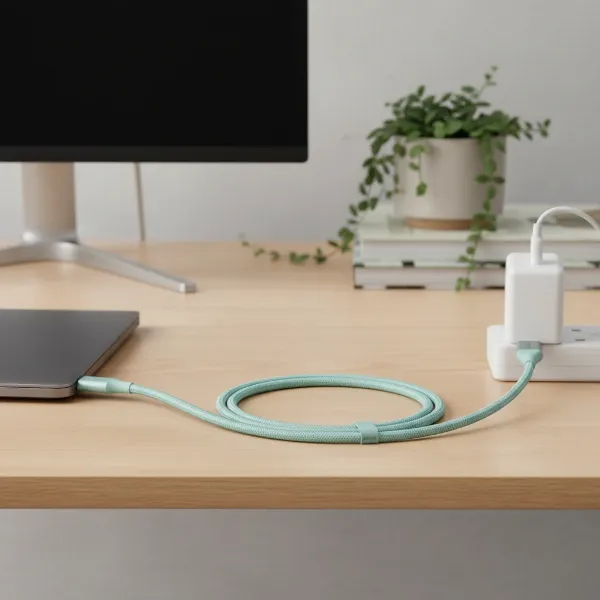 Anker PowerLine III Flow USB-C to USB-C cable in a neat home office setup
Apple users seeking a robust solution should consider the Belkin BOOST↑CHARGE Flex USB-C to Lightning Cable. MFi certified, this cable ensures seamless compatibility and fast charging for iPhones and iPads, supporting Power Delivery up to 20W or more depending on the charger. Its braided silicone construction offers superior flexibility and resistance to tangles and fraying, making it a long-lasting addition to your workstation.
For those requiring multiple connectivity options or longer reach, the Ugreen USB-C to USB-C 100W Braided Cable provides both performance and resilience. Available in various lengths, including 6ft and 10ft, it’s perfect for connecting devices across your desk or to a distant wall outlet. The braided nylon exterior significantly enhances its lifespan, while its 100W PD support ensures your power-hungry devices are always ready for action.
If your home office still utilizes devices with older ports, a high-quality Anker PowerLine+ II USB-A to Micro USB Cable or USB-A to USB-C Cable (for legacy chargers) offers reliable charging. These cables are known for their exceptional durability, featuring a double-braided nylon exterior and reinforced connectors to prevent common wear and tear, ensuring that even your older gadgets remain powered.
When selecting from these top options, consider the primary devices you use, the required charging speed, and the optimal cable length for your setup. Investing in these well-regarded cables guarantees a more efficient, reliable, and organized home office experience, allowing you to focus on your work without worrying about power issues.
Conclusion
Choosing the best charging cable for your home office workstation is a critical decision that impacts productivity, device longevity, and overall convenience. By prioritizing factors such as material durability, compatibility with fast-charging standards like Power Delivery, and appropriate cable length, you can ensure your devices remain powered and your workspace stays organized. Reputable brands like Anker, Belkin, and Ugreen consistently deliver high-quality products that meet stringent safety certifications. Investing in these superior charging cables not only safeguards your valuable electronics but also streamlines your workflow, allowing you to focus on what truly matters. What specific challenges have you faced with charging cables in your home office, and how do you plan to address them?
Frequently Asked Questions
What cable length is ideal for a home office setup?
The ideal cable length for a home office varies, but 6-foot (2-meter) cables are often recommended as they offer a good balance of flexibility to reach outlets and connect devices without creating excessive clutter. Shorter cables (3ft/1m) are great for close connections, while longer ones (10ft/3m) suit distant power sources.
How can I tell if a charging cable supports fast charging?
Look for specific labels on the cable or its packaging such as “Power Delivery (PD),” “Quick Charge (QC),” or a wattage rating (e.g., “60W,” “100W”). These indicate the cable’s capacity to handle the higher power required for rapid device charging.
Are MFi certified Lightning cables worth the extra cost?
Yes, MFi (Made For iPhone/iPad) certified Lightning cables are definitely worth the investment. They guarantee full compatibility, optimal performance, and safety with Apple devices, preventing potential damage that non-certified, cheaper alternatives might cause.
What is the most durable material for charging cables?
Braided nylon is widely considered the most durable material for charging cables. Its woven structure provides excellent resistance to tangles, fraying, and general wear and tear, especially when combined with reinforced stress points at the connectors.
Can I use any USB-C cable for my laptop?
No, while all USB-C cables fit, not all support the necessary power delivery for charging laptops. Ensure the USB-C cable specifies support for Power Delivery (PD) and has a wattage rating (e.g., 60W, 100W) that matches or exceeds your laptop’s charging requirements.
How can I prevent my charging cables from tangling and breaking?
To prevent tangling and breaking, choose cables with durable materials like braided nylon and reinforced connectors. Store them neatly using cable ties or wraps, avoid sharp bends, and always unplug them by gripping the connector head, not pulling the cable itself.